Appendix
Algorithm Principles
Optimization Formula
The system uses AdaptiveOptimizerAnalytical optimizer with Huber loss + hand-written analytical gradients + NLopt SLSQP:
Where is the joint angles from the previous frame, and is norm_delta (velocity regularization weight).
Adaptive Blending
The algorithm automatically switches optimization strategies based on finger pinch state:
- : Distance from the thumb to the tip of finger
- , : Pinch thresholds (default: 2.0 cm, 4.0 cm)
TipDirVec Mode: Optimizes fingertip position and direction, suitable for fine pinch actions
FullHandVec Mode: Optimizes full hand pose, suitable for open and grasping actions
Troubleshooting
Q: pinocchio installation fails?
If installing from a PyPI mirror fails, use the official source. Note: The package name on PyPI is pin (not pinocchio):
pip install pin==3.8.0 -i https://pypi.org/simpleQ: MuJoCo window not displaying on macOS?
Use mjpython instead of python to run simulation scripts on macOS:
mjpython teleop_sim.py --play data/avp1.pkl --hand leftQ: Video mode says mediapipe or opencv-python is missing?
Install the video dependencies:
pip install -e ".[video]"This will install the mediapipe and opencv-python packages required for video mode.
Q: RealSense mode cannot start or reports that pyrealsense2 is missing?
Install the RealSense extra dependencies:
pip install -e ".[realsense]"Also make sure an Intel RealSense device is connected and not occupied by another application.
Q: RealSense reports device is busy?
This usually means the camera is already being used by another tool or process. Close the other application and try again.
Q: --show-video causes lag?
--show-video is intended for debugging and adds extra rendering overhead. Disable it when you care more about runtime performance than visual inspection.
Custom Input Devices
Want to integrate your own hand input device — a glove, XR headset, or mocap system? Convert your device data into the unified 21-point hand keypoint format, and the retargeting, simulation, and real-hardware pipelines all reuse without change. No algorithm edits needed.
The Input Interface
Every input device implements one method:
def get_fingers_data(self) -> dict:
    return {
        "left_fingers":  np.ndarray,  # shape (21, 3), meters
        "right_fingers": np.ndarray,  # shape (21, 3), meters
    }
Conventions:
- Return an all-zero array
np.zeros((21, 3))when a hand is unavailable. - Order the 21 points to match the MediaPipe hand landmark definition (see the table below).
- Use the wrist (point 0) as the coordinate origin.
Once this interface aligns, teleop_sim.py, teleop_real.py, and tuning_tool.py all reuse directly.
Integration Steps
- Create the device class. Add
my_device.pyunderexample/input_devices/, subclassInputDeviceBase, and implementget_fingers_data(). Referencevisionpro.py(live TCP),mediapipe_replay.py(pkl replay), orvideo_mediapipe.py(video plus MediaPipe). - Register the device. Add
"my_device": lambda: MyDevice(...)to thedevice_mapin bothteleop_sim.pyandteleop_real.py, and add"my_device"to the--inputchoices. Keep both files consistent. - Prepare a config. Copy an existing YAML (such as
config/adaptive_analytical_avp.yaml) and adjustmediapipe_rotation,segment_scaling,lp_alpha,norm_delta, andpinch_thresholdsfor your device.
Debugging Order
Follow the stages in order — don't skip ahead:
- Record a pkl sample first, before connecting a live stream. A recorded sample makes problems reproducible and separates data issues from algorithm issues.
- Inspect the skeleton overlay with
tuning_tool.py --play. Confirm the pose is correct, the left and right hands aren't swapped, and the three skeleton layers track each other.
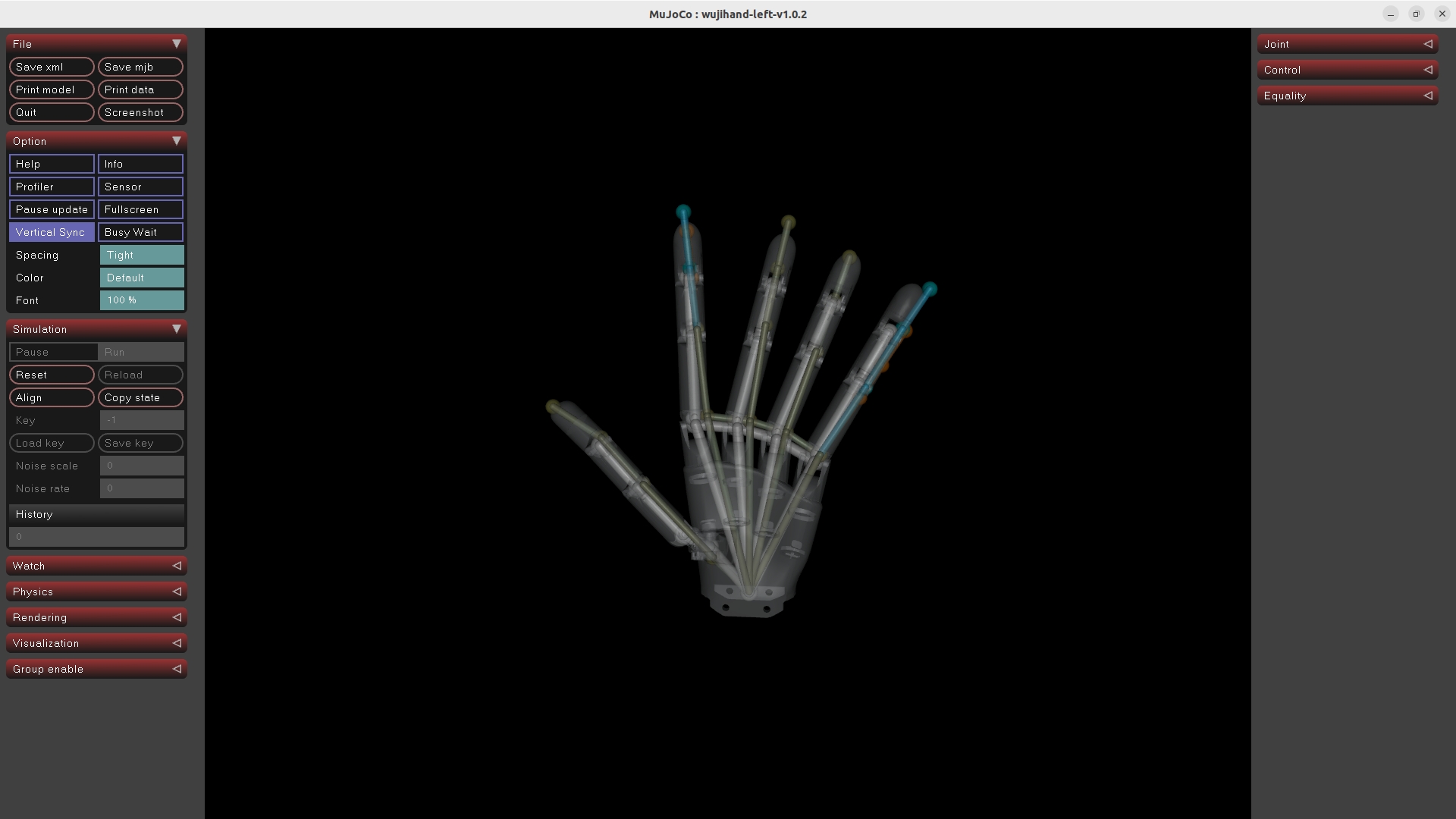
| Color | Meaning |
|---|---|
| Orange | Raw input keypoints |
| Cyan | Target after segment_scaling adjustment |
| White | Robot FK result (retargeting output) |
- Run the MuJoCo simulation with
teleop_sim.py --play. Verify the motion is smooth and holds up at extreme poses. - Connect the live stream and real hardware last, after the simulation passes.
MediaPipe 21-Point Order
Index   Joint name
 0      Wrist (coordinate origin)
 1      Thumb CMC      2    Thumb MCP      3    Thumb IP      4    Thumb TIP
 5      Index MCP      6    Index PIP      7    Index DIP     8    Index TIP
 9      Middle MCP    10    Middle PIP    11    Middle DIP   12    Middle TIP
13      Ring MCP      14    Ring PIP      15    Ring DIP     16    Ring TIP
17      Pinky MCP     18    Pinky PIP     19    Pinky DIP    20    Pinky TIP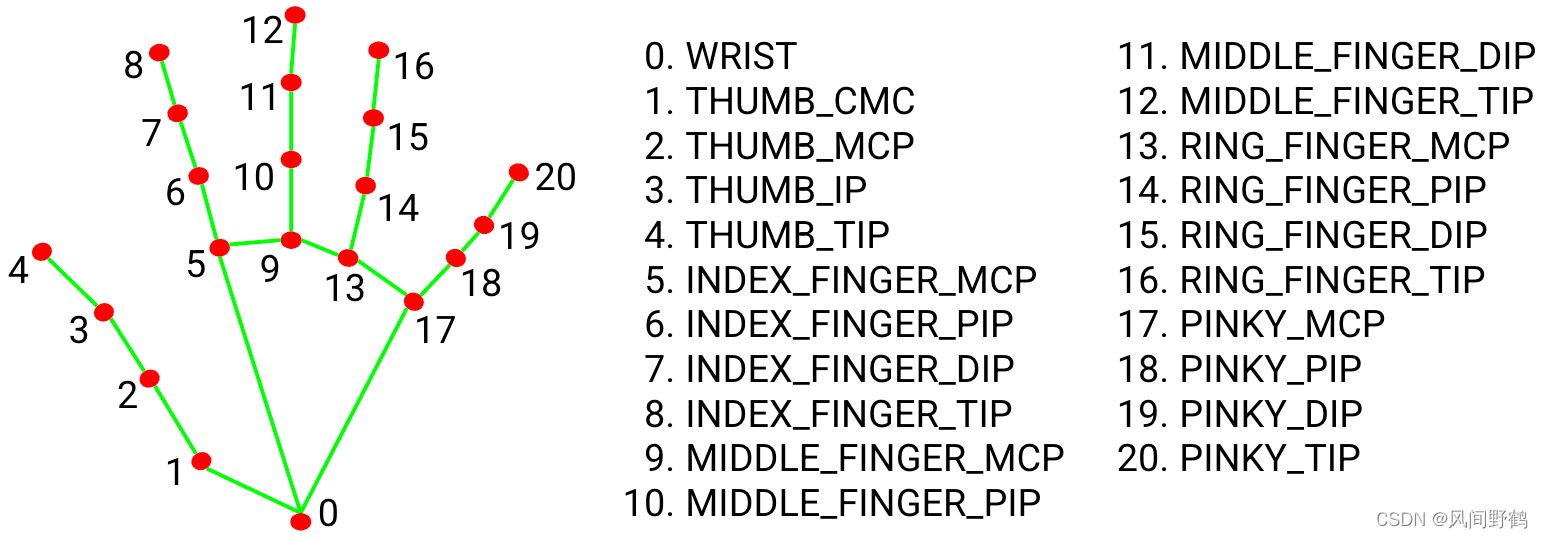
If your device uses a different skeleton order, reorder in _convert():
# Device-native indices, in MediaPipe point order
DEVICE_TO_MEDIAPIPE = [0, 4, 3, 2, 1, 8, 7, 6, 5, ...]
kp_mediapipe = kp_device[DEVICE_TO_MEDIAPIPE]
Related Resources
- GitHub Repository: wuji-technology/wuji-retargeting
- Wuji Hand SDK: wuji-technology/wujihandpy
- Vision Pro Streaming: VisionProTeleop
- Technical Support: support@wuji.tech