

Open-Source Algorithms and Simulation
WUJI Sim
Applies to WUJI Hand 2 revision 2.2. Revision 2.1 is not supported yet. See Version Identification to identify the hardware revision. WUJI Sim provides official simulation configurations for WUJI Hand 2, supporting MuJoCo, MuJoCo Warp, and Isaac Lab. WUJI Hand 2 is a five-finger dexterous hand with 20 actuated joints. Use WUJI Sim to load hand models, inspect joint motion, and build custom tasks without connecting a physical hand. WUJI Sim provides hand models, control parameters, and runnable examples. Proportional-derivative (PD) gains and joint parameters are configured with reference to the physical hand’s behavior inmit_v2 control mode with firmware v3.1.0 or later, providing a starting point for simulation development. See Control Modes and Joint Commands.
Key Capabilities
- Simulator configurations. Provides WUJI Hand 2 configurations for MuJoCo, MuJoCo Warp, and Isaac Lab, including timestep, joint, and contact parameters.
- Hand model integration. Loads the simulation and visualization models, using MJCF assets in MuJoCo and MuJoCo Warp, and USD assets in Isaac Lab.
- MIT control adapters. Uses the same physical units for gains and torque as the WUJI Hand 2 SDK’s
mit_v2mode. MuJoCo and MuJoCo Warp implement control through simulator actuators. Isaac Lab uses PhysX joint drives and requires zero feedforward torque.
Supported Simulators
WUJI Sim provides Pixi environments for Linux x86-64. Choose a simulator based on your project’s framework and hardware.
For software, driver, and GPU requirements, see Requirements.
Simulation Scope
WUJI Sim provides model checks, unloaded joint tracking comparisons, and motion examples for WUJI Hand 2, supporting simulation development in MuJoCo, MuJoCo Warp, and Isaac Lab.- Model checks. Checks fingertip kinematics, inertia, and self-collision behavior during the tested motions in simulation, providing a reference for loading and using the hand models.
- Physical-to-simulation comparisons. Replays commands collected from a physical hand in simulation and reports unloaded joint tracking errors, helping assess motion differences under the same commands.
- Task development examples. Provides examples for model loading, preset poses, joint tracking, and joint sweeps. MuJoCo Warp and Isaac Lab also include parallel environment examples as a reference for custom tasks.
Get Started
Follow the quick start to install an environment and load a hand model. Then explore the examples guide for preset poses, joint tracking, and parallel environments. For integration with a custom framework, see the platform details. Hand model assets are available under Simulation and Visualization Models.WUJI MJLab
Applies to WUJI Hand 2 revision 2.2. Revision 2.1 is not supported yet. See Version Identification to identify the hardware revision. wuji-mjlab is an in-hand cube reorientation reinforcement learning project for the WUJI Hand. It trains PPO policies in mjlab that cover the full SO(3) goal space, then deploys them on the physical hand through a sim-to-real bridge.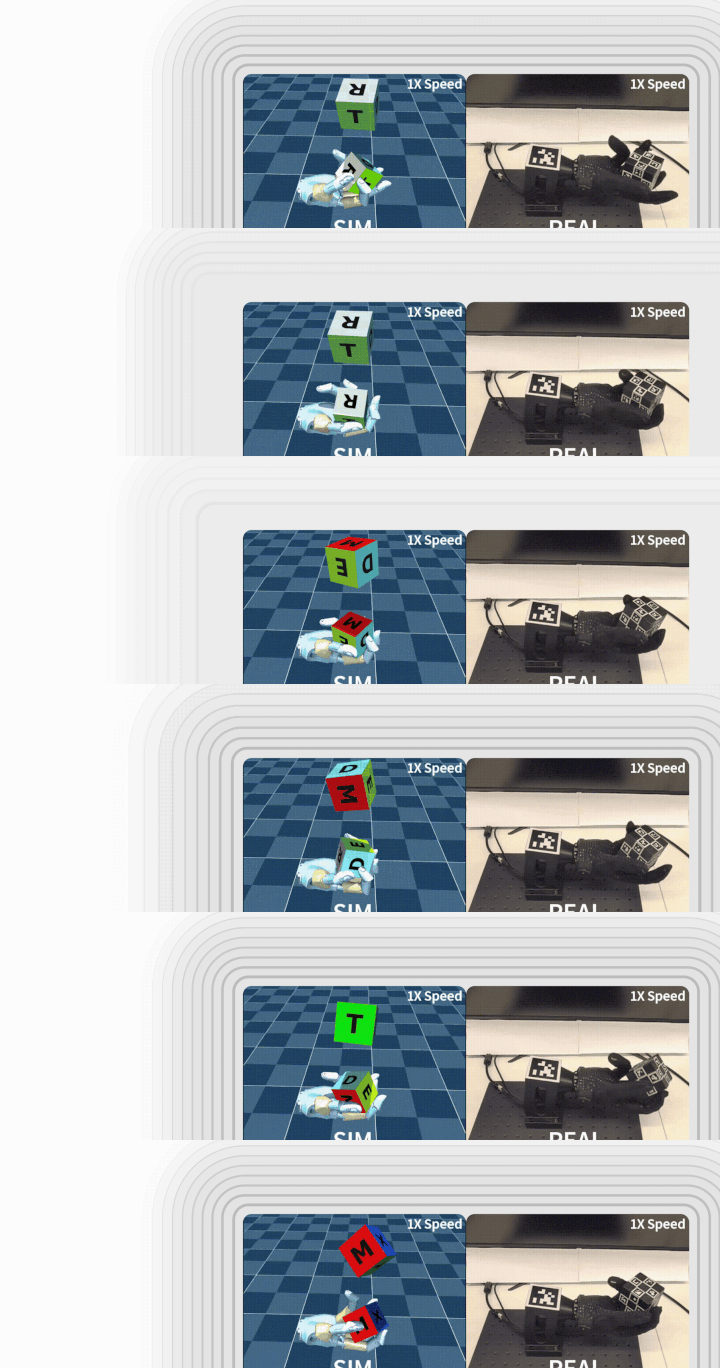
Docs and downloads
Guide Concept ReferenceVideos
In-hand retargeting — Simulation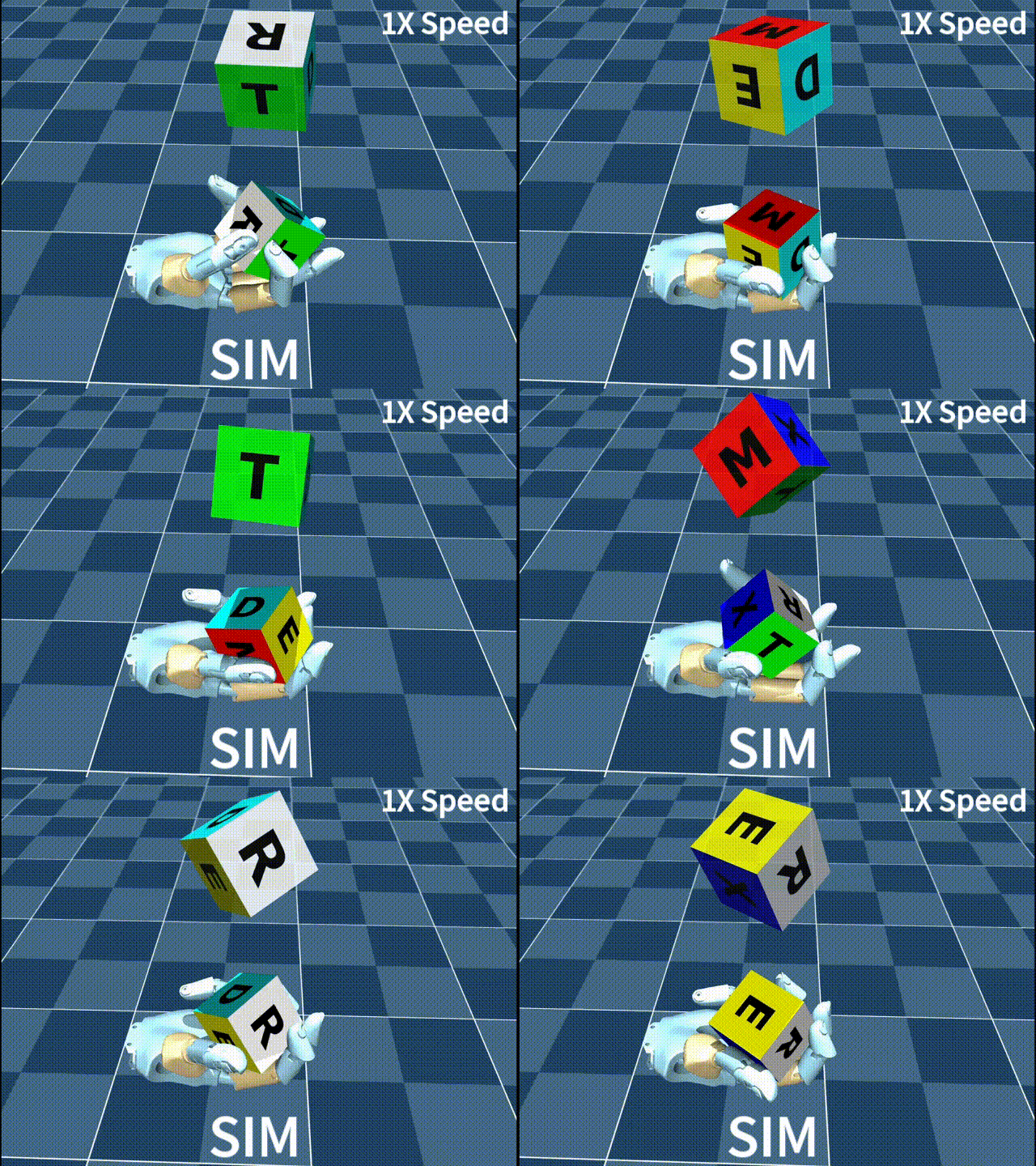
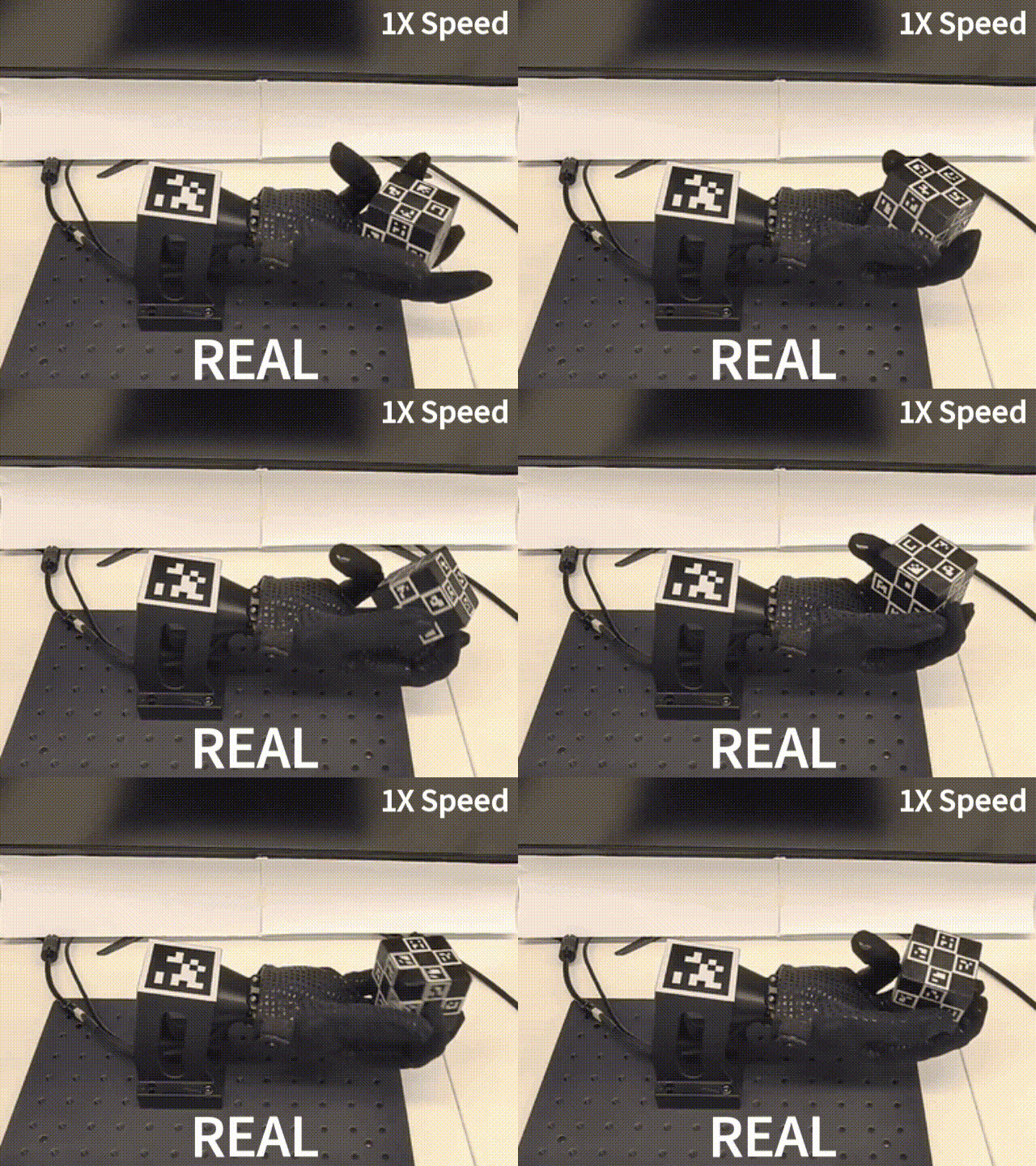
WUJI Isaac Lab
Applies to WUJI Hand 2 revision 2.2. Revision 2.1 is not supported yet. See Version Identification to identify the hardware revision. WUJI Isaac Lab is an open-source cube reorientation training project built on Isaac Lab 2.3.2 and Isaac Sim 5.1.0. It provides PPO reinforcement learning training, simulation playback, and policy export for the right WUJI Hand 2. WUJI Isaac Lab uses a separately installed runtime environment and does not depend on WUJI Sim.In-Hand Cube Reorientation
The task uses a fixed-base right WUJI Hand 2. Finger movements reorient a cube in the palm to randomly sampled target orientations. The project provides hand and cube configurations, a task environment, and training configurations as a starting point for developing dexterous manipulation policies.Key Capabilities
- Reinforcement learning training. Uses proximal policy optimization (PPO) from rsl_rl to train cube reorientation policies with GPU-parallel simulation. The default configuration uses 16,384 training environments. Adjust the environment count to match available GPU resources.
- Simulation playback. Loads training checkpoints to show policy-controlled hand and cube movements in simulation. Supports selecting a specific checkpoint and recording playback videos.
- Policy export. Exports
policy.pt,policy.onnx, andconfig.jsonduring playback for subsequent inference and deployment. - Physical deployment integration. Uses observation, action, and configuration definitions that match the wuji-mjlab deployment interface, so exported policies can use its cube pose observation and on-robot policy execution tools.
From Simulation to Hardware
After training and playing back a policy in WUJI Isaac Lab, use the exportedpolicy.onnx and the config.json in the same directory for physical deployment. Follow the wuji-mjlab deployment guide to prepare the hardware and vision system, then use its deployment tools to return the hand to its initial pose, observe the cube, and run the policy.
WUJI Isaac Lab provides the training environment and policy export. wuji-mjlab provides the physical deployment tools. Running a policy on hardware requires the hardware and vision system setup described in the deployment guide.
Requirements
The default number of parallel environments is a training setting, not a capacity supported by every GPU. Adjust
--num_envs to match available GPU resources. For Isaac Sim hardware requirements, see the NVIDIA documentation.
Get Started
Visit the wuji-isaaclab repository and follow its README to install the environment, run training, and play back policies. For physical deployment, see the wuji-mjlab Sim-to-real guide. WUJI Isaac Lab is available under the Apache-2.0 license. Its Isaac Sim dependency includes components governed by proprietary license terms. Review the repository’s licensing information before use.TopoRetarget
Applies to WUJI Hand 2 revision 2.2. Revision 2.1 is not supported yet. See Version Identification to identify the hardware revision. TopoRetarget is an open-source motion retargeting tool for dexterous manipulation. It converts human hand-object interaction demonstrations into motion trajectories for WUJI Hand 2. Using hand keypoints, object poses, and geometric models, it solves for robot hand motion under kinematic constraints to preserve the interaction relationships in the demonstration. TopoRetarget provides configurations for the left and right WUJI Hand 2, with data import, trajectory solving, visual playback, and batch processing. The solver runs on the CPU and requires no model training or GPU.Preserve Hand-Object Interactions
Human and robot hands differ in structure and size. Directly copying joint angles makes it difficult to preserve contact relationships during actions such as grasping and rotating objects. TopoRetarget builds an interaction mesh over hand keypoints and object surface samples, then optimizes the mesh’s local geometric relationships to map the demonstrated motion to the robot hand. The solver first initializes the pose by matching bone directions. It then iteratively optimizes distance-weighted Laplacian coordinates through quadratic programming (QP) for each frame, incorporating joint limits and hand-object non-penetration constraints. A subsequent sliding-window pass further reduces interpenetration between fingers.Key Capabilities
- Left and right hand retargeting. Provides model configurations for both WUJI Hand 2 hands. For two-hand clips, each hand is solved separately, and both hands are played back together in the viewer.
- Multiple data sources. Provides importers for GRAB, TACO, OakInk2, and HOT3D, and accepts captured keypoint data that follows the specified format.
- Interaction-based trajectory solving. Solves hand motion using hand keypoints and object surface samples, with a shared parameter configuration across objects, scales, and motion clips.
- Playback and inspection. Displays the robot hand, objects, captured keypoints, and links in contact in a browser-based viewer. Outputs diagnostics such as per-frame penetration and fingertip error.
- Batch processing. Solves motion clips across a dataset, with parallel processing through multiple CPU worker processes.
Inputs and Outputs
TopoRetarget produces reference motion trajectories for playback, analysis, or subsequent policy training. Execution on a physical hand uses the corresponding policy training and deployment workflow.
Integrate with Pen-Spinning Policy Training
The pen-spinning reference motions in WUJI MJLab are generated with TopoRetarget. The repository provides a standalone conversion example that converts retargeted results from the accompanying pen-spinning capture data into training clips for WUJI MJLab’spen_spin task.
This conversion example supports the right WUJI Hand 2, a single pen, and 50 Hz data. Follow the conversion guide to prepare the original capture data, object metadata, and solver results, then continue with training and physical deployment in WUJI MJLab.
Requirements
To import public datasets, obtain the data and MANO models as described in the corresponding guides. Reading TACO and OakInk2 data also requires a CPU build of PyTorch.
Get Started
Follow the TopoRetarget README to install the environment. Use the bundled pen-spinning clip for your first solve and playback. To use your own data or public datasets, see the data format and import guide. For algorithm details and experimental results, see the project page and paper. TopoRetarget code is available under the MIT license. MANO models and public datasets remain subject to their respective license terms.WUJI OpenPI
WUJI OpenPI is an open-source project built on Physical Intelligence’s openpi. It provides workflows for supervised fine-tuning and on-robot deployment of vision-language-action (VLA) policies for robotic arms paired with WUJI Hand. The model combines camera images, robot state, and task instructions to generate action sequences for the arms and dexterous hands. The project includes a π0.5 reference configuration for two arms and two hands. It covers data adaptation, model training, a policy server, and a ROS 2 control client, connecting teleoperation demonstrations to policy execution on physical robots.Coordinated Arm and Hand Control
Thepi05_wuji_multi_54d reference configuration uses 54-dimensional robot state and action vectors: seven arm joints and 20 hand joints on each side. Visual input consists of three image streams from the head camera and the left and right wrist cameras.
During training, the project uses demonstration data to fine-tune a pretrained model. During deployment, the policy server generates action sequences from observations and task instructions. The robot control client publishes joint commands through ROS 2 and continuously receives updated state and images.
Key Capabilities
- VLA policy fine-tuning. Uses openpi’s models and training framework, with WUJI data adapters and a π0.5 reference training configuration. Supports computing normalization statistics and saving training checkpoints.
- Multi-dataset training. Combines multiple LeRobot datasets through concatenation or weighted sampling, and uses task information to supply language instructions.
- Multi-camera observations. Organizes head and wrist camera images, robot state, and task instructions into model inputs for training and online inference.
- ROS 2 deployment. Provides a policy server and a robot control client. The client requests inference over WebSocket, subscribes to observations through ROS 2, and publishes action commands.
- Action sequence transitions. Supports serial execution and real-time trajectory generation (RTG). RTG asynchronously obtains subsequent action sequences and smooths the transition between consecutive sequences.
From Demonstrations to Robot Execution
- Collect demonstrations. Record arm, hand, and camera data in ROS 2 MCAP bags. Include the joint states, actions, and images needed for training.
- Prepare the data. Convert the recordings to LeRobot v2.1 datasets. Match the image fields and the ordering of state and action values to the WUJI data adapter configuration.
- Fine-tune the model. Configure the datasets and base model weights, compute normalization statistics, and run supervised fine-tuning.
- Deploy the policy. Start the policy server and run the control client in a ROS 2 environment. Configure joint-state, camera-image, and joint-command topics for the robot interface. Check message types, joint order, and units.
Reference Configuration and Hardware Adaptation
The deployment configuration includes left-side, right-side, and dual-side operation modes, along with settings for arm and hand degrees of freedom. Adapting to other hardware also requires matching data fields, joint order, units, model action dimensions, and policy input and output transforms. Some data transforms in the repository use the 54-dimensional reference layout. Check these transforms when changing deployment parameters.
Requirements
Configure the Python environment for training and policy serving separately from the ROS 2 client environment. GPU requirements depend on the model, fine-tuning method, and batch size.
Get Started
Follow the wuji-openpi README to install dependencies, prepare data, and start training. For robot connections, camera topics, and action execution modes, see the deployment guide and its configuration files.Research Papers
TopoRetarget: Interaction-Preserving Retargeting for Dexterous Manipulation
TopoRetarget converts human hand-object demonstrations into reference motions for dexterous robotic hands. It adapts to differences in hand structure while preserving task-relevant poses and contact relationships, providing reference motions for reinforcement learning through reference tracking. The method constructs a sparse interaction graph over hand and object keypoints. It optimizes distance-weighted Laplacian deformation with directional consistency, kinematic constraints, and penetration handling, using a single parameter set across different retargeting conditions. The paper evaluates the generated references through contact preservation and downstream policy learning, and demonstrates sim-to-real transfer of trained policies for in-hand cube rotation and pen spinning on WUJI Hand. Read the Paper Libraries- TopoRetarget — Provides interaction-preserving retargeting, data import, trajectory solving, visual playback, and batch processing.
- WUJI MJLab — Provides reinforcement learning training, playback, and physical deployment workflows for in-hand cube rotation and reference-tracking pen spinning.
- TopoRetarget Quick Start — Runs retargeting and playback with the bundled pen-spinning clip.
- Pen-Spinning Training Data Conversion — Converts retargeted results from the accompanying capture data into WUJI MJLab training clips for the right WUJI Hand 2, a single pen, and 50 Hz data.
- Pen-Spinning Training and Playback — Explains how to prepare reference motions, select a motion group, train a policy, and play it back.
- Pen-Spinning Deployment — Explains how to configure camera observation and run physical control with a policy and reference motion from the same group.
HandsOn: A Large-Scale Simulation Benchmark for Generalizable Dexterous Manipulation
HandsOn is a composable simulation platform and benchmark for cross-embodiment dexterous manipulation. It supports five robotic arms, six dexterous hands, and approximately 200 rigid, articulated, and deformable object assets. It provides 18,000 curated human demonstrations and 66 human-verified tasks for studying manipulation generalization across objects, tasks, and robot configurations. Core-50 supports demonstration-based learning and execution tests. Transfer-16 evaluates asset and relation transfer, skill composition, and deformable manipulation without target-task training demonstrations. Stage-level diagnostics help analyze failures in contact establishment, action coordination, goal maintenance, and task sequencing. Read the Paper Libraries- HandsOn — Provides simulation tasks, demonstration dataset instructions, policy evaluation, and diagnostic tools.
- WUJI Retargeting — Maps human hand keypoints to robot joint targets in the paper’s simulation demonstration collection workflow.
- HandsOn Quick Start — Runs a task diagnostic example and generates camera videos, initial and final images, and runtime records.
- Policy Evaluation Guide — Explains how to configure model inference environments and evaluate policies under the benchmark protocol.
MINT: A Unified Model for World-Space Camera and Hand Motion Estimation from Scalable Egocentric Pipeline Supervision
MINT (Minting IN-the-Wild Trajectories) jointly estimates camera and hand motion from egocentric RGB video and reconstructs hand motion in a shared world coordinate system. The resulting trajectories support research in activity understanding, robot learning, and augmented reality. Read the Paper Libraries- WUJI Retargeting — Maps human hand motion to WUJI robotic hands, with examples for video, live tracking, and recorded inputs.
- WUJI SDK — Reads and records WUJI Glove hand-tracking data for motion capture workflows.
- Retargeting Quick Start — Runs hand-motion retargeting examples in simulation or on hardware, including examples with MP4 video input.
- Record WUJI Glove Data — Saves glove hand-skeleton, pose, and tactile data streams to an MCAP recording.
Towards High-DoF Dexterous Manipulation through VLA Post-Training
This post-training pipeline adapts vision-language-action (VLA) models to dexterous robotic hands. It combines a learned hand-action representation, supervised fine-tuning, human corrections, and real-world reinforcement learning, with evaluations across bimanual transfer, in-hand object reorientation, and tool use. Read the Paper Libraries- WUJI OpenPI — Supports fine-tuning and deployment of VLA policies on robotic arms equipped with WUJI Hand.
- WUJI Hand Teleop — Provides arm and hand teleoperation and demonstration recording for policy training. This project is archived and no longer maintained.
- VLA Training Workflow — Covers demonstration collection, dataset conversion, supervised fine-tuning, and deployment. WUJI Hand Teleop, used in the reference workflow, is archived and no longer maintained.
- Policy Deployment Guide — Explains how to configure and run the WUJI OpenPI deployment example.