> ## Documentation Index
> Fetch the complete documentation index at: https://docs.wuji.tech/llms.txt
> Use this file to discover all available pages before exploring further.

# Product Introduction

## Product Overview

Wuji Hand is a bionic dexterous hand with 20 active degrees of freedom developed by WUJI TECH, designed for various application scenarios such as scientific research, robot integration, and human-computer interaction.

## Product Parameters

The Wuji Hand core technical parameters table covers structural design, drive control, load performance, dynamic response, and electrical characteristics for product selection, simulation modeling, and application integration.

<table>
  <thead>
    <tr>
      <th>Parameter Category</th>
      <th>Parameter Item</th>
      <th>Typical Value or Description</th>
    </tr>
  </thead>

  <tbody>
    <tr>
      <td rowSpan="5">Structure and Degrees of Freedom</td>
      <td>Active Degrees of Freedom</td>
      <td rowSpan="2">20, 4 per finger</td>
    </tr>

    <tr>
      <td>Number of Joints</td>
    </tr>

    <tr>
      <td>Finger Configuration</td>
      <td>Full opposable, supports lateral swing</td>
    </tr>

    <tr>
      <td>Kinematic Configuration</td>
      <td>Serial direct drive rotary joints, no nonlinear kinematics</td>
    </tr>

    <tr>
      <td>Maximum Grasping Diameter</td>
      <td>100 mm</td>
    </tr>

    <tr>
      <td rowSpan="2">Dimensions and Weight</td>
      <td>Self-weight (excluding cables)</td>
      <td>580 ± 10 g</td>
    </tr>

    <tr>
      <td>Dimensions</td>
      <td>201 mm × 75 mm × 50 mm</td>
    </tr>

    <tr>
      <td rowSpan="2">Drive Mode</td>
      <td>Drive Mode</td>
      <td>Self-locking rotary direct drive joints</td>
    </tr>

    <tr>
      <td>Control Algorithm</td>
      <td>FOC vector control drive</td>
    </tr>

    <tr>
      <td rowSpan="5">Control and Communication</td>
      <td>Control Frequency</td>
      <td>1000 Hz × 20 axes</td>
    </tr>

    <tr>
      <td>Communication Interface</td>
      <td>USB 2.0</td>
    </tr>

    <tr>
      <td>Control Mode</td>
      <td>Position control</td>
    </tr>

    <tr>
      <td>Communication Protocol</td>
      <td>Self-developed protocol</td>
    </tr>

    <tr>
      <td>Communication Rate</td>
      <td>480 Mbps (theoretical value)</td>
    </tr>

    <tr>
      <td rowSpan="6">Load Performance</td>
      <td>Fingertip Force</td>
      <td>15 N</td>
    </tr>

    <tr>
      <td>Single Finger Maximum Load (Hook Grip)</td>
      <td>3 kg</td>
    </tr>

    <tr>
      <td>Maximum Static Load for Whole-hand Grasping</td>
      <td>10 kg</td>
    </tr>

    <tr>
      <td>Maximum Static Load of Whole-hand Hook Grip</td>
      <td>10 kg</td>
    </tr>

    <tr>
      <td>Maximum Static Load for Whole-hand Vertical Grasping</td>
      <td>5 kg</td>
    </tr>

    <tr>
      <td>Max Hanging Weight</td>
      <td>5 kg</td>
    </tr>

    <tr>
      <td rowSpan="4">Dynamic Performance</td>
      <td>Minimum Opening and Closing Time</td>
      <td>≈ 0.3 s</td>
    </tr>

    <tr>
      <td>Repeat Opening and Closing Speed</td>
      <td>≥ 2 times/s</td>
    </tr>

    <tr>
      <td>Thumb Flexion/Lateral Swing Speed</td>
      <td>≥ 100 rpm</td>
    </tr>

    <tr>
      <td>Four-finger Bending Speed</td>
      <td>≈ 0.25 s</td>
    </tr>

    <tr>
      <td rowSpan="3">Precision and Lifespan</td>
      <td>Positioning Repeatability</td>
      <td>± 1 mm</td>
    </tr>

    <tr>
      <td>Idle Grip Life</td>
      <td>≥ 300,000 times</td>
    </tr>

    <tr>
      <td>Backlash</td>
      <td>≤ ± 7 mm</td>
    </tr>

    <tr>
      <td rowSpan="3">Electrical Performance</td>
      <td>Operating Voltage</td>
      <td>12V - 20V DC</td>
    </tr>

    <tr>
      <td>Static Power</td>
      <td>12 W</td>
    </tr>

    <tr>
      <td>Included Adapter Specifications</td>

      <td>
        Rated Output: 12V 20A<br />
        Peak Power: 420 W (10 ms transient)<br />
        Cable: 14 AWG
      </td>
    </tr>

    <tr>
      <td rowSpan="2">Materials and Protection</td>
      <td>Shell Material</td>
      <td>Aluminum alloy</td>
    </tr>

    <tr>
      <td>Protection Class</td>
      <td>IP40</td>
    </tr>
  </tbody>
</table>

## Product Structural Features

This section introduces the overall structural design of Wuji Hand, communication and power interface layout, as well as the naming conventions and motion parameters of each degree of freedom, helping users understand the mechanical structure and usage specifications of the product.

### Structural Schematic

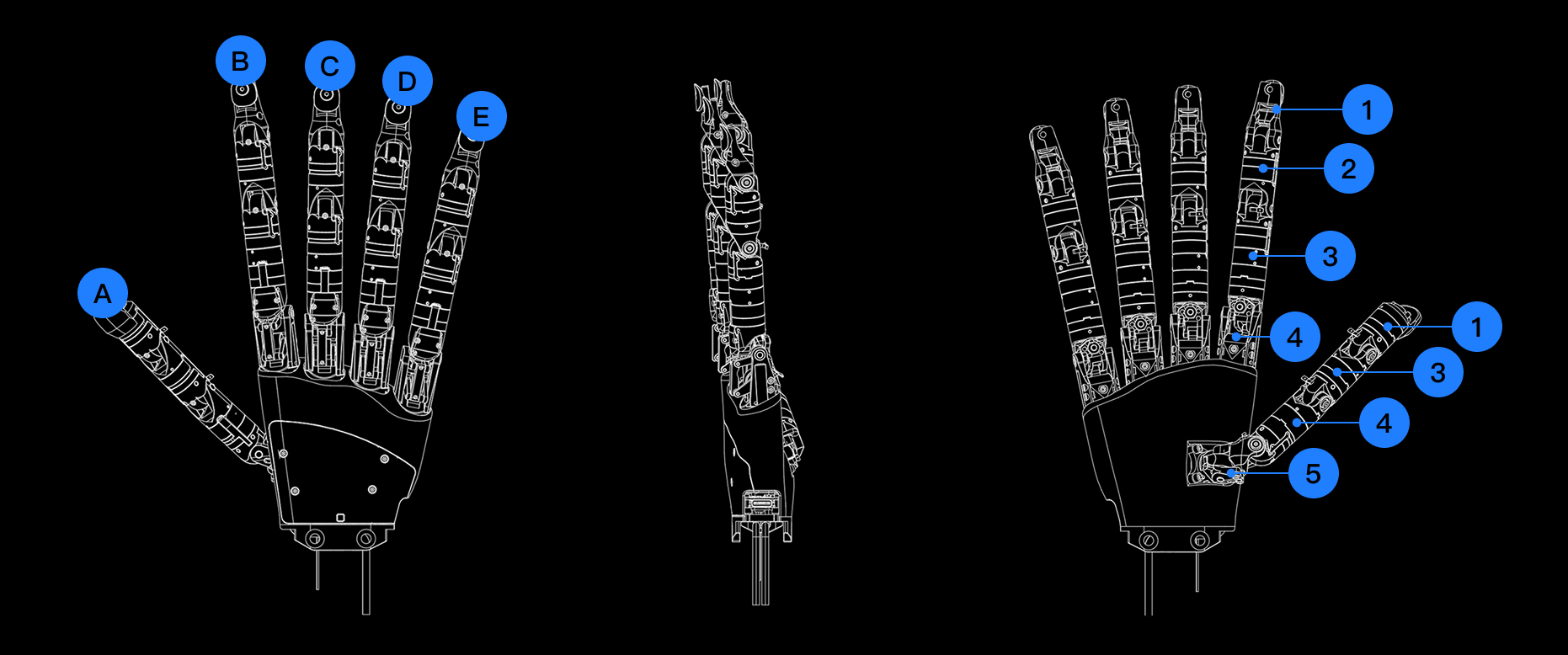
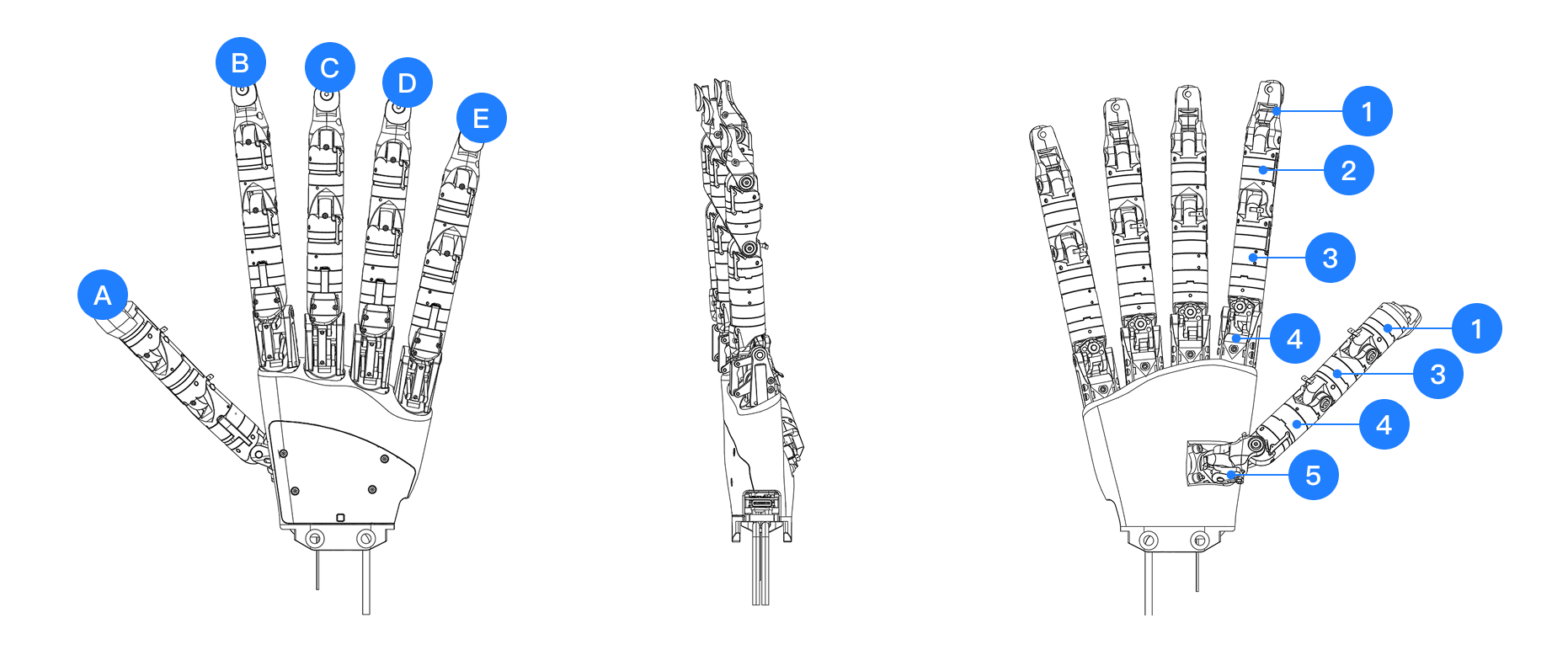
Wuji Hand adopts a five-finger bionic structural design, with each finger containing multiple joints for flexible motion. The figure below shows the overall structure and main components:

<div className="dark:hidden">
  <img src="https://mintcdn.com/wuji-0bbde051/KO3tT6qNwl3EeRut/assets/source/images/en/wuji-hand/v1/overview/structure-schematic-2025-11.png?fit=max&auto=format&n=KO3tT6qNwl3EeRut&q=85&s=2f9b41edeb400f19cbf2aa4a40a4318b" alt="Structural Schematic" width="1862" height="778" data-path="assets/source/images/en/wuji-hand/v1/overview/structure-schematic-2025-11.png" />
</div>

<div className="hidden dark:block">
  <img src="https://mintcdn.com/wuji-0bbde051/KO3tT6qNwl3EeRut/assets/source/images/en/wuji-hand/v1/overview/structure-schematic-2025-11-dark.png?fit=max&auto=format&n=KO3tT6qNwl3EeRut&q=85&s=f3820560006ce2b9aee80d50ed2e4509" alt="Structural Schematic" width="1862" height="778" data-path="assets/source/images/en/wuji-hand/v1/overview/structure-schematic-2025-11-dark.png" />
</div>

* A to E in the figure correspond to:
  * A: Thumb
  * B: Index
  * C: Middle
  * D: Ring
  * E: Little
* Numbers 1 to 5 correspond to commonly used anatomical region identifications:
  * 1: Distal phalanges
  * 2: Intermediate phalanges
  * 3: Proximal phalanges
  * 4: Metacarpals
  * 5: Carpals

### Wuji Hand DOF Configuration

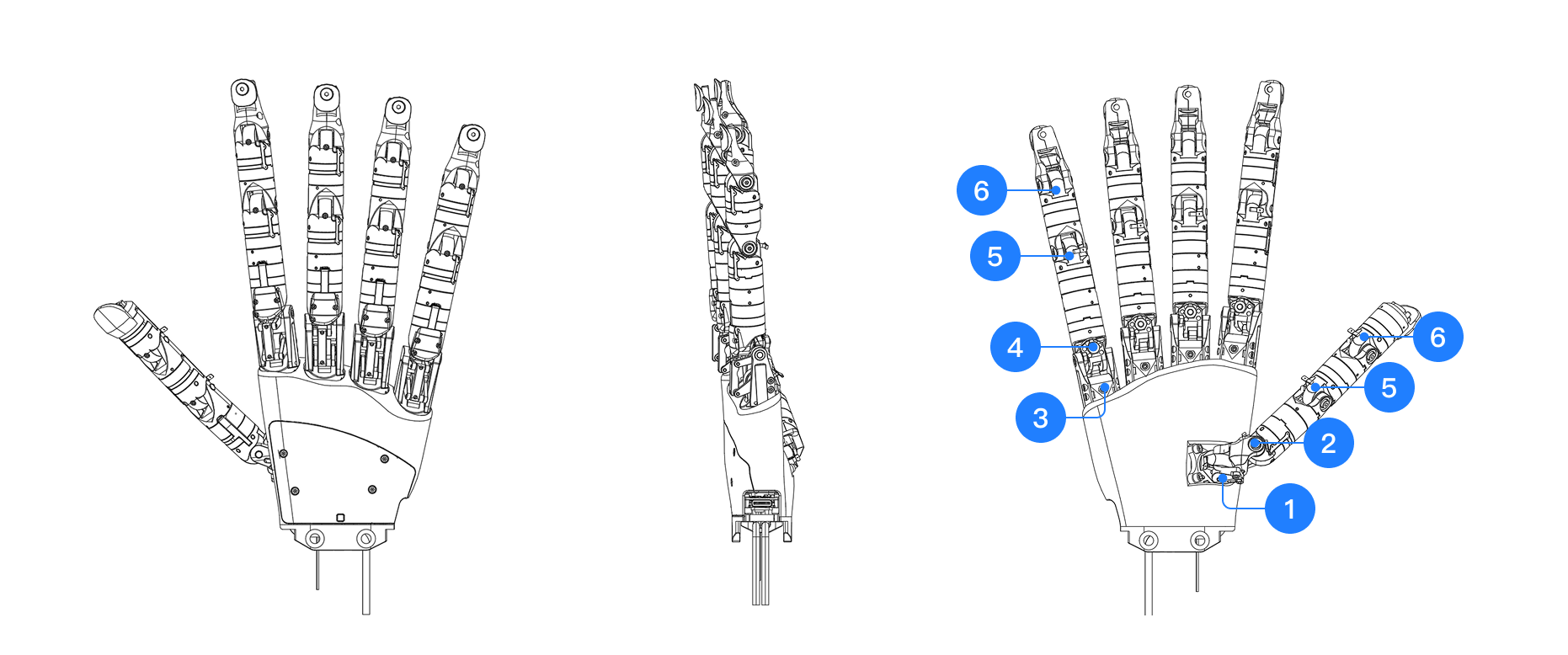
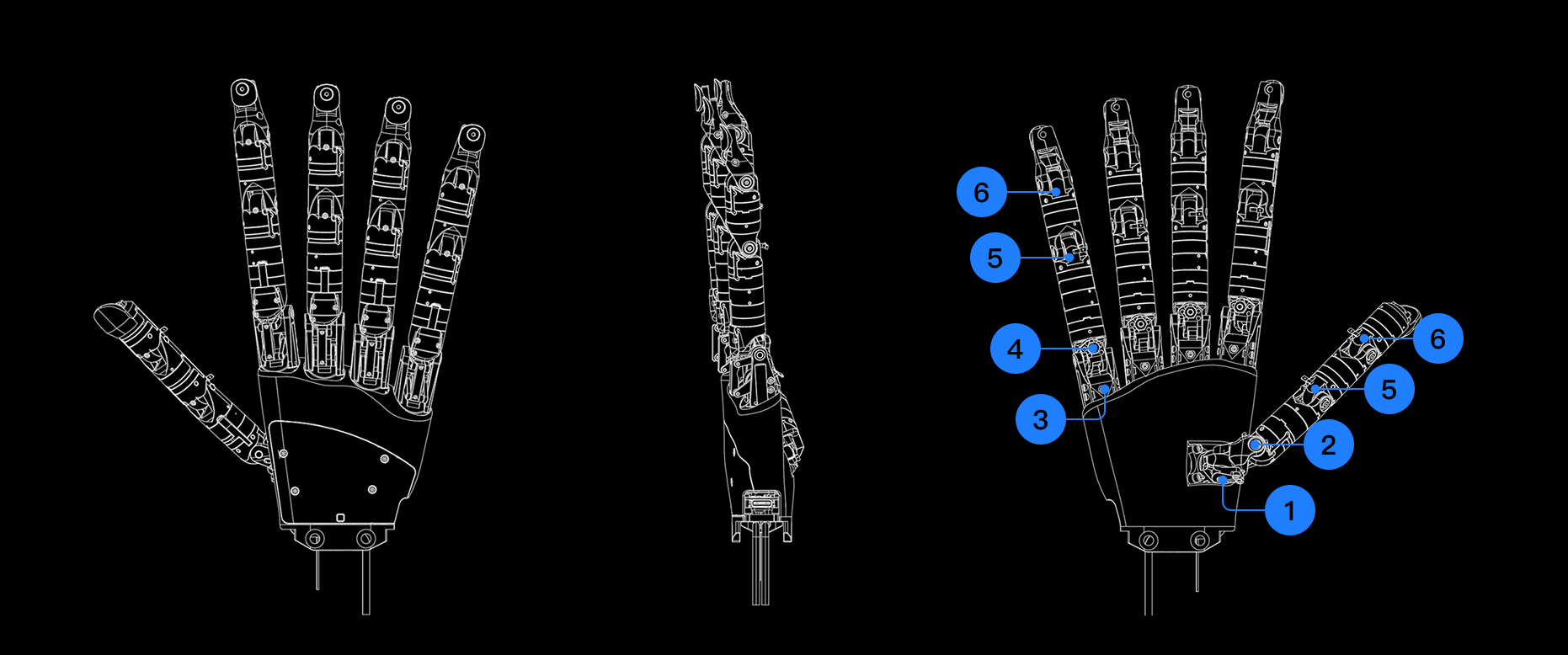
The figure below shows the anatomical naming and corresponding positional relationships of each joint of Wuji Hand, helping users understand the functional positioning of each degree of freedom.

<div className="dark:hidden">
  <img src="https://mintcdn.com/wuji-0bbde051/KO3tT6qNwl3EeRut/assets/source/images/en/wuji-hand/v1/overview/dof-configuration-2025-11.png?fit=max&auto=format&n=KO3tT6qNwl3EeRut&q=85&s=988cd610935c2760a6c77de2f9428428" alt="DOF Configuration" width="1862" height="778" data-path="assets/source/images/en/wuji-hand/v1/overview/dof-configuration-2025-11.png" />
</div>

<div className="hidden dark:block">
  <img src="https://mintcdn.com/wuji-0bbde051/KO3tT6qNwl3EeRut/assets/source/images/en/wuji-hand/v1/overview/dof-configuration-2025-11-dark.png?fit=max&auto=format&n=KO3tT6qNwl3EeRut&q=85&s=bb4e60e591b015acf860ee5dee5fde39" alt="DOF Configuration" width="1862" height="778" data-path="assets/source/images/en/wuji-hand/v1/overview/dof-configuration-2025-11-dark.png" />
</div>

Numbers 1 to 6 in the figure correspond to:

* 1: CMC1
* 2: CMC2
* 3: MCP1
* 4: MCP2
* 5: PIP
* 6: DIP

### DOF Motion Direction and Range

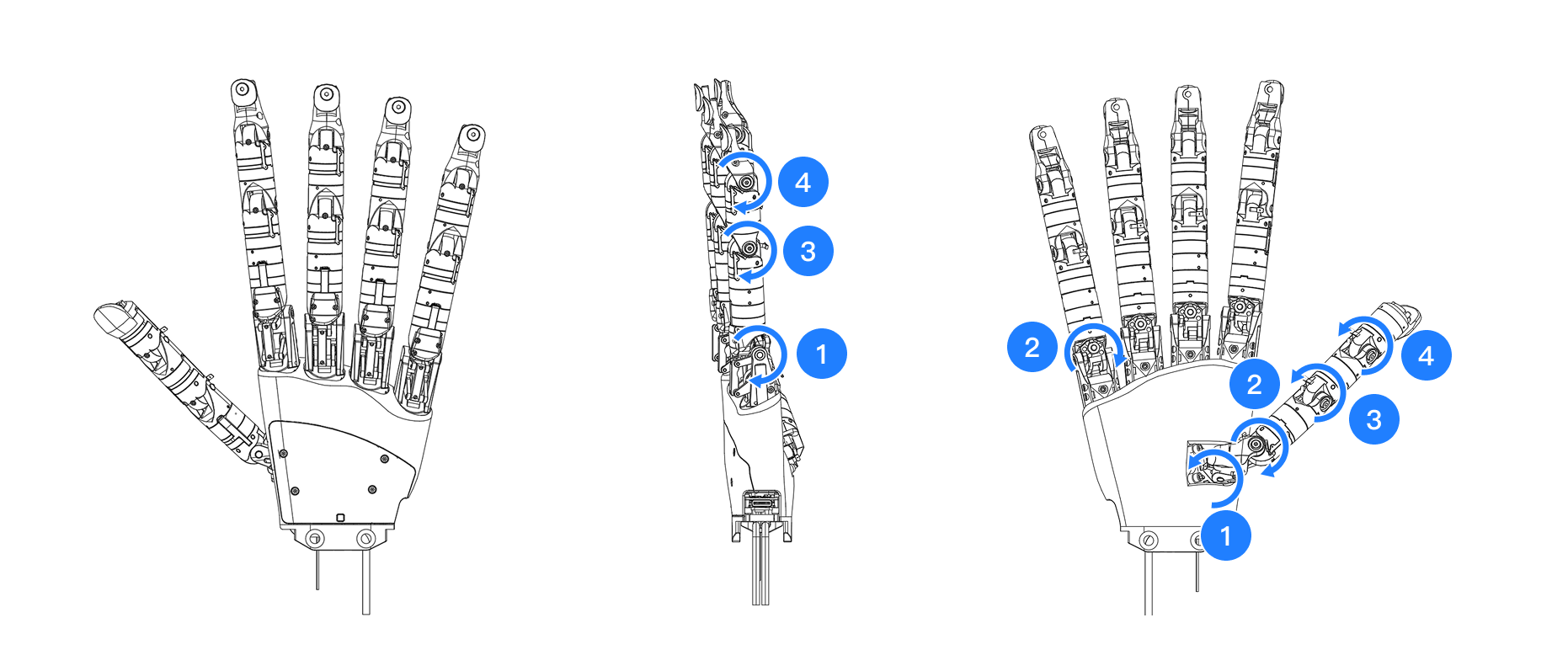
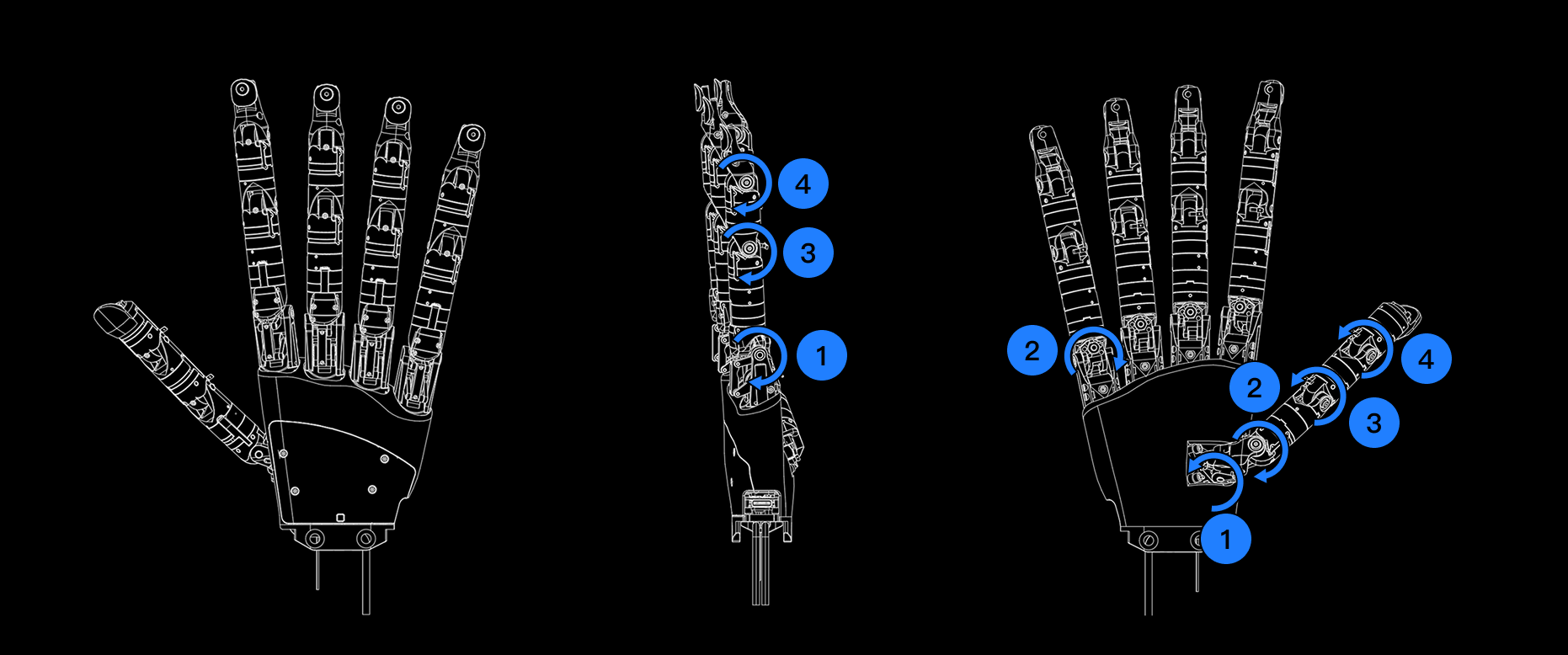
The four-finger structure is consistent, with a single finger full length of approximately 157 mm. The thumb module structure is slightly different, with a single finger full length of approximately 130 mm. The figure below uses the thumb and little finger as examples to illustrate the motion direction and angle range of each degree of freedom:

<div className="dark:hidden">
  <img src="https://mintcdn.com/wuji-0bbde051/KO3tT6qNwl3EeRut/assets/source/images/en/wuji-hand/v1/overview/dof-motion-direction-and-range-2025-11.png?fit=max&auto=format&n=KO3tT6qNwl3EeRut&q=85&s=8718498de29d4afa0a2a83cd5ba33d84" alt="DOF Motion Direction and Range" width="1862" height="778" data-path="assets/source/images/en/wuji-hand/v1/overview/dof-motion-direction-and-range-2025-11.png" />
</div>

<div className="hidden dark:block">
  <img src="https://mintcdn.com/wuji-0bbde051/KO3tT6qNwl3EeRut/assets/source/images/en/wuji-hand/v1/overview/dof-motion-direction-and-range-2025-11-dark.png?fit=max&auto=format&n=KO3tT6qNwl3EeRut&q=85&s=735f8a1aaf098df6cc510429d542ae32" alt="DOF Motion Direction and Range" width="1862" height="778" data-path="assets/source/images/en/wuji-hand/v1/overview/dof-motion-direction-and-range-2025-11-dark.png" />
</div>

* Thumb
  * 1: Carpometacarpal abduction/adduction, motion range approximately 100°
  * 2: Carpometacarpal lateral swing, motion range approximately 80°
  * 3: Flexion/extension, motion range approximately 130°
  * 4: Flexion/extension, motion range approximately 130°
* Little Finger
  * 1: Flexion/extension, motion range approximately 125°
  * 2: Lateral swing, motion range approximately 60°
  * 3: Flexion/extension, motion range approximately 130°
  * 4: Flexion/extension, motion range approximately 130°

### Communication and Power Interface Schematic

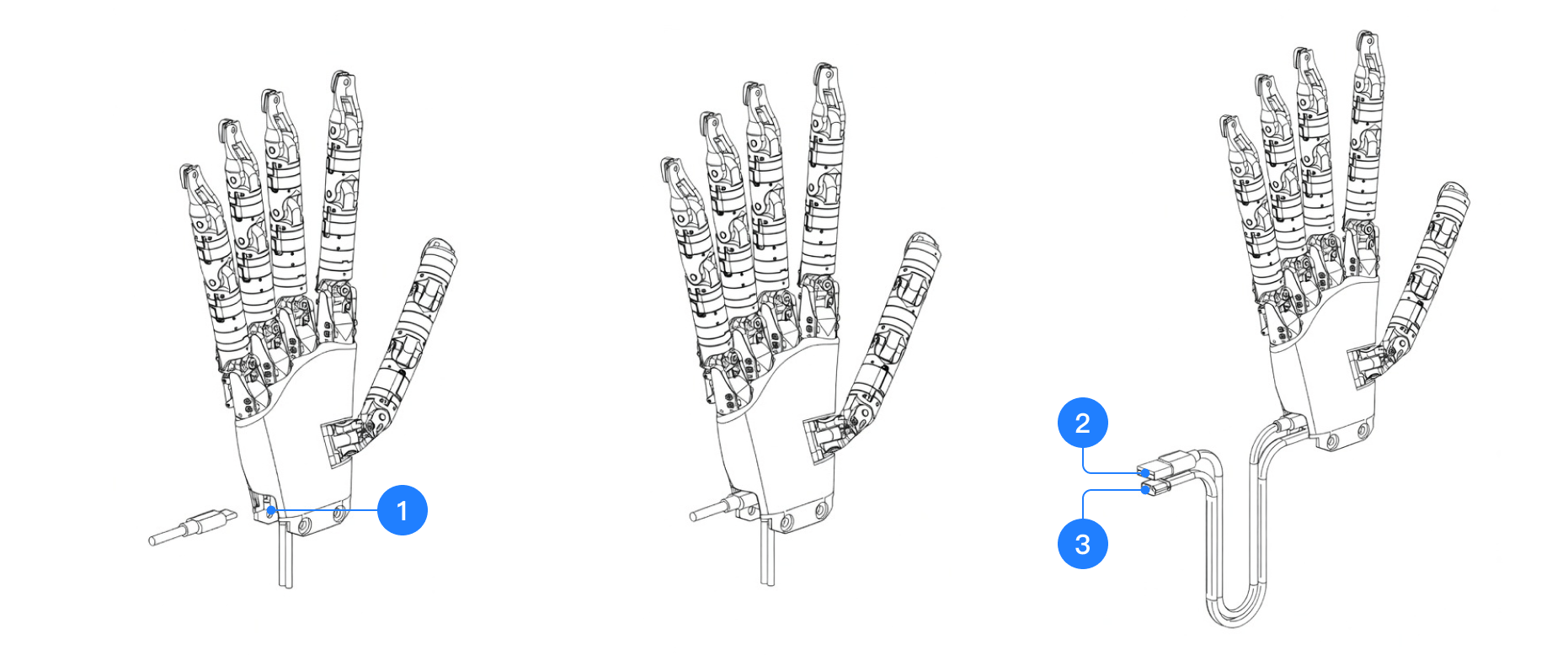
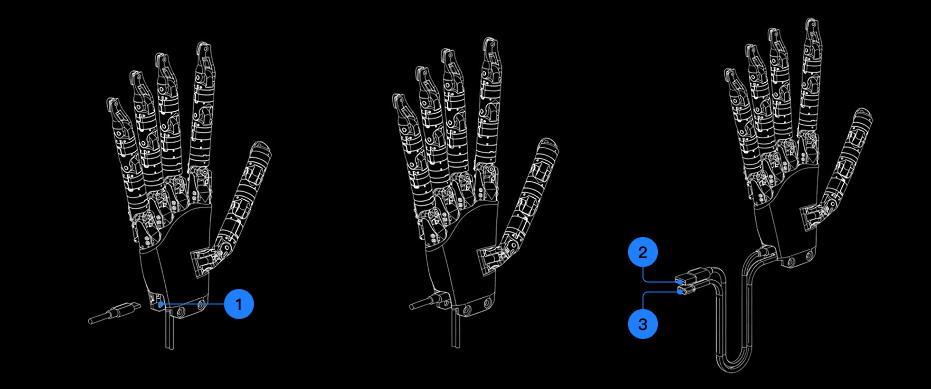
Wuji Hand achieves data communication with the host computer through a USB-C interface while supporting external power supply. The figure below shows the communication and power interface positions and connection methods of Wuji Hand:

<div className="dark:hidden">
  <img src="https://mintcdn.com/wuji-0bbde051/KO3tT6qNwl3EeRut/assets/source/images/en/wuji-hand/v1/overview/communication-and-power-interface-schematic-2025-11.png?fit=max&auto=format&n=KO3tT6qNwl3EeRut&q=85&s=bb637f5b28ff30d404e08fba2dffec49" alt="Communication and Power Interface" width="1862" height="778" data-path="assets/source/images/en/wuji-hand/v1/overview/communication-and-power-interface-schematic-2025-11.png" />
</div>

<div className="hidden dark:block">
  <img src="https://mintcdn.com/wuji-0bbde051/KO3tT6qNwl3EeRut/assets/source/images/en/wuji-hand/v1/overview/communication-and-power-interface-schematic-2025-11-dark.png?fit=max&auto=format&n=KO3tT6qNwl3EeRut&q=85&s=3455d817fed06af088eb4d45bc238cf0" alt="Communication and Power Interface" width="931" height="389" data-path="assets/source/images/en/wuji-hand/v1/overview/communication-and-power-interface-schematic-2025-11-dark.png" />
</div>

* Numbers 1 to 3 in the figure are:
  * 1: USB data cable connection end (plugged into the dexterous hand device)
  * 2: USB data cable other end (connected to host computer or robot controller)
  * 3: XT30 power interface for external power supply

<Info>
  Note: Use the original cables to maintain stable communication and safe power delivery
</Info>

## Product Electrical Characteristics

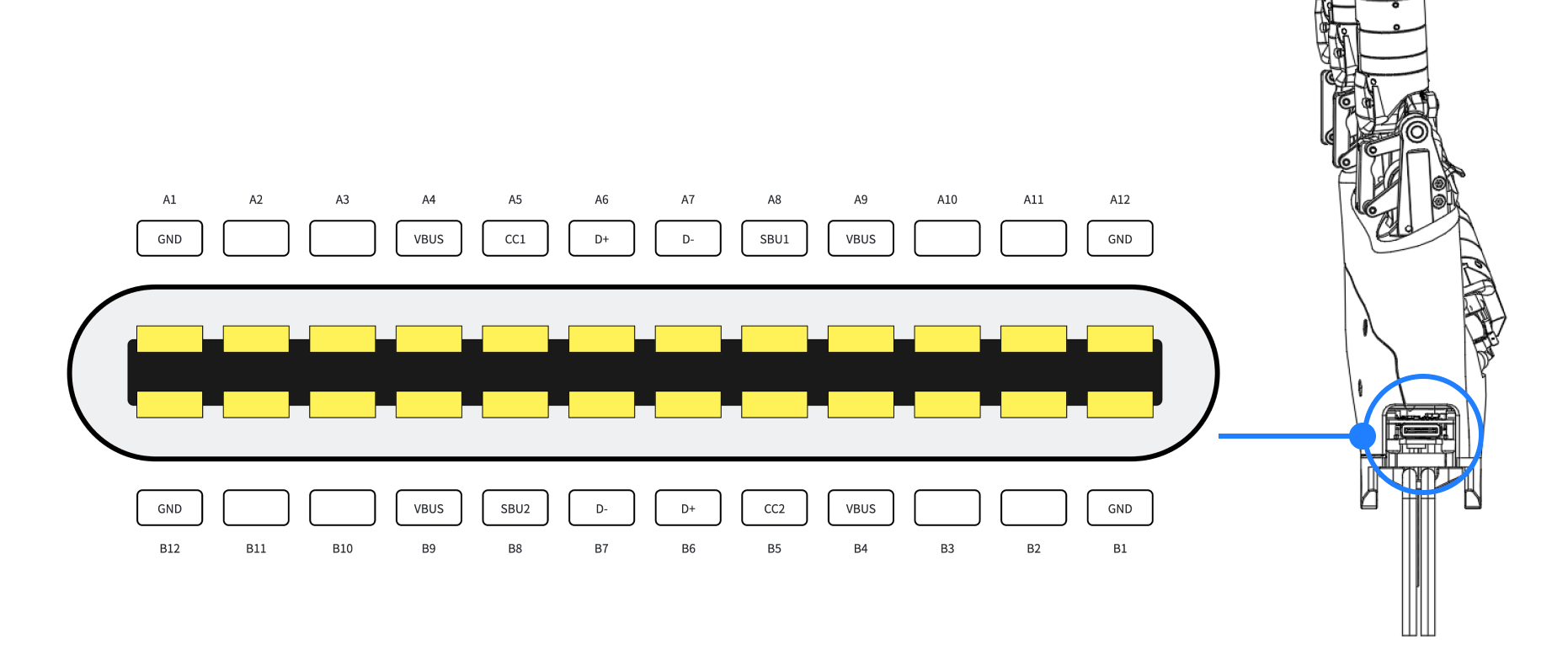
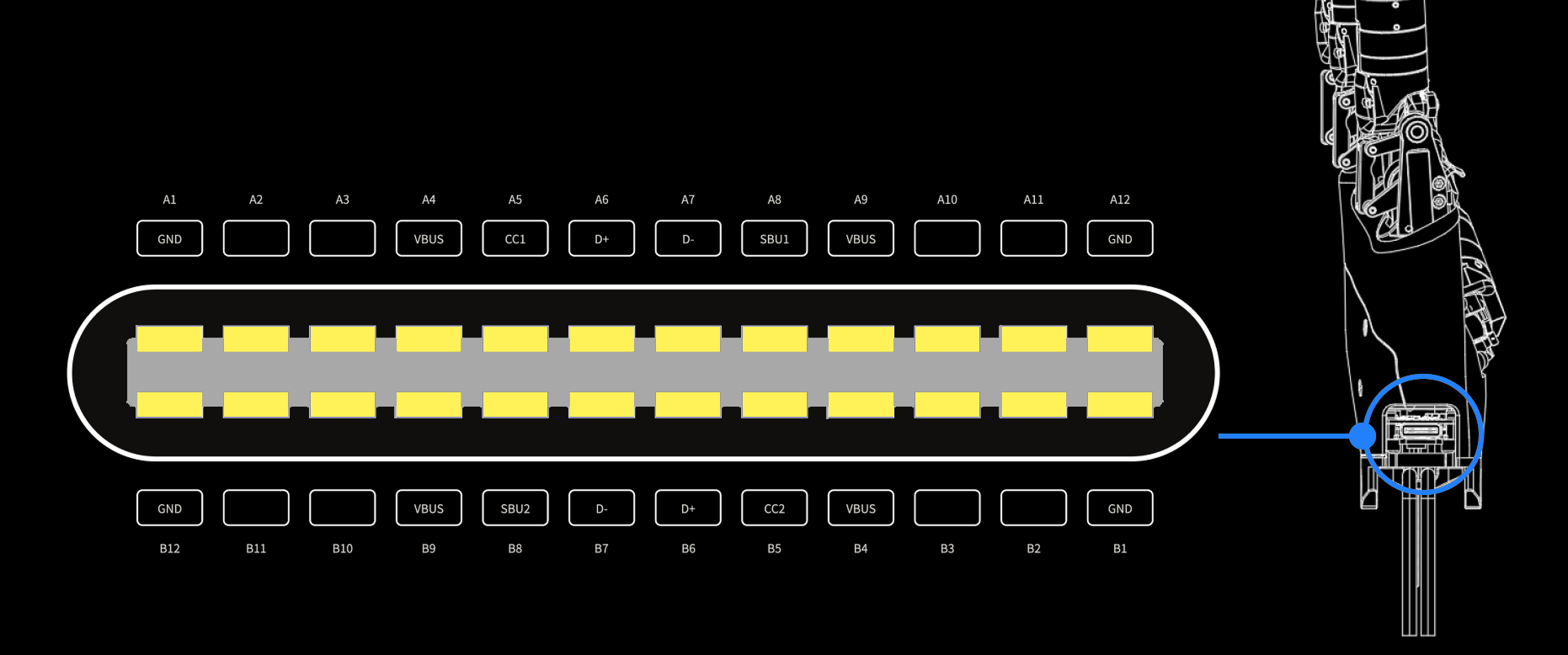
### Pin Definition

<div className="dark:hidden">
  <img src="https://mintcdn.com/wuji-0bbde051/KO3tT6qNwl3EeRut/assets/source/images/en/wuji-hand/v1/overview/pin-definition-2025-11.png?fit=max&auto=format&n=KO3tT6qNwl3EeRut&q=85&s=c9ace32fd7b2ddf27956f545622f7b8c" alt="Pin Definition" width="1862" height="778" data-path="assets/source/images/en/wuji-hand/v1/overview/pin-definition-2025-11.png" />
</div>

<div className="hidden dark:block">
  <img src="https://mintcdn.com/wuji-0bbde051/KO3tT6qNwl3EeRut/assets/source/images/en/wuji-hand/v1/overview/pin-definition-2025-11-dark.png?fit=max&auto=format&n=KO3tT6qNwl3EeRut&q=85&s=aff7060d5b4a0aaa725ce7331a9601ea" alt="Pin Definition" width="1862" height="778" data-path="assets/source/images/en/wuji-hand/v1/overview/pin-definition-2025-11-dark.png" />
</div>

### Indicator Light Reference Table

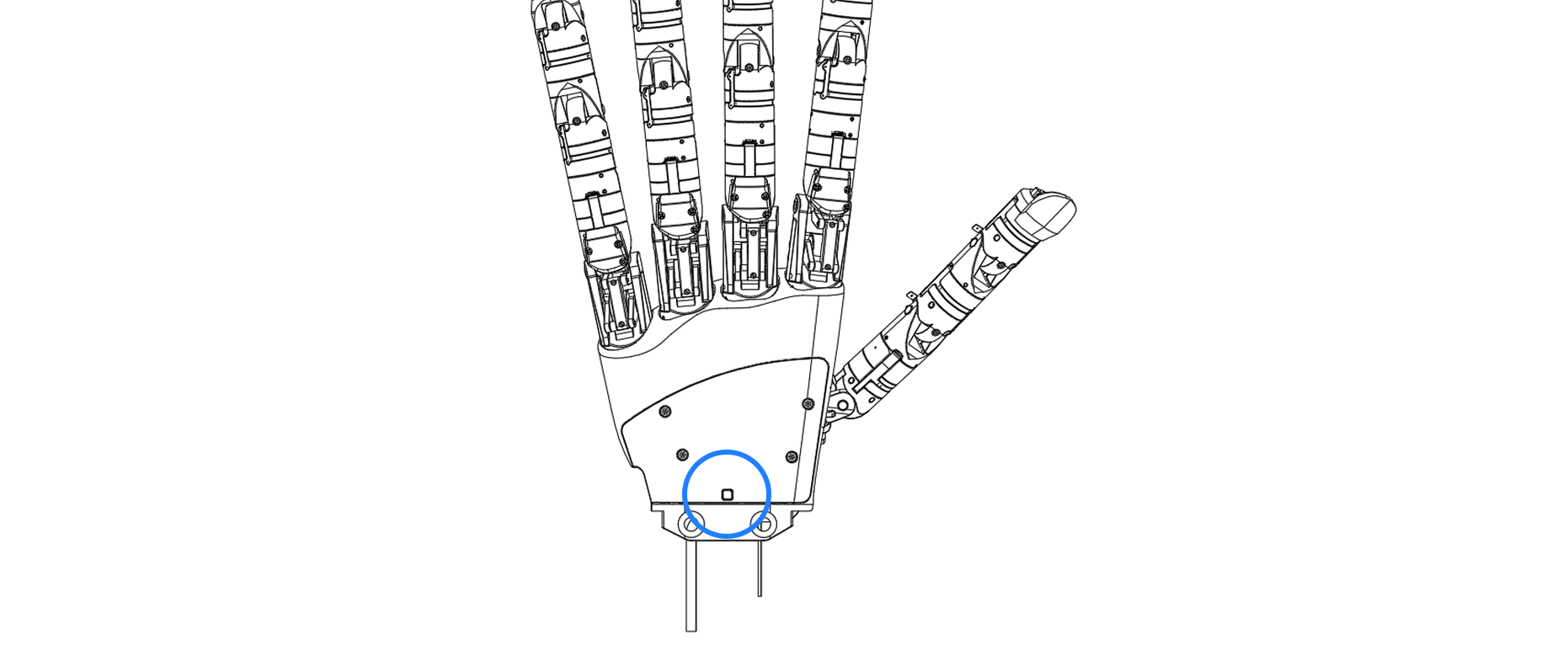
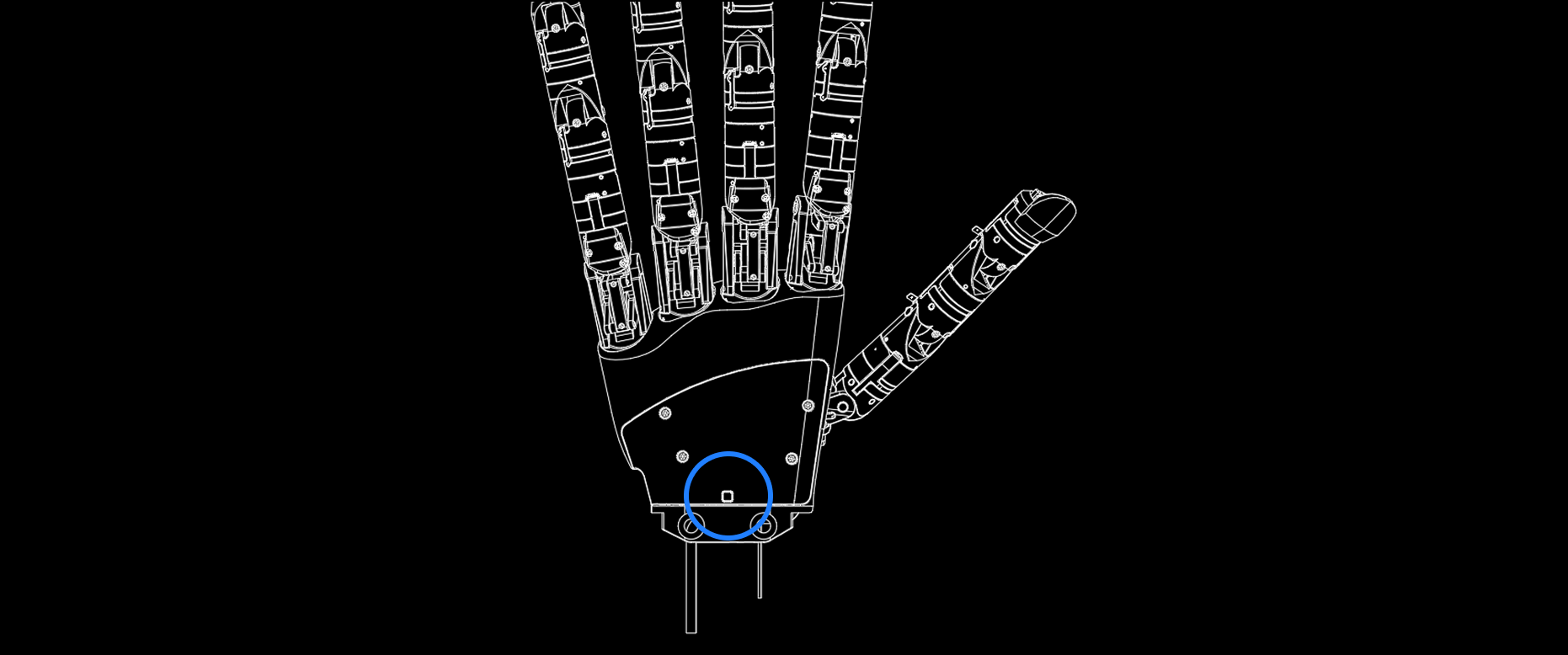
An RGB status indicator sits on the lower back of the hand. It provides real-time feedback on power supply and system operation.

<div className="dark:hidden">
  <img src="https://mintcdn.com/wuji-0bbde051/KO3tT6qNwl3EeRut/assets/source/images/en/wuji-hand/v1/overview/indicator-light-position-2025-11.png?fit=max&auto=format&n=KO3tT6qNwl3EeRut&q=85&s=da8f127199789e03353ef91efc64075e" alt="Indicator Light Position" width="1862" height="778" data-path="assets/source/images/en/wuji-hand/v1/overview/indicator-light-position-2025-11.png" />
</div>

<div className="hidden dark:block">
  <img src="https://mintcdn.com/wuji-0bbde051/KO3tT6qNwl3EeRut/assets/source/images/en/wuji-hand/v1/overview/indicator-light-position-2025-11-dark.png?fit=max&auto=format&n=KO3tT6qNwl3EeRut&q=85&s=fd4dd8351e3d1b5484c12d33d10dd50e" alt="Indicator Light Position" width="1862" height="778" data-path="assets/source/images/en/wuji-hand/v1/overview/indicator-light-position-2025-11-dark.png" />
</div>

The meanings corresponding to each status are shown in the table below:

<table>
  <thead>
    <tr>
      <th colSpan="2">Indicator Light Color</th>
      <th>Status Symbol</th>
      <th>System Phase Description</th>
      <th>Description</th>
    </tr>
  </thead>

  <tbody>
    <tr>
      <td>
        <img src="https://mintcdn.com/wuji-0bbde051/KO3tT6qNwl3EeRut/assets/source/images/en/wuji-hand/v1/overview/no-light-2025-11.png?fit=max&auto=format&n=KO3tT6qNwl3EeRut&q=85&s=930db4caa2986002da60d52eb121f423" alt="No Light" width="446" height="128" data-path="assets/source/images/en/wuji-hand/v1/overview/no-light-2025-11.png" />
      </td>

      <td>No Light</td>
      <td>OFF</td>
      <td>Powered off/unpowered state</td>
      <td>Power supply not connected or main power failure</td>
    </tr>

    <tr>
      <td>
        <img src="https://mintcdn.com/wuji-0bbde051/KO3tT6qNwl3EeRut/assets/source/images/en/wuji-hand/v1/overview/blue-solid-2025-11.png?fit=max&auto=format&n=KO3tT6qNwl3EeRut&q=85&s=9fb3055a7354d550aac79b6b25da699a" alt="Blue Solid" width="446" height="195" data-path="assets/source/images/en/wuji-hand/v1/overview/blue-solid-2025-11.png" />
      </td>

      <td>Blue Solid</td>
      <td>Bootloader</td>
      <td>Firmware update or bootloader</td>
      <td>Device is in bootloader. If device is performing firmware upgrade, **strictly prohibit power disconnection or cable reconnection** to avoid system damage</td>
    </tr>

    <tr>
      <td>
        <img src="https://mintcdn.com/wuji-0bbde051/KO3tT6qNwl3EeRut/assets/source/images/en/wuji-hand/v1/overview/green-flashing-2025-11.png?fit=max&auto=format&n=KO3tT6qNwl3EeRut&q=85&s=a84b72a53d6cbe0476265091abcf2d43" alt="Green Flashing" width="446" height="195" data-path="assets/source/images/en/wuji-hand/v1/overview/green-flashing-2025-11.png" />
      </td>

      <td>Green Flashing</td>
      <td>Standby</td>
      <td>Normal standby</td>
      <td>Power supply normal, system normal, not connected to host computer or SDK</td>
    </tr>

    <tr>
      <td>
        <img src="https://mintcdn.com/wuji-0bbde051/KO3tT6qNwl3EeRut/assets/source/images/en/wuji-hand/v1/overview/green-solid-2025-11.png?fit=max&auto=format&n=KO3tT6qNwl3EeRut&q=85&s=f0d80c71be79fbfc845291657a6265a2" alt="Green Solid" width="446" height="195" data-path="assets/source/images/en/wuji-hand/v1/overview/green-solid-2025-11.png" />
      </td>

      <td>Green Solid</td>
      <td>Running</td>
      <td>Normal operation</td>
      <td>Power supply normal, system started, connected to host computer or SDK</td>
    </tr>

    <tr>
      <td>
        <img src="https://mintcdn.com/wuji-0bbde051/KO3tT6qNwl3EeRut/assets/source/images/en/wuji-hand/v1/overview/yellow-solid-2025-11.png?fit=max&auto=format&n=KO3tT6qNwl3EeRut&q=85&s=48b038513e201577a93327e29b04199a" alt="Yellow Solid" width="446" height="195" data-path="assets/source/images/en/wuji-hand/v1/overview/yellow-solid-2025-11.png" />
      </td>

      <td>Yellow Solid</td>
      <td>Warning</td>
      <td>Device warning</td>
      <td>System detected warnings such as high temperature, power fluctuation, and other non-fatal faults. Pause debugging and investigate the warning cause</td>
    </tr>

    <tr>
      <td>
        <img src="https://mintcdn.com/wuji-0bbde051/KO3tT6qNwl3EeRut/assets/source/images/en/wuji-hand/v1/overview/red-flashing-2025-11.png?fit=max&auto=format&n=KO3tT6qNwl3EeRut&q=85&s=17a6b4e844cb50b48e226c3b1b1adf76" alt="Red Flashing" width="445" height="195" data-path="assets/source/images/en/wuji-hand/v1/overview/red-flashing-2025-11.png" />
      </td>

      <td>Red Flashing</td>
      <td>Pre-fault</td>
      <td>Fault warning</td>
      <td>Warning of impending fault, such as temperature approaching overtemperature threshold</td>
    </tr>

    <tr>
      <td>
        <img src="https://mintcdn.com/wuji-0bbde051/KO3tT6qNwl3EeRut/assets/source/images/en/wuji-hand/v1/overview/red-solid-2025-11.png?fit=max&auto=format&n=KO3tT6qNwl3EeRut&q=85&s=a120de0b310f6533ec6429799cb3520b" alt="Red Solid" width="446" height="195" data-path="assets/source/images/en/wuji-hand/v1/overview/red-solid-2025-11.png" />
      </td>

      <td>Red Solid</td>
      <td>Fault</td>
      <td>Critical fault</td>
      <td>Serious hardware/software fault (such as main MCU abnormality, communication out of sync, etc.). Disable immediately and troubleshoot via host computer (observe indicator light, terminal log, reset/factory restore)</td>
    </tr>
  </tbody>
</table>

## Product Accessories Introduction

### Product Accessories Table

<table>
  <thead>
    <tr>
      <th>Image</th>
      <th>Name</th>
      <th>Description</th>
    </tr>
  </thead>

  <tbody>
    <tr>
      <td>
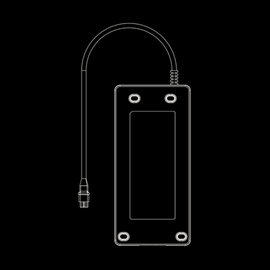
        <img src="https://mintcdn.com/wuji-0bbde051/KO3tT6qNwl3EeRut/assets/source/images/en/wuji-hand/v1/overview/accessories/power-adapter.png?fit=max&auto=format&n=KO3tT6qNwl3EeRut&q=85&s=7546292560e131c0614766fc436486b3" alt="12V 20A Power Adapter" className="dark:hidden" width="270" height="270" data-path="assets/source/images/en/wuji-hand/v1/overview/accessories/power-adapter.png" />

        <img src="https://mintcdn.com/wuji-0bbde051/KO3tT6qNwl3EeRut/assets/source/images/en/wuji-hand/v1/overview/accessories/power-adapter-dark.png?fit=max&auto=format&n=KO3tT6qNwl3EeRut&q=85&s=3737abff89d2909f9a1b1ab12fc756ad" alt="12V 20A Power Adapter" className="hidden dark:block" width="270" height="270" data-path="assets/source/images/en/wuji-hand/v1/overview/accessories/power-adapter-dark.png" />
      </td>

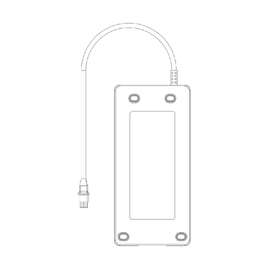
      <td style={{ whiteSpace: 'nowrap' }}>12V 20A Power Adapter</td>
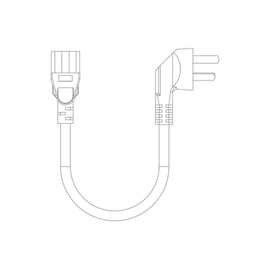
      <td rowSpan="2">Power supply</td>
    </tr>

    <tr>
      <td>
        <img src="https://mintcdn.com/wuji-0bbde051/KO3tT6qNwl3EeRut/assets/source/images/en/wuji-hand/v1/overview/accessories/power-adapter-ac-cable.png?fit=max&auto=format&n=KO3tT6qNwl3EeRut&q=85&s=b7d389d5a8eb9c0488ec8cf4a7e3be3c" alt="Power Adapter AC Cable" className="dark:hidden" width="270" height="270" data-path="assets/source/images/en/wuji-hand/v1/overview/accessories/power-adapter-ac-cable.png" />

        <img src="https://mintcdn.com/wuji-0bbde051/KO3tT6qNwl3EeRut/assets/source/images/en/wuji-hand/v1/overview/accessories/power-adapter-ac-cable-dark.png?fit=max&auto=format&n=KO3tT6qNwl3EeRut&q=85&s=9ca54844fcd4109a22f2641c441b8839" alt="Power Adapter AC Cable" className="hidden dark:block" width="270" height="270" data-path="assets/source/images/en/wuji-hand/v1/overview/accessories/power-adapter-ac-cable-dark.png" />
      </td>

      <td style={{ whiteSpace: 'nowrap' }}>Power Adapter AC Cable</td>
    </tr>

    <tr>
      <td>
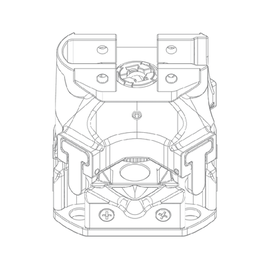
        <img src="https://mintcdn.com/wuji-0bbde051/KO3tT6qNwl3EeRut/assets/source/images/en/wuji-hand/v1/overview/accessories/anti-impact-adapter.png?fit=max&auto=format&n=KO3tT6qNwl3EeRut&q=85&s=128a7c11e9bbcfca617e46a36f5719ce" alt="Impact-resistant Adapter" className="dark:hidden" width="270" height="270" data-path="assets/source/images/en/wuji-hand/v1/overview/accessories/anti-impact-adapter.png" />

        <img src="https://mintcdn.com/wuji-0bbde051/KO3tT6qNwl3EeRut/assets/source/images/en/wuji-hand/v1/overview/accessories/anti-impact-adapter-dark.png?fit=max&auto=format&n=KO3tT6qNwl3EeRut&q=85&s=138c7b73caee201ac3c6e9655dc326d1" alt="Impact-resistant Adapter" className="hidden dark:block" width="270" height="270" data-path="assets/source/images/en/wuji-hand/v1/overview/accessories/anti-impact-adapter-dark.png" />
      </td>

      <td style={{ whiteSpace: 'nowrap' }}>Impact-resistant Adapter</td>
      <td>[See Impact-resistant Adapter](#impact-resistant-adapter)</td>
    </tr>

    <tr>
      <td>
        <img src="https://mintcdn.com/wuji-0bbde051/KO3tT6qNwl3EeRut/assets/source/images/en/wuji-hand/v1/overview/accessories/direct-adapter.png?fit=max&auto=format&n=KO3tT6qNwl3EeRut&q=85&s=cb8b5a7cd1db3afcb666b6fa83932999" alt="Direct-mount Adapter" className="dark:hidden" width="270" height="270" data-path="assets/source/images/en/wuji-hand/v1/overview/accessories/direct-adapter.png" />

        <img src="https://mintcdn.com/wuji-0bbde051/KO3tT6qNwl3EeRut/assets/source/images/en/wuji-hand/v1/overview/accessories/direct-adapter-dark.png?fit=max&auto=format&n=KO3tT6qNwl3EeRut&q=85&s=74db725396bca915a0c212719bc0b8fc" alt="Direct-mount Adapter" className="hidden dark:block" width="270" height="270" data-path="assets/source/images/en/wuji-hand/v1/overview/accessories/direct-adapter-dark.png" />
      </td>

      <td style={{ whiteSpace: 'nowrap' }}>Direct-mount Adapter</td>
      <td>Connects Wuji Hand to user equipment (such as robot arm flange)</td>
    </tr>

    <tr>
      <td>
        <img src="https://mintcdn.com/wuji-0bbde051/KO3tT6qNwl3EeRut/assets/source/images/en/wuji-hand/v1/overview/accessories/tool-kit.png?fit=max&auto=format&n=KO3tT6qNwl3EeRut&q=85&s=c1147341425d057ecc07748551cec0c0" alt="Toolkit" className="dark:hidden" width="270" height="270" data-path="assets/source/images/en/wuji-hand/v1/overview/accessories/tool-kit.png" />

        <img src="https://mintcdn.com/wuji-0bbde051/KO3tT6qNwl3EeRut/assets/source/images/en/wuji-hand/v1/overview/accessories/tool-kit-dark.png?fit=max&auto=format&n=KO3tT6qNwl3EeRut&q=85&s=37c16410bfe5b7931ef7f8d6215d09c2" alt="Toolkit" className="hidden dark:block" width="270" height="270" data-path="assets/source/images/en/wuji-hand/v1/overview/accessories/tool-kit-dark.png" />
      </td>

      <td style={{ whiteSpace: 'nowrap' }}>Toolkit</td>
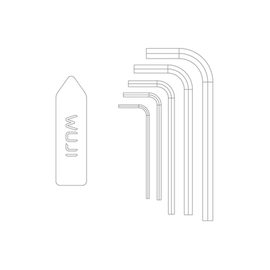
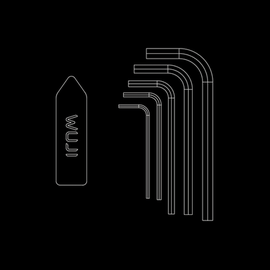
      <td><ul><li>Hex wrench</li><li>Pry bar: for separating the latched impact-resistant adapter</li></ul></td>
    </tr>

    <tr>
      <td>
        <img src="https://mintcdn.com/wuji-0bbde051/KO3tT6qNwl3EeRut/assets/source/images/en/wuji-hand/v1/overview/accessories/accessory-kit.png?fit=max&auto=format&n=KO3tT6qNwl3EeRut&q=85&s=b66d7094eebf747e6f1588309d9d8da1" alt="Accessory Kit" className="dark:hidden" width="270" height="270" data-path="assets/source/images/en/wuji-hand/v1/overview/accessories/accessory-kit.png" />

        <img src="https://mintcdn.com/wuji-0bbde051/KO3tT6qNwl3EeRut/assets/source/images/en/wuji-hand/v1/overview/accessories/accessory-kit-dark.png?fit=max&auto=format&n=KO3tT6qNwl3EeRut&q=85&s=dcc389d4a07ae325ef4d23305b99091e" alt="Accessory Kit" className="hidden dark:block" width="270" height="270" data-path="assets/source/images/en/wuji-hand/v1/overview/accessories/accessory-kit-dark.png" />
      </td>

      <td style={{ whiteSpace: 'nowrap' }}>Accessory Kit</td>
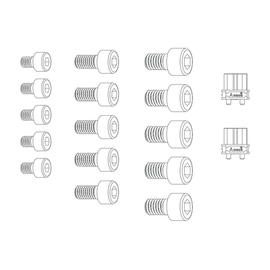
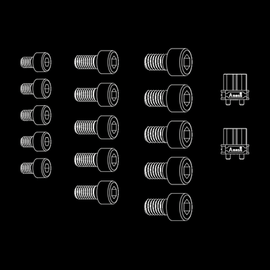
      <td><ul><li>Socket head cap screws: M4x6, M5x10, M6x10</li><li>XT30 female connector</li></ul></td>
    </tr>

    <tr>
      <td>
        <img src="https://mintcdn.com/wuji-0bbde051/KO3tT6qNwl3EeRut/assets/source/images/en/wuji-hand/v1/overview/accessories/usb-atoc-cable.png?fit=max&auto=format&n=KO3tT6qNwl3EeRut&q=85&s=6b24d27149f30f351484e4d7fd1d4825" alt="USB A to USB C Cable" className="dark:hidden" width="270" height="270" data-path="assets/source/images/en/wuji-hand/v1/overview/accessories/usb-atoc-cable.png" />

        <img src="https://mintcdn.com/wuji-0bbde051/KO3tT6qNwl3EeRut/assets/source/images/en/wuji-hand/v1/overview/accessories/usb-atoc-cable-dark.png?fit=max&auto=format&n=KO3tT6qNwl3EeRut&q=85&s=6b3339e64892417bd64d4661cf905d33" alt="USB A to USB C Cable" className="hidden dark:block" width="270" height="270" data-path="assets/source/images/en/wuji-hand/v1/overview/accessories/usb-atoc-cable-dark.png" />
      </td>

      <td style={{ whiteSpace: 'nowrap' }}>USB A to USB C Cable</td>
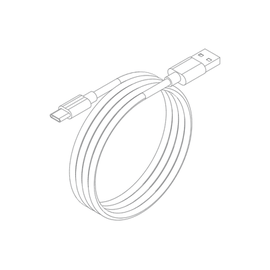
      <td>For communication between host device and Wuji Hand</td>
    </tr>

    <tr>
      <td>
        <img src="https://mintcdn.com/wuji-0bbde051/KO3tT6qNwl3EeRut/assets/source/images/en/wuji-hand/v1/overview/accessories/tactile-glove.png?fit=max&auto=format&n=KO3tT6qNwl3EeRut&q=85&s=5a40aa9a69206e50437fb90f42515c45" alt="Tactile Sensing Glove" className="dark:hidden" width="270" height="270" data-path="assets/source/images/en/wuji-hand/v1/overview/accessories/tactile-glove.png" />

        <img src="https://mintcdn.com/wuji-0bbde051/KO3tT6qNwl3EeRut/assets/source/images/en/wuji-hand/v1/overview/accessories/tactile-glove-dark.png?fit=max&auto=format&n=KO3tT6qNwl3EeRut&q=85&s=0ae1ab662479f1edb2b8dc1b915def50" alt="Tactile Sensing Glove" className="hidden dark:block" width="270" height="270" data-path="assets/source/images/en/wuji-hand/v1/overview/accessories/tactile-glove-dark.png" />
      </td>

      <td style={{ whiteSpace: 'nowrap' }}>Tactile Sensing Glove (Optional)</td>
      <td>[See Tactile Sensing Glove](#tactile-sensing-glove)<br />Whether it ships with Wuji Hand, and the left- or right-hand fit, depend on your order</td>
    </tr>
  </tbody>
</table>

### Tactile Sensing Glove

The Tactile Sensing Glove is an optional tactile perception accessory for Wuji Hand. It targets research and engineering scenarios — sensing, data collection, human-machine interaction — and provides a unified hardware foundation for algorithm adaptation, simulation modeling, and multi-modal fusion.

* **High sensing density**: Full-palm uniformly distributed sensor array, more than 400 sensors, each independently capturing contact states, with super-resolution further enhancing perception
* **High compliance**: Fully flexible Nerve skin (flexible sensing skin) accommodates bending and stretching, forming a dynamic sensing array that conforms closely to objects

#### System Requirements

<table>
  <thead>
    <tr>
      <th>Category</th>
      <th>Item</th>
      <th>Requirement</th>
    </tr>
  </thead>

  <tbody>
    <tr>
      <td rowSpan="2">Hardware setup</td>
      <td>USB-C port</td>
      <td>At least one free USB-C port on the host (USB 2.0 or higher)</td>
    </tr>

    <tr>
      <td>Cables</td>
      <td>Bundled USB-C cable and short interconnect cable (see <a href="#connection">Connection</a>)</td>
    </tr>

    <tr>
      <td rowSpan="3">Recommended computer</td>
      <td>CPU</td>
      <td>x86\_64 or ARM64</td>
    </tr>

    <tr>
      <td>Memory</td>
      <td>≥ 16 GB, to support parallel data streams and visualization</td>
    </tr>

    <tr>
      <td>Storage</td>
      <td>≥ 1 GB free space for SDK and dependencies</td>
    </tr>

    <tr>
      <td rowSpan="3">Operating system</td>
      <td>SDK platform</td>
      <td>Currently Linux only</td>
    </tr>

    <tr>
      <td>Recommended distribution</td>
      <td>Ubuntu 22.04 / 24.04</td>
    </tr>

    <tr>
      <td>Windows support</td>
      <td>Not yet supported, planned for a future release</td>
    </tr>

    <tr>
      <td rowSpan="3">Wuji Hand SDK (wujihandpy)</td>
      <td>Python version</td>
      <td>3.8 – 3.14</td>
    </tr>

    <tr>
      <td>Dependency</td>
      <td>numpy</td>
    </tr>

    <tr>
      <td>Install</td>
      <td><code>pip install wujihandpy</code></td>
    </tr>

    <tr>
      <td rowSpan="2">Wuji Hand SDK (wujihandcpp)</td>
      <td>Packages</td>
      <td>Deb / RPM, install directly</td>
    </tr>

    <tr>
      <td>Build instructions</td>
      <td>See <a href="https://github.com/wuji-technology/wujihandpy/tree/main/wujihandcpp">wujihandcpp</a></td>
    </tr>

    <tr>
      <td>USB device permissions (Linux)</td>
      <td>udev rule</td>

      <td>
        Add the rule so the device can be accessed without sudo:

        <pre>
          <code>
            {`echo 'SUBSYSTEM=="usb", ATTR{idVendor}=="0483", MODE="0666"' | \\
                        sudo tee /etc/udev/rules.d/95-wujihand.rules && \\
                        sudo udevadm control --reload-rules && sudo udevadm trigger`}
          </code>
        </pre>
      </td>
    </tr>
  </tbody>
</table>

#### Glove Specifications

| Parameter | Value |
| - | - |
| Pressure Range | 0 - 400 kPa |
| Measurement Method | Pressure-Resistance |
| Lifespan | > 100,000 cycles |
| Accuracy | ± 6% |
| Normal Operating Temperature | 0 \~ 40 °C |
| Storage Temperature | -20 \~ 60 °C |
| Communication Frequency | 120 FPS |
| Operating Voltage | 3.3 V |
| Operating Current | 300 mA |
| Communication Method | USB |
| Weight | \~50 g |
| Sensor Count | > 400 |
| Sensor Distribution | Full palm, dynamic distribution |
| Sensor Physical Resolution | ≤ 40 mm² |

#### Connection

<Warning>
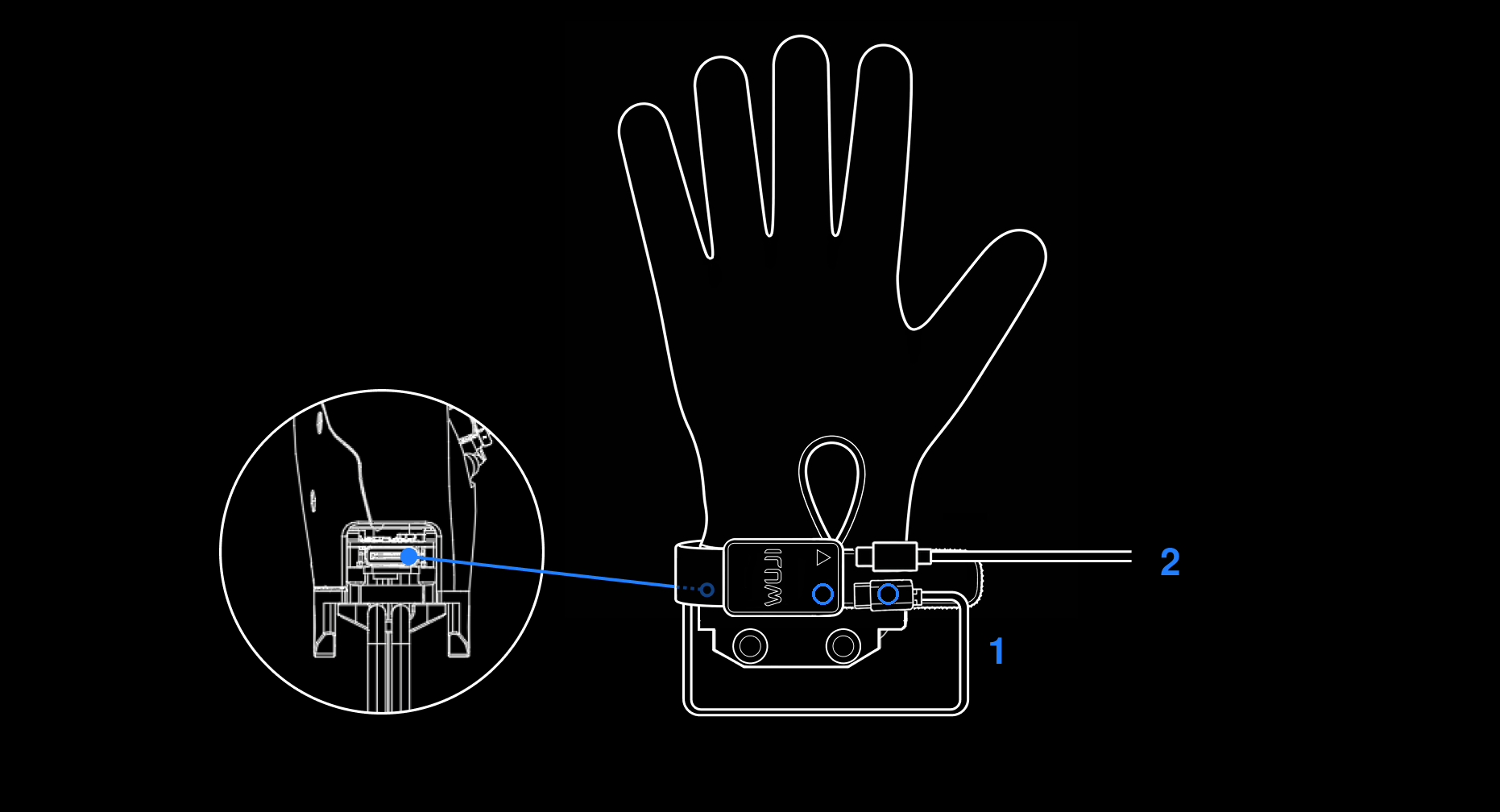
  When attaching or removing the Wuji Hand Tactile Sensing Glove, first run `glove_donning.py` from the Wuji Hand SDK [joint control examples](https://github.com/wuji-technology/wujihandpy/tree/main/example/joint) to smoothly drive the hand into the disassembly pose (thumb adducted across the palm, other fingers nearly extended). Do not pull forcefully to avoid damaging finger joints.
</Warning>

<div className="dark:hidden">
  <img src="https://mintcdn.com/wuji-0bbde051/KO3tT6qNwl3EeRut/assets/source/images/en/wuji-hand/v1/overview/tactile-glove-connection.png?fit=max&auto=format&n=KO3tT6qNwl3EeRut&q=85&s=0c62f2cc3755177767ce570fc0dea360" alt="Tactile Sensing Glove connection diagram" width="1862" height="1008" data-path="assets/source/images/en/wuji-hand/v1/overview/tactile-glove-connection.png" />
</div>

<div className="hidden dark:block">
  <img src="https://mintcdn.com/wuji-0bbde051/KO3tT6qNwl3EeRut/assets/source/images/en/wuji-hand/v1/overview/tactile-glove-connection-dark.png?fit=max&auto=format&n=KO3tT6qNwl3EeRut&q=85&s=847fac19d68afbbd55da22f889a2d864" alt="Tactile Sensing Glove connection diagram" width="1862" height="1008" data-path="assets/source/images/en/wuji-hand/v1/overview/tactile-glove-connection-dark.png" />
</div>

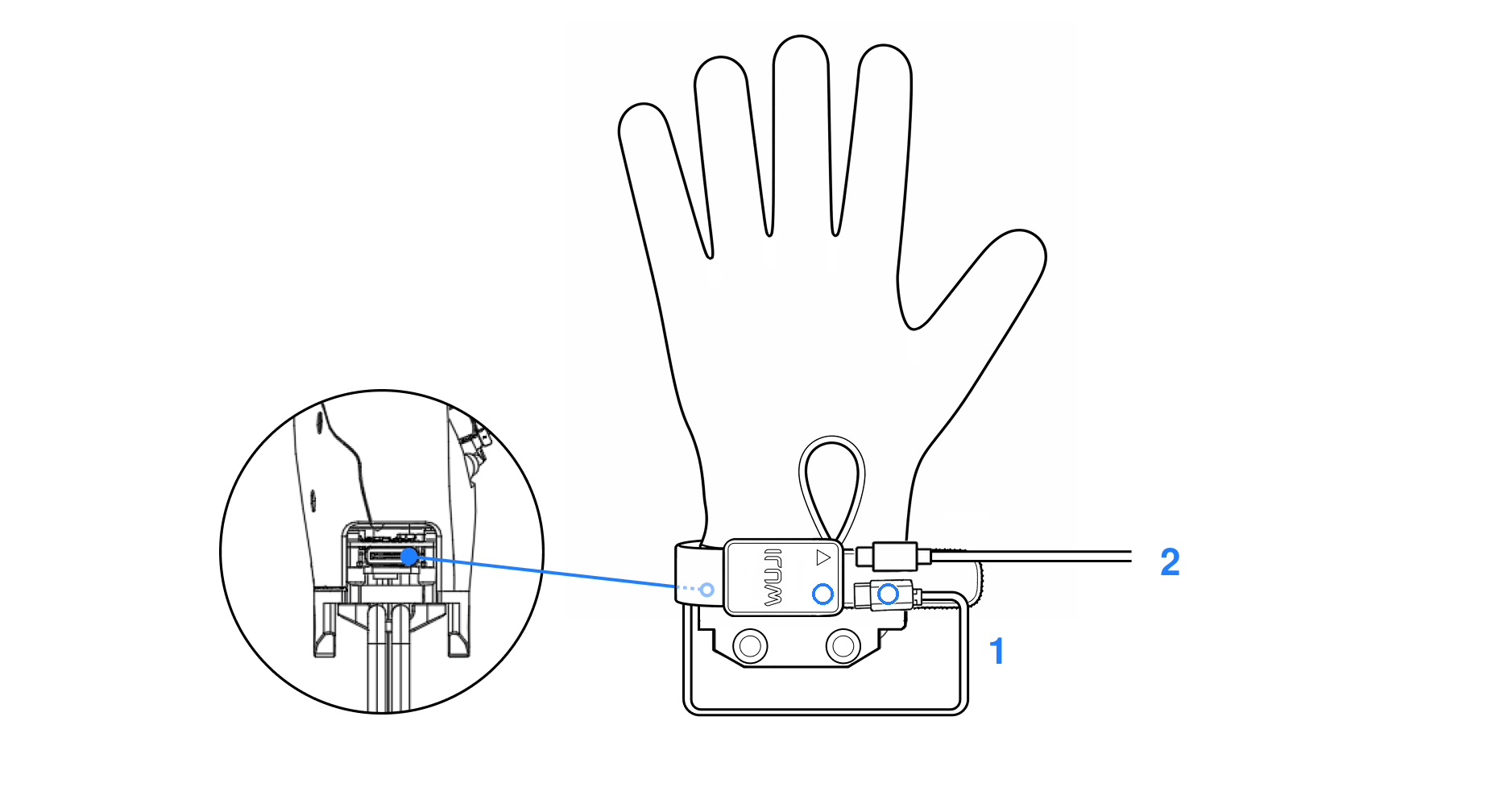
1. Connect the **circle marker** end of the bundled short data cable to the Brain Watch bridge port (**circle marker**). Route the other end around the inner wrist of Wuji Hand and connect it to the Wuji Hand [communication port](#communication-and-power-interface-schematic).
2. Use a USB-C (USB 2.0 or higher) data cable to connect to the PC — connect either USB-C end to the Brain Watch output port (triangle marker), and the other end to the PC.

#### Communication Interface

The product currently exposes a single communication interface, simplifying host integration.

<table>
  <thead>
    <tr>
      <th>Category</th>
      <th>Item</th>
      <th>Description</th>
    </tr>
  </thead>

  <tbody>
    <tr>
      <td>Physical interface</td>
      <td>Port type</td>
      <td>USB-C (USB 2.0 or higher)</td>
    </tr>

    <tr>
      <td rowSpan="3">Transport protocol</td>
      <td>Mode</td>
      <td>USB CDC (virtual serial port). The host recognizes a standard serial device</td>
    </tr>

    <tr>
      <td>Linux node</td>
      <td><code>/dev/ttyACM\*</code></td>
    </tr>

    <tr>
      <td>USB identifiers</td>
      <td>VID = <code>0x0483</code><br />PID = <code>0x5700</code></td>
    </tr>

    <tr>
      <td rowSpan="2">Data stream</td>
      <td>Push rate</td>
      <td>Up to 120 FPS, 24 × 32 float pressure frames</td>
    </tr>

    <tr>
      <td>Frame structure</td>
      <td>Sequence number, timestamp, and CRC. The SDK handles frame sync, drop counting, and reconnect</td>
    </tr>

    <tr>
      <td rowSpan="2">Data access</td>
      <td>Recommended</td>
      <td>Official SDK (C++ / Python) for structured frame data</td>
    </tr>

    <tr>
      <td>Debug</td>
      <td>Generic serial tool to read the raw byte stream</td>
    </tr>
  </tbody>
</table>

#### Software Support

The official SDK provides full data access and device control, covering everything from algorithm validation to production deployment. See the [SDK User Guide — Tactile Sensing Glove](/en/docs/wujihandpy/api-reference/#tactile-sensing-glove) for the full API reference.

**SDK interfaces**

Two interfaces share a single backend and behave identically:

| SDK | Source | Installation | Use cases |
| - | - | - | - |
| Wuji Hand SDK (wujihandpy) | [wuji-technology/wujihandpy](https://github.com/wuji-technology/wujihandpy) | `pip install wujihandpy` | Algorithm validation, data collection, rapid integration |
| Wuji Hand SDK (wujihandcpp) | [wujihandcpp directory in the wujihandpy repo](https://github.com/wuji-technology/wujihandpy/tree/main/wujihandcpp) | Deb / RPM / build from source | Production deployment, low-latency real-time control |

**Core API capabilities**

* Connection: `connect()` / `disconnect()` / `is_connected()`, with multi-device addressing by USB serial number
* Frame reading: blocking `read_frame(timeout_ms)` or callback-based `start_streaming(callback)` / `stop_streaming()`
* Device info: `get_device_info()` (serial / hardware / firmware version), `get_fw_build()`, `get_handedness()`
* Diagnostics: `get_diagnostics()` (uptime, frame count, CRC errors, drops, USB resets), `reset_counters()`
* Runtime config: `get_sample_rate_hz()` / `set_sample_rate_hz()` (1–120 Hz), `set_streaming(enable)`
* Time sync: `get_device_time()`, `sync_host_epoch(host_unix_ns)` for multi-device alignment
* Lifecycle: `reset_device()` for soft reset
* Error handling: USB disconnection triggers DisconnectCallback. C++ raises `ConnectionLostError`, and Python raises the corresponding exception

**Joint operation**

The tactile glove and Wuji Hand use independent USB transports and threads, so they can run in parallel within the same process (see `example/joint_with_tactile.py`) — enabling closed-loop scenarios such as tactile-driven motion control.

### Impact-resistant Adapter

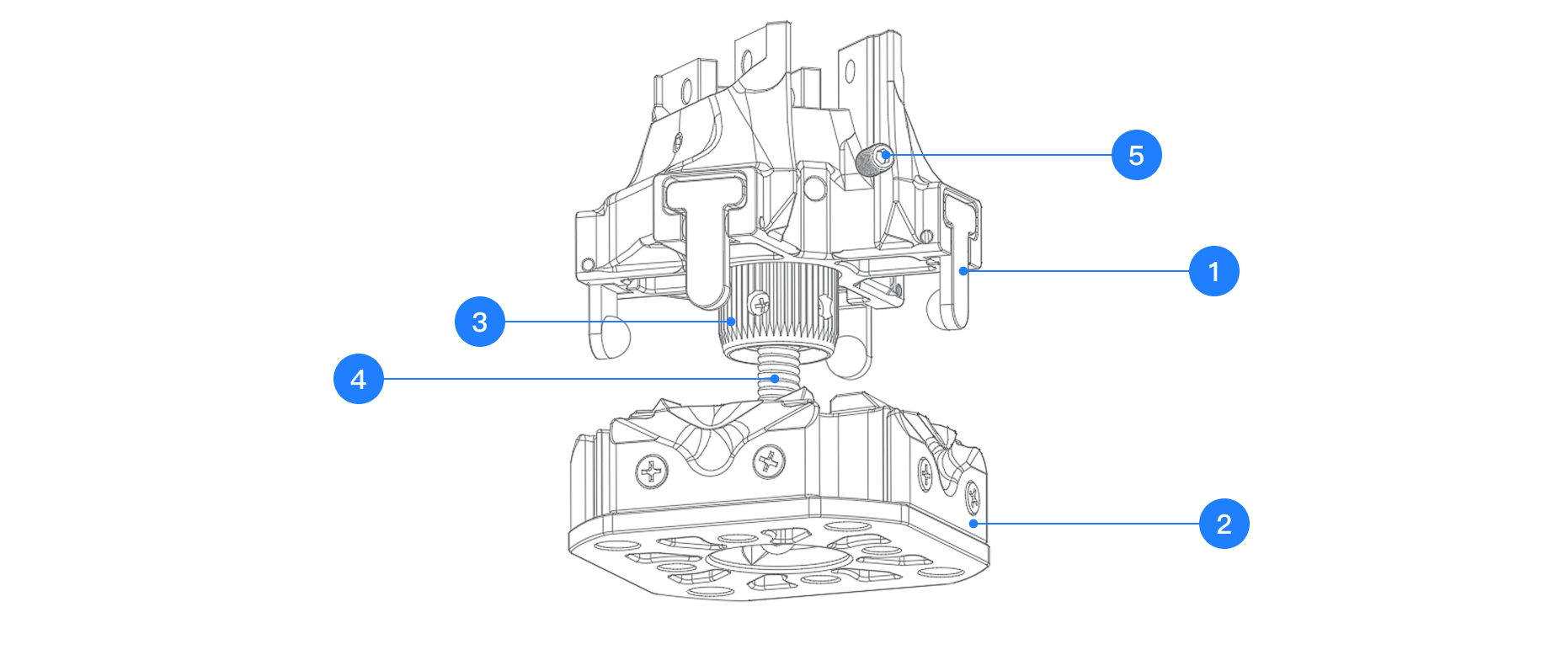
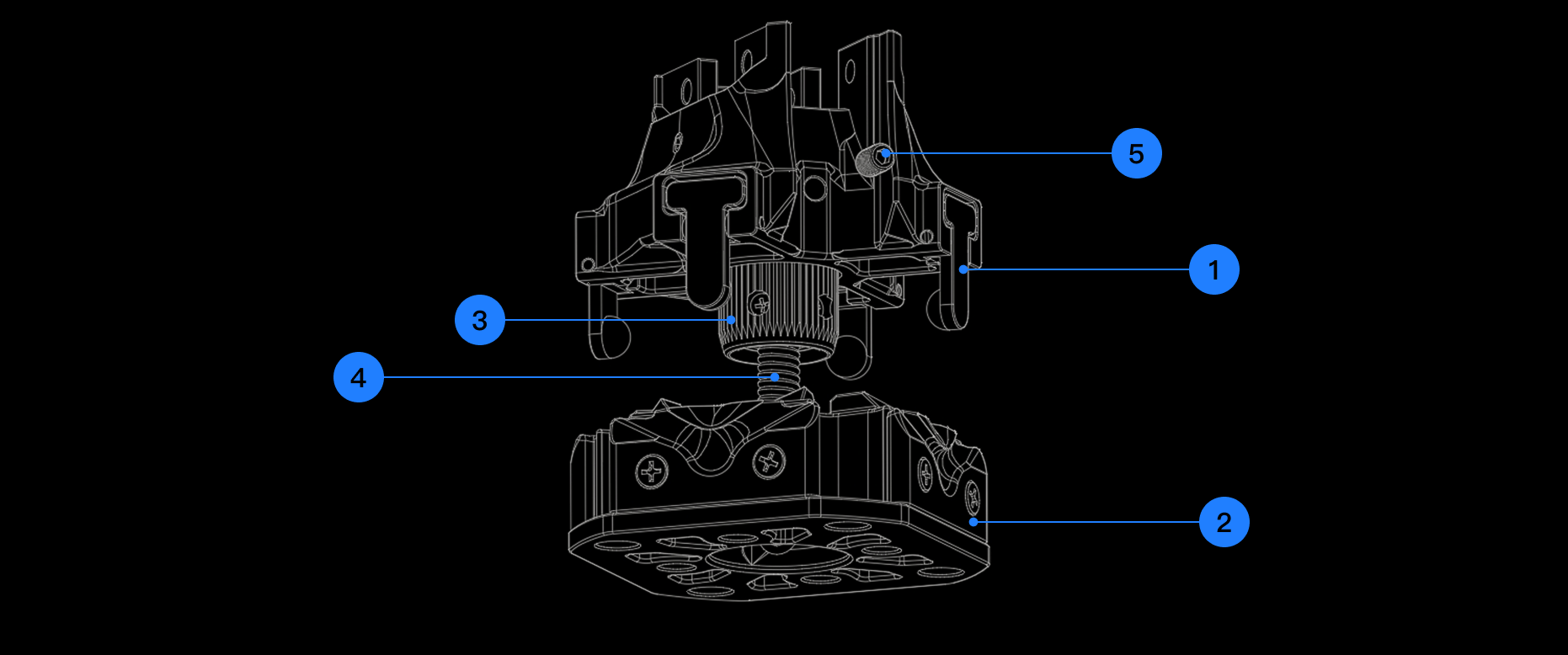
The impact-resistant adapter uses a twist-lock and slot locking structure to maintain a rigid connection under normal conditions. When subjected to external impact forces exceeding the safety threshold (such as robot arm loss of control or severe end-effector collision), Wuji Hand and the robot arm will trigger active separation to protect critical components (joints, motors, reducers, etc.) from damage. This design ensures improved reliability while minimizing maintenance and repair risks.

* **Normal state:** Twist-lock and set screws are tightened to ensure structural stability and prevent loosening due to daily vibration or minor impacts.
* **Abnormal state:** Automatically releases when exceeding the safety threshold, with Wuji Hand suspended by the safety chain to avoid secondary impact or falling hazards.

<Info>
  This trigger mechanism has been engineered to ensure it will not be falsely triggered during normal minor vibrations or routine operations, and is only effective for severe impacts exceeding the safety threshold. Note that this mechanism mainly covers most common impact and vulnerable scenarios, but cannot completely avoid potential damage in all extreme situations.
</Info>

<div className="dark:hidden">
  <img src="https://mintcdn.com/wuji-0bbde051/KO3tT6qNwl3EeRut/assets/source/images/en/wuji-hand/v1/overview/anti-impact-adapter-components-2025-11.png?fit=max&auto=format&n=KO3tT6qNwl3EeRut&q=85&s=d04950dec9382f1955a14187e104c82e" alt="Impact-resistant Adapter Component Names" width="1862" height="778" data-path="assets/source/images/en/wuji-hand/v1/overview/anti-impact-adapter-components-2025-11.png" />
</div>

<div className="hidden dark:block">
  <img src="https://mintcdn.com/wuji-0bbde051/KO3tT6qNwl3EeRut/assets/source/images/en/wuji-hand/v1/overview/anti-impact-adapter-components-2025-11-dark.png?fit=max&auto=format&n=KO3tT6qNwl3EeRut&q=85&s=f5409d99086b0bec0cc52e8b436e4ed3" alt="Impact-resistant Adapter Component Names" width="1862" height="778" data-path="assets/source/images/en/wuji-hand/v1/overview/anti-impact-adapter-components-2025-11-dark.png" />
</div>

| No. | Component Name |
| :-: | :- |
| 1 | Four-claw Latch |
| 2 | Grooved Flange |
| 3 | Twist-lock |
| 4 | Safety Chain |
| 5 | Set Screw |

## Installation and Removal

<Warning>
  **Safety Warning**:

  * Installation and removal must be performed with power off. Live operation is prohibited
  * After installation, confirm that the twist-lock is fully tightened and the set screw is locked before starting the robot arm
</Warning>

### Installation Steps

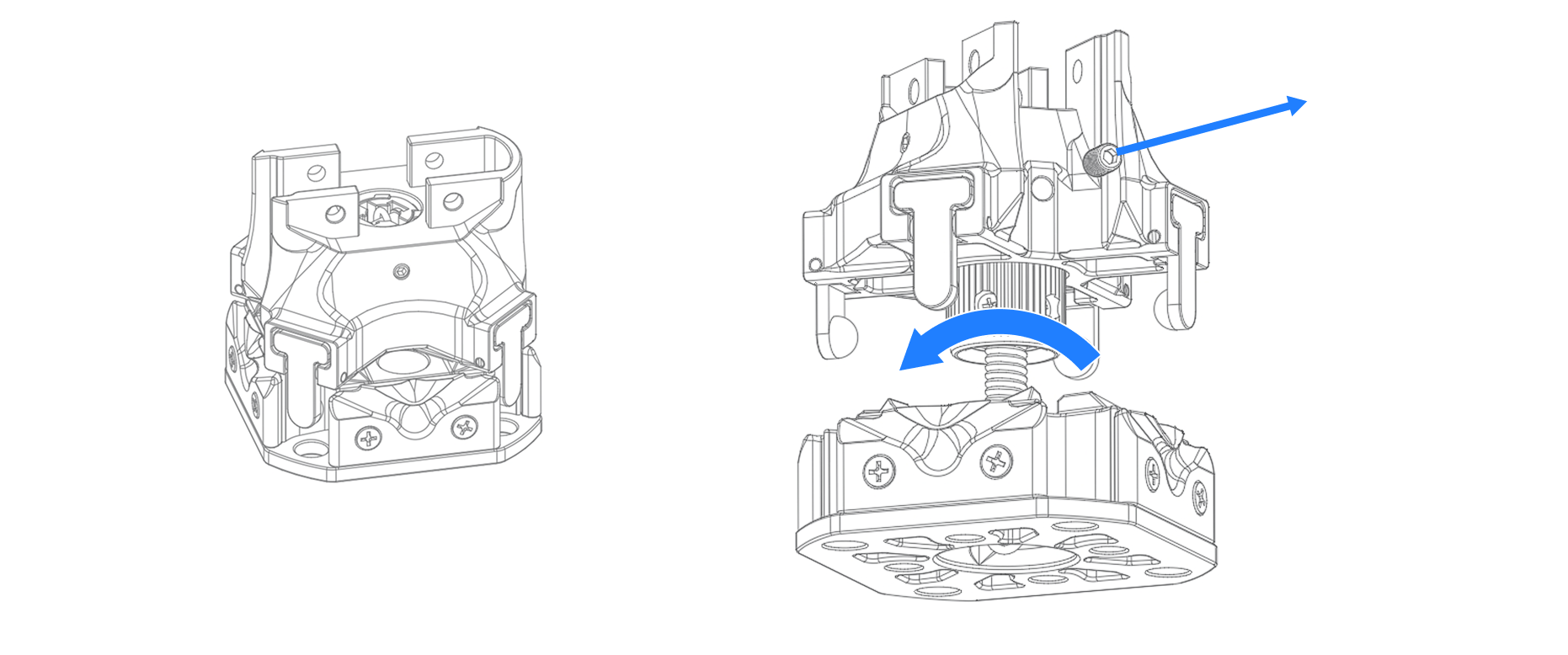
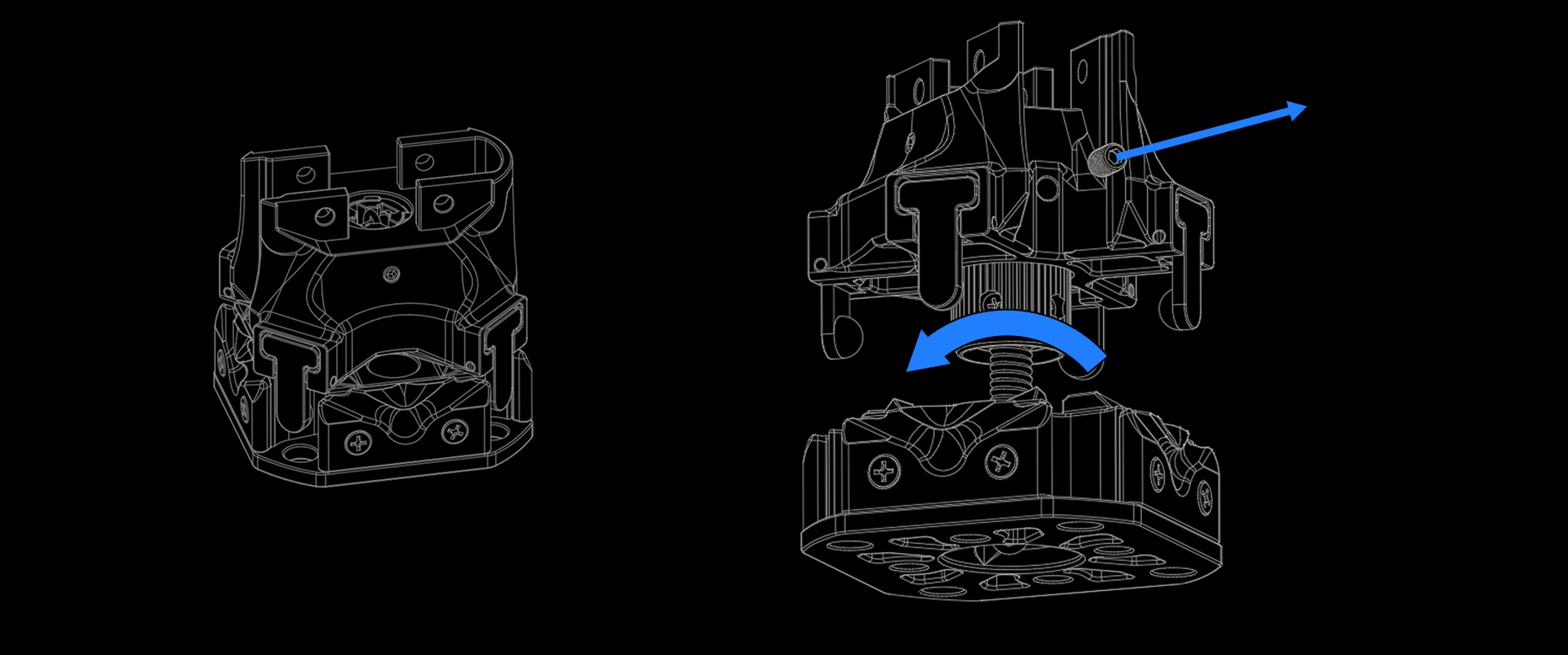
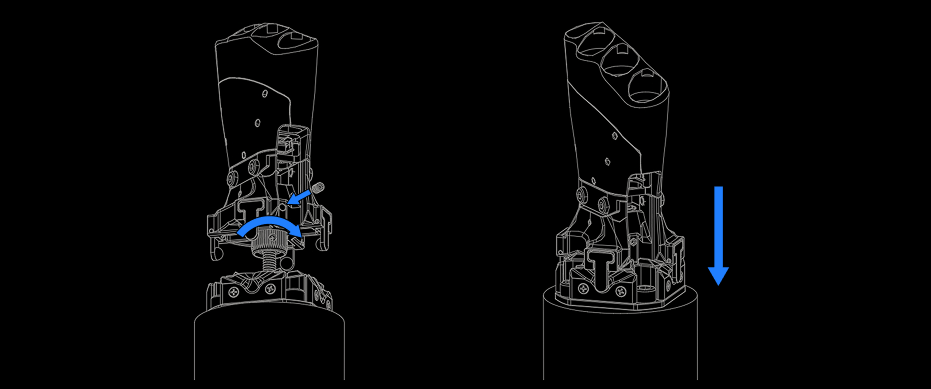
**Step 1:** Remove the impact-resistant adapter from the packaging (left image), pull apart the four-claw latch and grooved flange (right image), remove the set screw and rotate the twist-lock counterclockwise to separate the upper and lower components.

<div className="dark:hidden">
  <img src="https://mintcdn.com/wuji-0bbde051/KO3tT6qNwl3EeRut/assets/source/images/en/wuji-hand/v1/overview/anti-impact-adapter-step1.png?fit=max&auto=format&n=KO3tT6qNwl3EeRut&q=85&s=ed6c3e3a4aab1534e44a78e7d7918dd0" alt="Impact-resistant Adapter" width="1862" height="778" data-path="assets/source/images/en/wuji-hand/v1/overview/anti-impact-adapter-step1.png" />
</div>

<div className="hidden dark:block">
  <img src="https://mintcdn.com/wuji-0bbde051/KO3tT6qNwl3EeRut/assets/source/images/en/wuji-hand/v1/overview/anti-impact-adapter-step1-dark.png?fit=max&auto=format&n=KO3tT6qNwl3EeRut&q=85&s=f83661eec0f2d38640ae23093ab2ee93" alt="Impact-resistant Adapter" width="1862" height="778" data-path="assets/source/images/en/wuji-hand/v1/overview/anti-impact-adapter-step1-dark.png" />
</div>

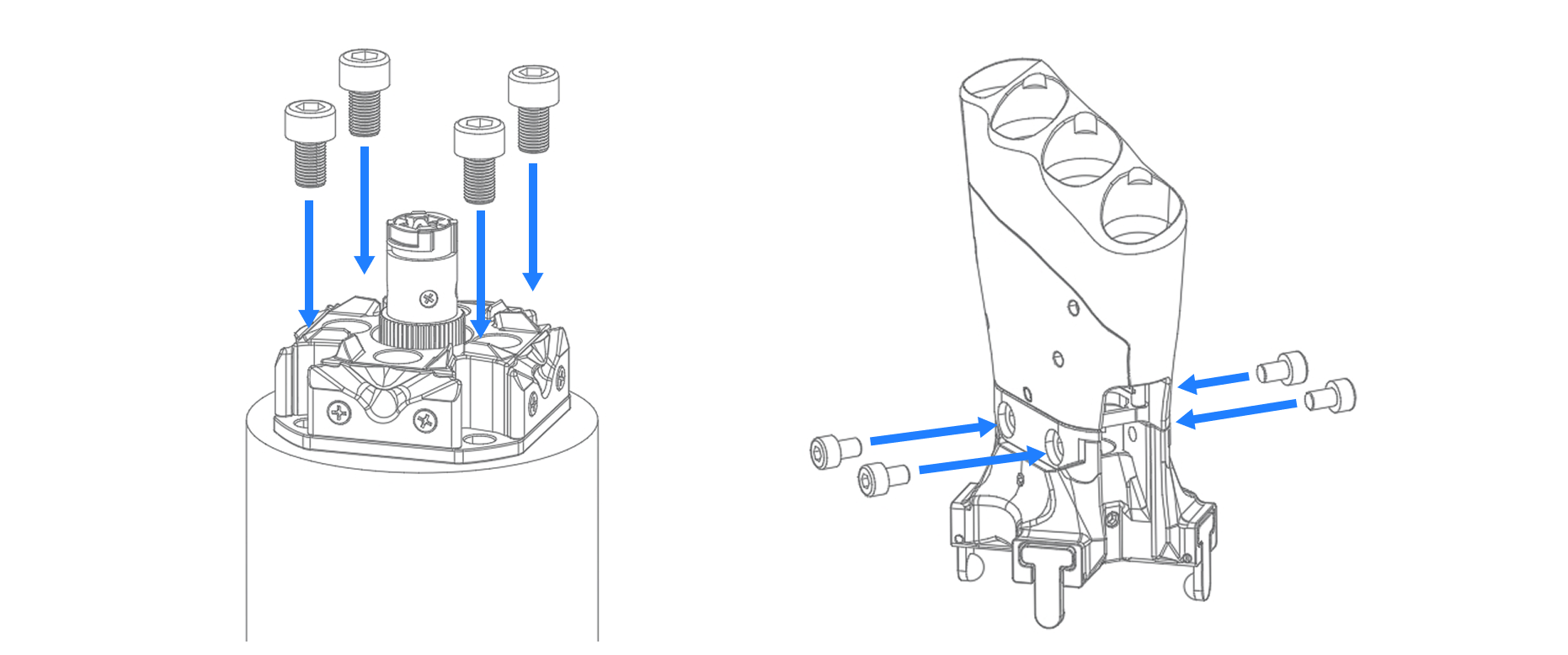
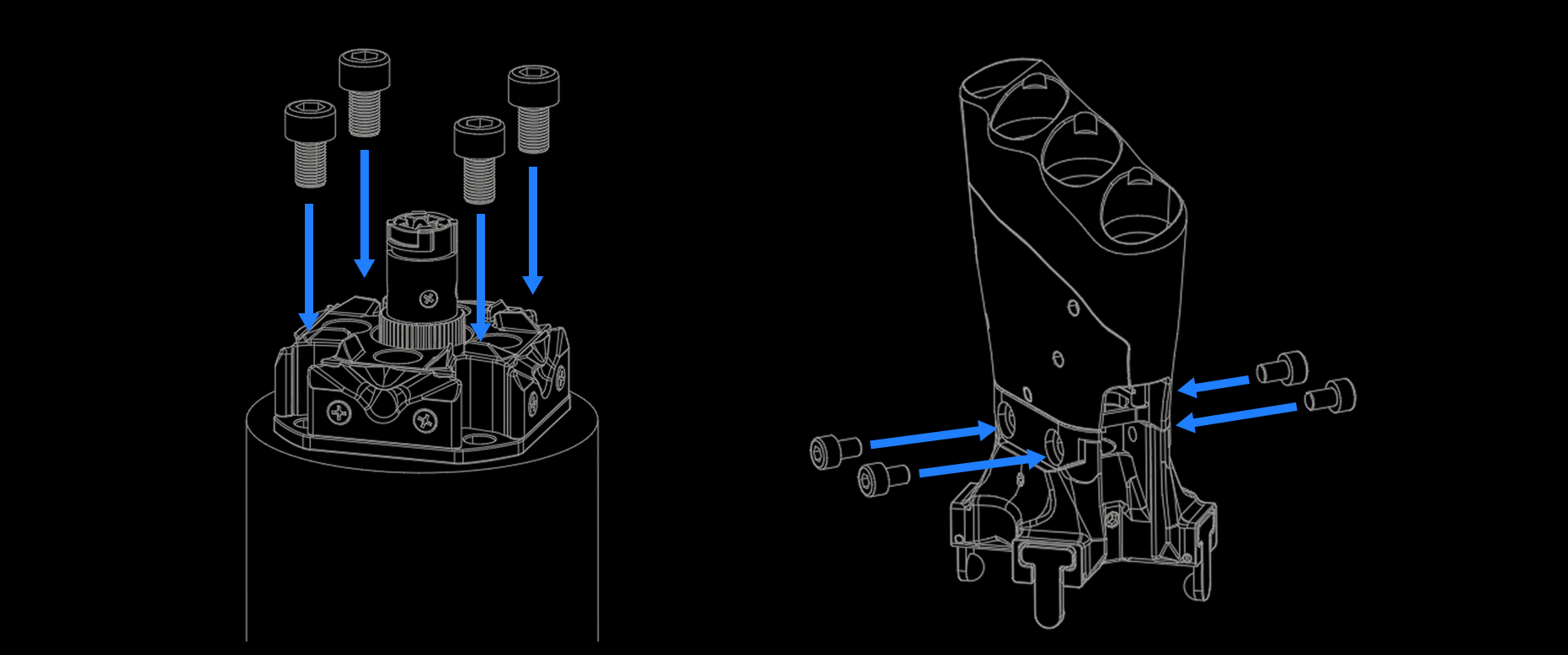
**Step 2:** Use screws to connect the grooved flange to the user equipment (such as robot arm). The grooved flange provides two hole sizes, with matching screw sizes of M5×10 and M6×10. Use M4×6 screws to connect Wuji Hand to the four-claw latch.

<div className="dark:hidden">
  <img src="https://mintcdn.com/wuji-0bbde051/KO3tT6qNwl3EeRut/assets/source/images/en/wuji-hand/v1/overview/anti-impact-adapter-step2-3.png?fit=max&auto=format&n=KO3tT6qNwl3EeRut&q=85&s=aace7aaaa8b48f248c2002cf1a6118b9" alt="Grooved Flange and Four-claw Latch Connection" width="1862" height="778" data-path="assets/source/images/en/wuji-hand/v1/overview/anti-impact-adapter-step2-3.png" />
</div>

<div className="hidden dark:block">
  <img src="https://mintcdn.com/wuji-0bbde051/KO3tT6qNwl3EeRut/assets/source/images/en/wuji-hand/v1/overview/anti-impact-adapter-step2-3-dark.png?fit=max&auto=format&n=KO3tT6qNwl3EeRut&q=85&s=5613d9504a2e5cfb30d32198ab7682e6" alt="Grooved Flange and Four-claw Latch Connection" width="1862" height="778" data-path="assets/source/images/en/wuji-hand/v1/overview/anti-impact-adapter-step2-3-dark.png" />
</div>

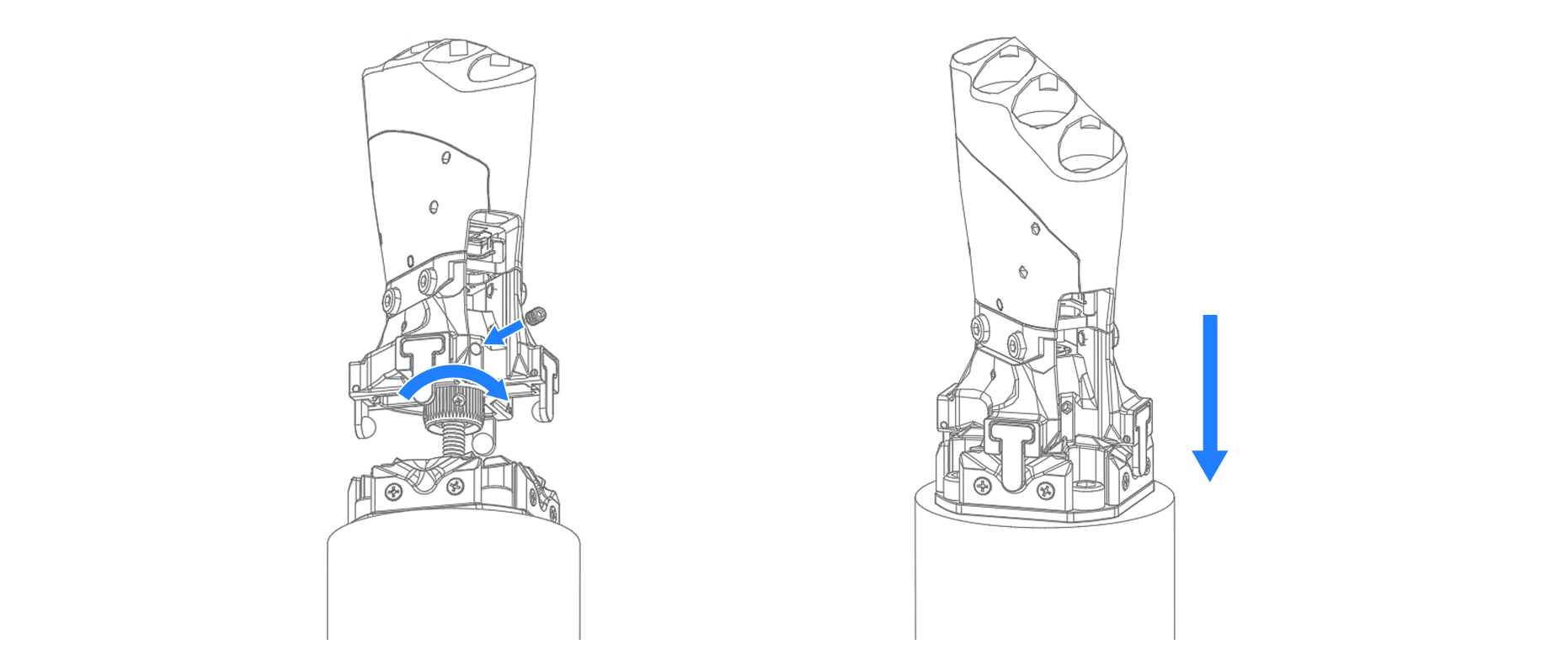
**Step 3:** Insert the twist-lock into the four-claw latch and rotate clockwise until tight (gently pull the safety chain to verify the twist-lock will not slip out). Install the set screw. Align the four-claw latch with the positioning slot on the grooved flange, press down to latch, and the impact-resistant adapter installation is complete.

<div className="dark:hidden">
  <img src="https://mintcdn.com/wuji-0bbde051/KO3tT6qNwl3EeRut/assets/source/images/en/wuji-hand/v1/overview/anti-impact-adapter-step3-4.png?fit=max&auto=format&n=KO3tT6qNwl3EeRut&q=85&s=b90104521f42828c3d0befc04e01d352" alt="Twist-lock Tightening and Installation Complete" width="1862" height="778" data-path="assets/source/images/en/wuji-hand/v1/overview/anti-impact-adapter-step3-4.png" />
</div>

<div className="hidden dark:block">
  <img src="https://mintcdn.com/wuji-0bbde051/KO3tT6qNwl3EeRut/assets/source/images/en/wuji-hand/v1/overview/anti-impact-adapter-step3-4-dark.png?fit=max&auto=format&n=KO3tT6qNwl3EeRut&q=85&s=09782c234992891d19fe6d6f4d43e9ad" alt="Twist-lock Tightening and Installation Complete" width="931" height="389" data-path="assets/source/images/en/wuji-hand/v1/overview/anti-impact-adapter-step3-4-dark.png" />
</div>

### Precautions

#### Fastening Check

* Use recommended specification screws. Screws of insufficient length or incorrect specifications are strictly prohibited
* It is recommended to tighten screws in a diagonal sequence to ensure even flange surface contact
* If possible, configure a recommended torque wrench according to screw specifications to ensure tightening torque meets standards

#### Maintenance and Inspection

* After each installation or removal, check whether the **safety chain and twist-lock** are flexible, unworn, and whether the attachment points are loose
* If impact-resistant release is triggered during operation, check whether installation screws are loose and whether the twist-lock locking mechanism is intact before reinstallation

## Wuji SDK Data Types

### HandJointStates

Real-time 20-joint state (the `hand.joint_states().subscribe()` frame). Joint order is finger-major: `{left,right}_finger{1..5}_joint{1..4}`.

| Field | Type | Description |
| - | - | - |
| `header` | `FrameHeader` | Frame header |
| `position` | `list[float]` | 20 joint positions in radians, always length 20 |
| `velocity` | `list[float]` | Angular velocity, length 0 when not provided |
| `effort` | `list[float]` | Joint effort, length 0 when not provided |

```json theme={null}
{
  "header": { "seq": 42, "timestamp_us": 1709876543210, "frame_id": "" },
  "position": [0.001, -0.012, 0.087, 0.045, ...],
  "velocity": [],
  "effort": []
}
```

### HandJointCommand

20-joint command frame. `seq` is client-incrementing so receivers can detect dropped frames.

| Field | Type | Description |
| - | - | - |
| `seq` | `int` | Client-incremented sequence number |
| `position` | `list[float]` | Target positions, length 20 |
| `velocity` | `list[float]` | Target velocity, optional |
| `effort` | `list[float]` | Target effort, optional |

### TactileGloveFrame

A single pressure frame from the paired tactile glove, on a 24×32 grid.

| Field | Type | Description |
| - | - | - |
| `handedness` | `int` | Handedness (0 = Left, 1 = Right — note this is the opposite of the `WujiHand` SDO encoding) |
| `sequence` | `int` | Frame sequence number |
| `timestamp_ms` | `int` | Device timestamp in milliseconds |
| `pressure` | `list[float]` | 768 f32 pressure values, row-major 24×32 |

## Wuji Hand SDK Subscription

### Wuji Hand Data Subscription

Wuji Hand product docs are archived. The subscription APIs are maintained on this page. The device connects over USB, exposed as `wuji_sdk.WujiHand` in Python and as the `wuji_hand_*` functions in C.

| Operation | Python | C |
| - | - | - |
| Subscribe to joint state | `hand.joint_states().subscribe()` | `wuji_hand_subscribe_joint_states()` |
| Read a joint position snapshot | No equivalent — read it from a subscribed frame | `wuji_hand_read_joint_state()` |
| Open a realtime control session | `hand.realtime_controller(LowPass(cutoff_hz=...))` | `wuji_hand_realtime_controller_open()`, `wuji_hand_realtime_controller_close()` |
| Publish 20-joint commands | `hand.joint_command().publish()`, `publisher.send(joints)` | `wuji_hand_joint_command_publish()`, `wuji_hand_joint_command_publisher_send()` |
| Write filtered target positions | No equivalent — send them through the publisher | `wuji_hand_realtime_controller_set_target_position()` |
| Read back actual position and effort | `ctrl.get_actual_position()`, `ctrl.get_actual_effort()` | `wuji_hand_realtime_controller_get_actual_position()`, `wuji_hand_realtime_controller_get_actual_effort()` |
| Read and write effort limits | `hand.set_all_effort_limit(amps)`, `hand.get_all_effort_limit()` | `wuji_hand_set_all_effort_limit()`, `wuji_hand_get_all_effort_limit()` |
| Check whether a tactile glove is attached | `hand.is_tactile_attached()` | `wuji_hand_is_tactile_attached()` |
| Subscribe to tactile pressure frames | `hand.tactile.subscribe_pressure_frame()` | `wuji_hand_subscribe_tactile_pressure_frame()` |
| Subscribe to tactile status | `hand.tactile_status().subscribe()` | `wuji_hand_subscribe_tactile_status()` |
| Read tactile glove info, diagnostics, and handedness | No equivalent | `wuji_hand_get_tactile_device_info()`, `wuji_hand_get_tactile_diagnostics()`, `wuji_hand_get_tactile_handedness()` |

#### Subscribing to joint state

Receive real-time 20-joint position, with optional velocity and effort:

<Tabs>
  <Tab title="Python">
    ```python theme={null}
    sub = hand.joint_states().subscribe()
    for _ in range(100):
        state = await sub.recv_async()
        print(f"seq={state.header.seq}, joint0={state.position[0]:+.3f}")
    sub.close()
    ```
  </Tab>

  <Tab title="C">
    ```c theme={null}
    void on_state(WujiFrameKind kind, const WujiHandJointStates *frame, void *user) {
        if (kind != WUJI_FRAME_KIND_OK) return;
        printf("seq=%u, joint0=%+.3f\n", frame->header.seq, frame->position[0]);
    }

    WujiSub *sub = NULL;
    wuji_hand_subscribe_joint_states(hand, on_state, NULL, &sub);
    // ... after receiving in the background for a while
    wuji_sub_close(sub);
    ```
  </Tab>
</Tabs>

In Python, `hand.joint_states().subscribe()` returns `Subscription[HandJointStates]`. In C the same data arrives as `WujiHandJointStates`, where `position`, `velocity`, and `effort` each carry their own length field.

#### Publishing joint commands (realtime control)

A realtime control session applies a lowpass filter to suppress high-frequency jitter. Inside the session, get a PUB handle and push exactly 20 joint commands (`position` / `velocity` / `effort` each). The command shape matches Wuji Hand 2, so control code is portable between Wuji Hand 2 and Wuji Hand:

<Tabs>
  <Tab title="Python">
    ```python theme={null}
    from wuji_sdk import JointCommand, LowPass

    with hand.realtime_controller(LowPass(cutoff_hz=5.0)) as ctrl:
        publisher = hand.joint_command().publish()
        joints = [JointCommand(0.0, 0.0, 0.0)] * 20
        joints[0] = JointCommand(0.3, 0.0, 0.0)
        publisher.send(joints)
        print(ctrl.get_actual_position()[0], ctrl.get_actual_effort()[0])
        publisher.close()
    ```
  </Tab>

  <Tab title="C">
    ```c theme={null}
    WujiRealtimeController *ctrl = NULL;
    WujiLowPass filter = { .cutoff_hz = 5.0 };
    wuji_hand_realtime_controller_open(hand, filter, &ctrl);

    WujiHandJointCommandPublisher *pub = NULL;
    wuji_hand_joint_command_publish(hand, &pub);

    WujiJointCommand joints[20] = {0};
    joints[0].position = 0.3f;
    wuji_hand_joint_command_publisher_send(pub, joints);

    float actual_pos[20], actual_eff[20];
    wuji_hand_realtime_controller_get_actual_position(ctrl, actual_pos);
    wuji_hand_realtime_controller_get_actual_effort(ctrl, actual_eff);
    printf("%.3f %.3f\n", actual_pos[0], actual_eff[0]);

    wuji_hand_joint_command_publisher_close(pub);
    wuji_hand_realtime_controller_close(ctrl);
    ```
  </Tab>
</Tabs>

For continuous control, send commands at a fixed rate (typically 100 Hz). The session handle reads back actual state at any time: actual position is 20 joint values in radians and actual effort is 20 joint values in amps, both read from a non-blocking cache, so control frequency is unaffected. You can share the session handle across threads without locking — for example, one thread streaming targets at a fixed rate while another polls actual positions.

In C, release both the publisher and the controller explicitly. `wuji_hand_joint_command_publisher_close()` and `wuji_hand_realtime_controller_close()` are NULL-safe, but skipping them leaks resources.

#### Effort limits

Set the torque limit on all 20 joints to the same amperage and read back a length-20 array:

<Tabs>
  <Tab title="Python">
    ```python theme={null}
    hand.set_all_effort_limit(1.5)
    limits = hand.get_all_effort_limit()
    ```
  </Tab>

  <Tab title="C">
    ```c theme={null}
    wuji_hand_set_all_effort_limit(hand, 1.5f);

    float limits[20];   // finger-major order
    wuji_hand_get_all_effort_limit(hand, limits);
    ```
  </Tab>
</Tabs>

* Default is 1.5 A, suitable for most applications
* Valid range is 0.0 to 3.5 A — values above 3.5 are clamped to 3.5

Modifying the effort limit changes the maximum output capability of each joint. The firmware also reduces the effective limit based on joint temperature. For the full reference and risk notes, see [Wuji Hand SDK Guide — joint\_effort\_limit](/en/docs/wujihandpy/api-reference/#joint_effort_limit).

#### Tactile sensing glove companion data

When a tactile sensing glove shares the USB bus and matches the hand's handedness, the SDK auto-pairs it while connecting. Check the pairing status and subscribe to pressure frames:

<Tabs>
  <Tab title="Python">
    ```python theme={null}
    if hand.is_tactile_attached():
        tactile_sub = hand.tactile.subscribe_pressure_frame()
        frame = await tactile_sub.recv_async()
        print(f"max pressure: {max(frame.pressure):.2f}")
        tactile_sub.close()
    ```
  </Tab>

  <Tab title="C">
    ```c theme={null}
    void on_pressure(WujiFrameKind kind, const WujiTactileGloveFrame *frame, void *user) {
        if (kind != WUJI_FRAME_KIND_OK) return;
        float max = 0.0f;
        for (size_t i = 0; i < frame->pressure_len; i++) {
            if (frame->pressure[i] > max) max = frame->pressure[i];
        }
        printf("max pressure: %.2f\n", max);
    }

    bool attached = false;
    wuji_hand_is_tactile_attached(hand, &attached);
    if (attached) {
        WujiSub *tactile_sub = NULL;
        wuji_hand_subscribe_tactile_pressure_frame(hand, on_pressure, NULL, &tactile_sub);
        // ... after receiving in the background for a while
        wuji_sub_close(tactile_sub);
    }
    ```
  </Tab>
</Tabs>

C adds three tactile info readers: `wuji_hand_get_tactile_device_info` (fills `WujiTactileGloveDeviceInfo`), `wuji_hand_get_tactile_diagnostics` (fills `WujiTactileGloveDiagnostics`), and `wuji_hand_get_tactile_handedness` (fills a `uint8_t`). On `WUJI_STATUS_OK`, the first two leave heap-owned fields in `out`. Release them with `wuji_tactile_glove_device_info_free` and `wuji_tactile_glove_diagnostics_free` respectively, and don't free on a non-OK status. When the glove is missing or faulty, these calls return an error status — read the details with `wuji_last_error()`.

<Warning>
  `wuji_hand_get_handedness` and `wuji_hand_get_tactile_handedness` both return a raw `uint8_t`, but their encodings are opposites—don't mix them. `wuji_hand_get_handedness` returns `0` for right and `1` for left, the reverse of the `WujiHandedness` enum, so reading it through the enum swaps left and right. `wuji_hand_get_tactile_handedness` returns `0` for left and `1` for right, which matches the enum.
</Warning>


This documentation is built and hosted on [Mintlify](https://mintlify.com), a developer documentation platform.