> ## Documentation Index
> Fetch the complete documentation index at: https://docs.wuji.tech/llms.txt
> Use this file to discover all available pages before exploring further.
# Tactile
```python theme={null}
# Tactile matrix
sub = glove.tactile().subscribe()
frame = await sub.recv_async()
print(f"Max pressure: {max(frame.data):.2f}")
# Zone data
sub = glove.tactile_zones().subscribe()
zones = await sub.recv_async()
print(f"Palm: {zones.palm}, Thumb: {zones.thumb}")
```
```c theme={null}
// C uses typed callbacks for tactile frames and zone data.
wuji_glove_subscribe_tactile(dev, on_tactile, user, &tactile_sub);
wuji_glove_subscribe_tactile_zones(dev, on_zones, user, &zones_sub);
```
The contact detection and contact residual streams ([TactileBinary](#tactilebinary) and [TactileResidual](#tactileresidual)) depend on a trained contact model. Before first use, run `wuji calib tactile` to complete [tactile calibration](/en/docs/wuji-cli/tactile-calibration/). The model loads automatically per SDK user and glove serial number.
## Tactile Matrix Layout
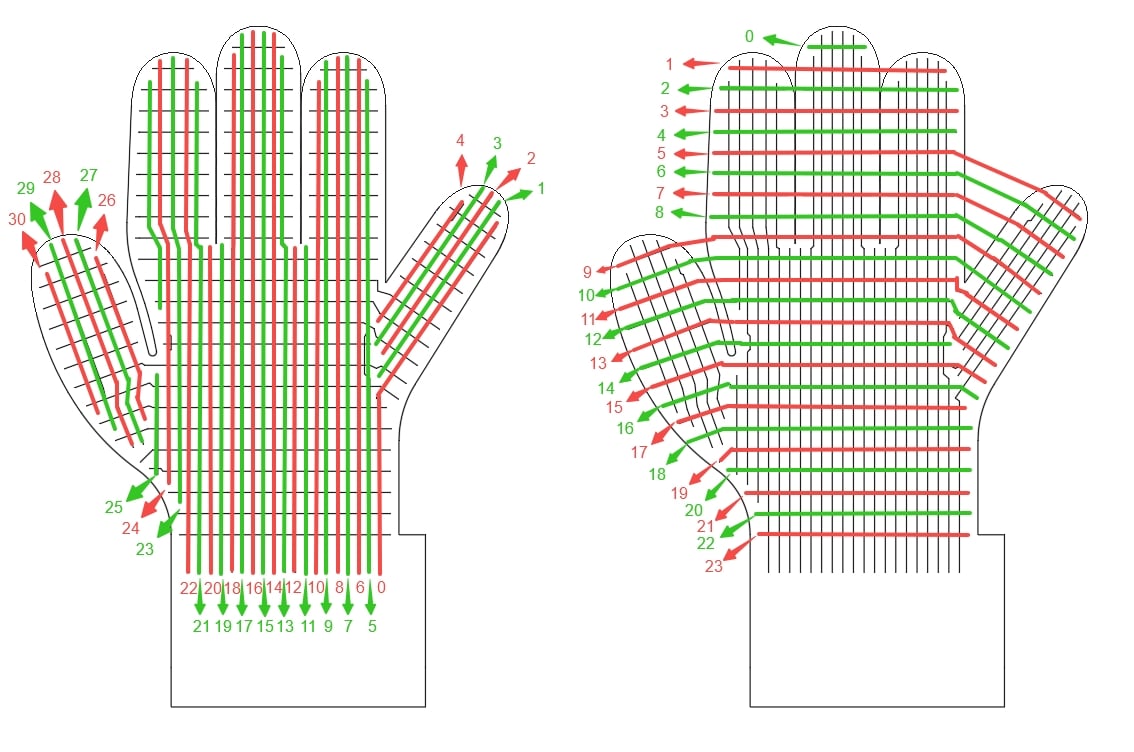
Tactile data comes from a 24×31 piezoresistive sensor matrix, 744 positions in total, of which 526 are active taxels. [TactileFrame](#tactileframe), [TactileBinary](#tactilebinary), and [TactileResidual](#tactileresidual) all use this layout, in 24×31 row-major order. Access row `r`, column `c`: `data[r * 31 + c]` (`r` is 0–23, `c` is 0–30).
The figure below marks where each column index (left) and row index (right) sits on the physical glove, letting you map a matrix index (or a point's order in the exported point cloud) to a specific location on the glove.
 ### Layout Change
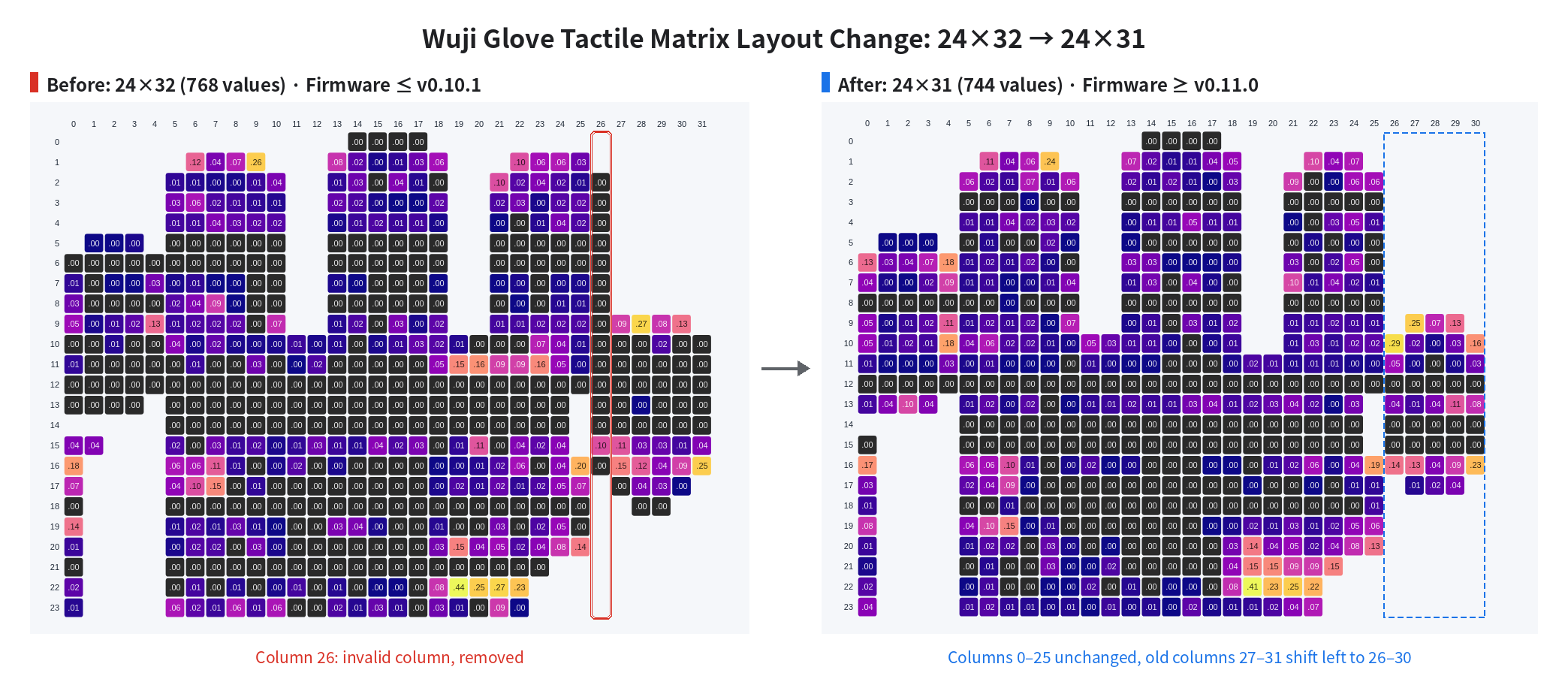
Starting with firmware v0.11.0, the tactile matrix changes from 24×32 (768 values) to 24×31 (744 values), removing invalid column 26 from the 24×32 layout. The remaining columns keep their relative order: columns 0–25 keep their indices, and columns 27–31 shift left to become columns 26–30.
### Layout Change
Starting with firmware v0.11.0, the tactile matrix changes from 24×32 (768 values) to 24×31 (744 values), removing invalid column 26 from the 24×32 layout. The remaining columns keep their relative order: columns 0–25 keep their indices, and columns 27–31 shift left to become columns 26–30.
 ## TactileFrame
Calibrated tactile matrix data. Frame rate: **120 FPS**.
| Field | Type | Description |
| - | - | - |
| `header` | [FrameHeader](/en/docs/wuji-sdk/data-reference#frameheader) | Frame header |
| `data` | `List[float]` | 744 values: 526 active points (pressure `0.0~1.0`), the rest are invalid taxels fixed at `-1.0` |
`data` is an array of 744 values in 24×31 row-major order. Access row `r`, column `c`: `data[r * 31 + c]`. Invalid positions are fixed at `-1.0`, which distinguishes them from an active taxel reading zero pressure (`0.0`).
```json theme={null}
{
"header": {
"seq": 42,
"timestamp_us": 1709876543210,
"frame_id": ""
},
"data": [-1.0, 0.12, 0.45, 0.78, -1.0, 0.33, ...] // 744 values total, 526 active, invalid taxels are -1.0
}
```
## TactileZones
Tactile data aggregated by finger region. Each region is a rectangle in row-major order. Positions inside the rectangle that belong to the region carry a pressure value, and the rest are fixed at `-1.0`.
| Field | Type | Array Length | Active Taxels | Description |
| - | - | - | - | - |
| `header` | [FrameHeader](/en/docs/wuji-sdk/data-reference#frameheader) | — | — | Frame header |
| `palm` | `List[float]` | 308 | 288 | Palm region, 14 × 22 |
| `thumb` | `List[float]` | 50 | 41 | Thumb region, 10 × 5 |
| `index` | `List[float]` | 45 | 43 | Index finger region, 9 × 5 |
| `middle` | `List[float]` | 60 | 58 | Middle finger region, 10 × 6 |
| `ring` | `List[float]` | 54 | 52 | Ring finger region, 9 × 6 |
| `pinky` | `List[float]` | 55 | 44 | Pinky region, 11 × 5 |
Active taxels across the six regions total 526, the same mask as [TactileFrame](#tactileframe). Array length is the rectangle's cell count — index within it to stay in bounds.
```json theme={null}
{
"header": {
"seq": 42,
"timestamp_us": 1709876543210,
"frame_id": ""
},
"palm": [0.0, 0.12, 0.45, ...], // 308 values, 288 of them active taxels
// For each finger's array length and active taxel count, see the table above
"thumb": [0.0, 0.85, 0.92, ...],
"index": [0.0, 0.67, 0.23, ...],
"middle": [0.0, 0.34, ...],
"ring": [0.0, 0.11, ...],
"pinky": [0.0, 0.05, ...]
}
```
## PointField
Point cloud field descriptor.
| Field | Type | Description |
| - | - | - |
| `name` | `str` | Field name |
| `offset` | `int` | Byte offset |
| `type` | `int` | Data type encoding, fixed at `7` (float32) |
## PointCloud
Tactile point cloud data: each frame gives the 3D position and pressure of the 526 active taxels on the glove. Positions come from linear blend skinning over the hand skeleton, in the `l_wrist` or `r_wrist` frame. Beyond `x` / `y` / `z`, each point also carries `pressure` (normalized to 0.0–1.0), so applications can color the 3D view by force.
The spatial positions in `glove.tactile_point_cloud()` come from the EMF-derived hand pose, so its output rate follows the rate in effect on `emf_poses`. See [Output Rate Tuning](/en/docs/wuji-glove/sdk-data-reference/hand-tracking#output-rate-tuning).
The byte layout is self-describing, in the style of ROS `sensor_msgs/PointCloud2`: `data` is a flat byte stream, `point_stride` is the byte count per point, and `fields` describes the per-point fields (name, byte offset, type). The current implementation has 4 fields and 16 bytes per point, so `data` is `point_count × 16` bytes packed point by point. Adding a new per-point field only means appending one entry to `fields` — the `PointCloud` message definition itself stays unchanged.
```text theme={null}
┌─────── point 0 (16 bytes) ────┐┌─────── point 1 (16 bytes) ────┐
data = │ x0 (4B) y0 (4B) z0 (4B) p0 4B ││ x1 (4B) y1 (4B) z1 (4B) p1 4B │ ...
└───────────────────────────────┘└───────────────────────────────┘
offset 0 offset 16 offset 32
```
Slice back to per-point values:
```text theme={null}
start of point i = i × point_stride
point i's x = float32(data[start + 0 : start + 4])
point i's y = float32(data[start + 4 : start + 8])
point i's z = float32(data[start + 8 : start + 12])
point i's pressure = float32(data[start + 12 : start + 16])
```
| Field | Type | Description |
| - | - | - |
| `header` | [FrameHeader](/en/docs/wuji-sdk/data-reference#frameheader) | Frame header |
| `frame_id` | `str` | Coordinate frame |
| `point_stride` | `int` | Bytes per point |
| `fields` | `List[PointField]` | Per-point field descriptors |
| `data` | `List[int]` | Flat byte stream, length = `point_count` × `point_stride` |
| Method | Returns | Description |
| - | - | - |
| `point_count()` | `int` | Get the number of points |
```json theme={null}
{
"header": {
"seq": 42,
"timestamp_us": 1709876543210,
"frame_id": "l_wrist"
},
"frame_id": "l_wrist",
"point_stride": 16,
"fields": [
{ "name": "x", "offset": 0, "type": 7 },
{ "name": "y", "offset": 4, "type": 7 },
{ "name": "z", "offset": 8, "type": 7 },
{ "name": "pressure", "offset": 12, "type": 7 }
],
"data": [0, 0, 128, 63, ...] // raw byte stream, 16 bytes per point (4 fields × 4 bytes)
}
```
Unpack the point cloud by field layout:
```python theme={null}
import struct
# Current layout: x, y, z, pressure are all float32, 16 bytes per point
raw = bytes(cloud.data)
for i in range(cloud.point_count()):
x, y, z, pressure = struct.unpack_from('
Contact detection relies on a contact model trained through [Wuji CLI tactile calibration](/en/docs/wuji-cli/tactile-calibration/) or the SDK calibration API `glove.calibrate_tactile()`, and loaded automatically from the current SDK user and glove serial number. When no model is loaded, the data stream is still published at 120 FPS, but every active taxel is `0.0` (no contact) and invalid taxels remain `-1.0`. `1.0` never appears.
Run calibration again after upgrading from an earlier version: a model trained back then doesn't move to the new model directory, the SDK no longer loads it, and the stream behaves as if you never calibrated.
### Train a Contact Model
Train once, and the model is saved per SDK user and glove serial number (see [tactile data paths](/en/docs/wuji-sdk/device-params/#tactile-data-paths)) and loaded automatically when you subscribe—no path to configure. There are two training entries:
* **Wuji CLI**: Run `wuji calib tactile` and follow the terminal prompts through four recorded motions. The CLI then trains, verifies, and installs the model. For usage, see [Tactile Calibration](/en/docs/wuji-cli/tactile-calibration/).
* **SDK calibration API**: `await glove.calibrate_tactile()` (or the blocking `glove.calibrate_tactile_blocking()`) records a few prompted hand motions, then trains and installs the model automatically. After each recording keep it, re-record it, or stop—pass an `on_pose_prompt` callback for interactive control, or omit it for a hands-off run. For complete usage, see the examples `7.tactile_calibration.py` (Python) and `4_tactile_calibration.c` (C—API details in [Tactile Contact Calibration](#tactile-contact-calibration)).
### Move a Model to Another Computer
The recommended way is [`wuji user export` and `wuji user import`](/en/docs/wuji-cli/user/#moving-calibration-between-machines). For a manual move, two requirements must be met:
* Copy all three model files: `contact.safetensors`, `contact.npz`, and `contact.json` (see [tactile data paths](/en/docs/wuji-sdk/device-params/#tactile-data-paths)). `contact.json` is the model's commit marker — without it the model doesn't load.
* Put them into the `paths["dir"]` directory that `manager.tactile_model_paths(user_id, sn)` returns.
The SDK hot-reloads when you switch SDK users or retrain the model.
```python theme={null}
from wuji_sdk import SdkManager
# Look up the model directory for this user and glove (wuji calib tactile writes it)
manager = SdkManager.instance()
user_id = manager.current_user()["user_id"]
paths = manager.tactile_model_paths(user_id, "WujiGlove-12345")
print(paths["dir"]) # place contact.safetensors, contact.npz, and contact.json here
sub = glove.tactile_binary().subscribe()
frame = await sub.recv_async()
contacts = sum(1 for v in frame.data if v == 1.0)
print(f"Active contacts: {contacts}")
```
```json theme={null}
{
"header": {
"seq": 42,
"timestamp_us": 1709876543210,
"frame_id": ""
},
"data": [-1.0, 0.0, 1.0, 1.0, -1.0, 0.0, ...] // 744 values total, 526 active
}
```
## TactileResidual
Per-taxel signed contact residual inferred from tactile data. Frame rate: **120 FPS**, published at the same rate as `glove.tactile()`.
| Field | Type | Description |
| - | - | - |
| `header` | [FrameHeader](/en/docs/wuji-sdk/data-reference#frameheader) | Frame header |
| `data` | `List[float]` | 744 residual values. Positive = pressed harder than the baseline (contact), \~`0` = no contact, negative = lighter than the baseline, `-1.0` marks an invalid taxel |
`data` is laid out in 24×31 row-major order, with the same shape and mask as [TactileFrame](#tactileframe) (526 active points). Access row `r`, column `c`: `data[r * 31 + c]`.
The residual signal is not smoothed, normalized, or binarized — pick a threshold and post-process it yourself. It shares the same contact model as [TactileBinary](#tactilebinary). Subscribing to both runs model inference only once.
Residual computation relies on a contact model trained through [Wuji CLI tactile calibration](/en/docs/wuji-cli/tactile-calibration/) or the SDK calibration API `glove.calibrate_tactile()`, and loaded automatically from the current SDK user and glove serial number. When no model is loaded, the data stream is still published at 120 FPS, but every active taxel stays close to the static zero point and cannot reflect true pressure changes.
Run calibration again after upgrading from an earlier version: a model trained back then doesn't move to the new model directory, the SDK no longer loads it, and the stream behaves as if you never calibrated.
`tactile_residual` and `tactile_binary` share one model directory, and it loads automatically from the current SDK user and glove serial number. For the training entries and how to move models across computers, see [TactileBinary](#tactilebinary). The SDK hot-reloads when you switch SDK users or retrain the model.
```python theme={null}
from wuji_sdk import SdkManager
# Look up the model directory for this user and glove (wuji calib tactile writes it)
manager = SdkManager.instance()
user_id = manager.current_user()["user_id"]
paths = manager.tactile_model_paths(user_id, "WujiGlove-12345")
print(paths["dir"]) # place contact.safetensors, contact.npz, and contact.json here
sub = glove.tactile_residual().subscribe()
frame = await sub.recv_async()
valid = [v for v in frame.data if v != -1.0]
print(f"Residual range: [{min(valid):.2f}, {max(valid):.2f}]")
```
```json theme={null}
{
"header": {
"seq": 42,
"timestamp_us": 1709876543210,
"frame_id": ""
},
"data": [-1.0, 0.05, 1.23, 0.87, -1.0, -0.02, ...] // 744 values total, 526 active
}
```
The C API matches the Python API on this page and uses the `wuji_glove_` prefix. For initialization conventions, memory management, error codes, and build setup, see the [C API Reference](/en/docs/wuji-sdk/data-reference/).
## Tactile Contact Sensitivity
`wuji_glove_set_tactile_binary_sensitivity` sets the `tactile_binary` sensitivity multiplier for the active SDK user. The SDK stores the value locally. It takes effect immediately and persists across reconnects. Pass a finite positive value. Values above `1.0` make contact detection more sensitive.
`wuji_glove_get_tactile_binary_sensitivity` returns the multiplier currently in effect. The returned value is limited to `0.5–3.0`. If no valid value is available, the getter returns `1.0`.
```c theme={null}
double sensitivity = 0.0;
if (wuji_glove_get_tactile_binary_sensitivity(dev, &sensitivity) == WUJI_STATUS_OK) {
printf("effective sensitivity: %.2f\n", sensitivity);
}
```
Both `dev` and `out_sensitivity` must be non-NULL. If either pointer is `NULL`, the getter returns `WUJI_STATUS_ERR_INVALID_ARG`. When `out_sensitivity` is valid, the getter leaves `*out_sensitivity` unchanged on failure. Call `wuji_last_error()` for details.
## Tactile Contact Calibration
`wuji_glove_calibrate_tactile_blocking` runs the guided tactile contact calibration in one call: you record a few prompted hand motions, then the SDK collects the data, validates it, and trains the model.
Decide `install` before you call:
* `install = true`: after training, the SDK runs load validation and installs the model. It's stored per SDK user and glove serial number, and loads automatically when you subscribe to `tactile_binary` / `tactile_residual`. The optional sensitivity pair (`has_sensitivity` set to true plus `sensitivity`) is only accepted in this mode — otherwise the call fails.
* `install = false`: the SDK trains only. Load validation and install are skipped, the artifacts stay in the run directory, and nothing loads automatically. Use this to evaluate a training run offline before deciding whether to install.
Make the call:
```c theme={null}
// uint32_t on_feedback(const WujiTactileCalibrationFeedback* event, void* user);
// uint32_t on_pose_prompt(const WujiTactilePromptRequest* request, void* user);
WujiTactileCalibrationOptions options = {
.seconds_per_pose = 10.0f,
.epochs = 60,
.install = true,
.timeout_s = 1800.0,
};
WujiTactileCalibrationCallbacks callbacks = {
.on_feedback = on_feedback, // collect and train progress
.on_pose_prompt = on_pose_prompt, // before and after each motion: proceed, retry, or stop
};
WujiTactileCalibrationSummary summary = {0};
if (wuji_glove_calibrate_tactile_blocking(dev, &options, &callbacks, &summary) == WUJI_STATUS_OK) {
// read the summary, then release its heap fields
wuji_tactile_calibration_summary_free(&summary);
}
```
`on_pose_prompt` makes the flow interactive: it fires before each motion starts and after each recording ends with a `WujiTactilePromptRequest`, and returns `0` to proceed, `1` to retry, or `2` to stop — any other value stops the run. `on_feedback` reports collect and train progress, and returns `0` to continue or `1` to abort — any other value aborts. Leave both unset for a hands-off run. Event pointers passed to callbacks are only valid for the duration of the callback. `timeout_s` is cooperative: on timeout the calibration is cancelled, but the function first waits for in-flight collect or train work and any running callback to return, so no callback ever fires after the function returns. If `on_pose_prompt` blocks indefinitely (for example, waiting on console input), the timeout can't force it to return.
On success, read the results from `summary`. `model_dir` is populated in both outcomes — use `installed` to tell them apart:
* `installed = true`: `model_dir` points to the installed model, which loads automatically when you subscribe.
* `installed = false`: `model_dir` points to the model saved in this run, which is not loaded automatically.
`verified_alive_taxels` is only valid when `has_verified_alive_taxels` is true. Call `wuji_tactile_calibration_summary_free` to release the heap fields once you're done.
Retrieve failure details with `wuji_last_error()`. A library built without the `model-export` feature returns `WUJI_STATUS_ERR_UNSUPPORTED`. The Python counterpart is `glove.calibrate_tactile_blocking()` — the async `glove.calibrate_tactile()` is Python-only, with no async C entry point.
To watch contact and residual live, see [Tactile Contact Grid View](/en/docs/wuji-glove/sdk-practice/tactile-contact-view) and [Tactile Residual Grid View](/en/docs/wuji-glove/sdk-practice/tactile-residual-view).
This documentation is built and hosted on [Mintlify](https://mintlify.com), a developer documentation platform.
## TactileFrame
Calibrated tactile matrix data. Frame rate: **120 FPS**.
| Field | Type | Description |
| - | - | - |
| `header` | [FrameHeader](/en/docs/wuji-sdk/data-reference#frameheader) | Frame header |
| `data` | `List[float]` | 744 values: 526 active points (pressure `0.0~1.0`), the rest are invalid taxels fixed at `-1.0` |
`data` is an array of 744 values in 24×31 row-major order. Access row `r`, column `c`: `data[r * 31 + c]`. Invalid positions are fixed at `-1.0`, which distinguishes them from an active taxel reading zero pressure (`0.0`).
```json theme={null}
{
"header": {
"seq": 42,
"timestamp_us": 1709876543210,
"frame_id": ""
},
"data": [-1.0, 0.12, 0.45, 0.78, -1.0, 0.33, ...] // 744 values total, 526 active, invalid taxels are -1.0
}
```
## TactileZones
Tactile data aggregated by finger region. Each region is a rectangle in row-major order. Positions inside the rectangle that belong to the region carry a pressure value, and the rest are fixed at `-1.0`.
| Field | Type | Array Length | Active Taxels | Description |
| - | - | - | - | - |
| `header` | [FrameHeader](/en/docs/wuji-sdk/data-reference#frameheader) | — | — | Frame header |
| `palm` | `List[float]` | 308 | 288 | Palm region, 14 × 22 |
| `thumb` | `List[float]` | 50 | 41 | Thumb region, 10 × 5 |
| `index` | `List[float]` | 45 | 43 | Index finger region, 9 × 5 |
| `middle` | `List[float]` | 60 | 58 | Middle finger region, 10 × 6 |
| `ring` | `List[float]` | 54 | 52 | Ring finger region, 9 × 6 |
| `pinky` | `List[float]` | 55 | 44 | Pinky region, 11 × 5 |
Active taxels across the six regions total 526, the same mask as [TactileFrame](#tactileframe). Array length is the rectangle's cell count — index within it to stay in bounds.
```json theme={null}
{
"header": {
"seq": 42,
"timestamp_us": 1709876543210,
"frame_id": ""
},
"palm": [0.0, 0.12, 0.45, ...], // 308 values, 288 of them active taxels
// For each finger's array length and active taxel count, see the table above
"thumb": [0.0, 0.85, 0.92, ...],
"index": [0.0, 0.67, 0.23, ...],
"middle": [0.0, 0.34, ...],
"ring": [0.0, 0.11, ...],
"pinky": [0.0, 0.05, ...]
}
```
## PointField
Point cloud field descriptor.
| Field | Type | Description |
| - | - | - |
| `name` | `str` | Field name |
| `offset` | `int` | Byte offset |
| `type` | `int` | Data type encoding, fixed at `7` (float32) |
## PointCloud
Tactile point cloud data: each frame gives the 3D position and pressure of the 526 active taxels on the glove. Positions come from linear blend skinning over the hand skeleton, in the `l_wrist` or `r_wrist` frame. Beyond `x` / `y` / `z`, each point also carries `pressure` (normalized to 0.0–1.0), so applications can color the 3D view by force.
The spatial positions in `glove.tactile_point_cloud()` come from the EMF-derived hand pose, so its output rate follows the rate in effect on `emf_poses`. See [Output Rate Tuning](/en/docs/wuji-glove/sdk-data-reference/hand-tracking#output-rate-tuning).
The byte layout is self-describing, in the style of ROS `sensor_msgs/PointCloud2`: `data` is a flat byte stream, `point_stride` is the byte count per point, and `fields` describes the per-point fields (name, byte offset, type). The current implementation has 4 fields and 16 bytes per point, so `data` is `point_count × 16` bytes packed point by point. Adding a new per-point field only means appending one entry to `fields` — the `PointCloud` message definition itself stays unchanged.
```text theme={null}
┌─────── point 0 (16 bytes) ────┐┌─────── point 1 (16 bytes) ────┐
data = │ x0 (4B) y0 (4B) z0 (4B) p0 4B ││ x1 (4B) y1 (4B) z1 (4B) p1 4B │ ...
└───────────────────────────────┘└───────────────────────────────┘
offset 0 offset 16 offset 32
```
Slice back to per-point values:
```text theme={null}
start of point i = i × point_stride
point i's x = float32(data[start + 0 : start + 4])
point i's y = float32(data[start + 4 : start + 8])
point i's z = float32(data[start + 8 : start + 12])
point i's pressure = float32(data[start + 12 : start + 16])
```
| Field | Type | Description |
| - | - | - |
| `header` | [FrameHeader](/en/docs/wuji-sdk/data-reference#frameheader) | Frame header |
| `frame_id` | `str` | Coordinate frame |
| `point_stride` | `int` | Bytes per point |
| `fields` | `List[PointField]` | Per-point field descriptors |
| `data` | `List[int]` | Flat byte stream, length = `point_count` × `point_stride` |
| Method | Returns | Description |
| - | - | - |
| `point_count()` | `int` | Get the number of points |
```json theme={null}
{
"header": {
"seq": 42,
"timestamp_us": 1709876543210,
"frame_id": "l_wrist"
},
"frame_id": "l_wrist",
"point_stride": 16,
"fields": [
{ "name": "x", "offset": 0, "type": 7 },
{ "name": "y", "offset": 4, "type": 7 },
{ "name": "z", "offset": 8, "type": 7 },
{ "name": "pressure", "offset": 12, "type": 7 }
],
"data": [0, 0, 128, 63, ...] // raw byte stream, 16 bytes per point (4 fields × 4 bytes)
}
```
Unpack the point cloud by field layout:
```python theme={null}
import struct
# Current layout: x, y, z, pressure are all float32, 16 bytes per point
raw = bytes(cloud.data)
for i in range(cloud.point_count()):
x, y, z, pressure = struct.unpack_from('
Contact detection relies on a contact model trained through [Wuji CLI tactile calibration](/en/docs/wuji-cli/tactile-calibration/) or the SDK calibration API `glove.calibrate_tactile()`, and loaded automatically from the current SDK user and glove serial number. When no model is loaded, the data stream is still published at 120 FPS, but every active taxel is `0.0` (no contact) and invalid taxels remain `-1.0`. `1.0` never appears.
Run calibration again after upgrading from an earlier version: a model trained back then doesn't move to the new model directory, the SDK no longer loads it, and the stream behaves as if you never calibrated.
### Train a Contact Model
Train once, and the model is saved per SDK user and glove serial number (see [tactile data paths](/en/docs/wuji-sdk/device-params/#tactile-data-paths)) and loaded automatically when you subscribe—no path to configure. There are two training entries:
* **Wuji CLI**: Run `wuji calib tactile` and follow the terminal prompts through four recorded motions. The CLI then trains, verifies, and installs the model. For usage, see [Tactile Calibration](/en/docs/wuji-cli/tactile-calibration/).
* **SDK calibration API**: `await glove.calibrate_tactile()` (or the blocking `glove.calibrate_tactile_blocking()`) records a few prompted hand motions, then trains and installs the model automatically. After each recording keep it, re-record it, or stop—pass an `on_pose_prompt` callback for interactive control, or omit it for a hands-off run. For complete usage, see the examples `7.tactile_calibration.py` (Python) and `4_tactile_calibration.c` (C—API details in [Tactile Contact Calibration](#tactile-contact-calibration)).
### Move a Model to Another Computer
The recommended way is [`wuji user export` and `wuji user import`](/en/docs/wuji-cli/user/#moving-calibration-between-machines). For a manual move, two requirements must be met:
* Copy all three model files: `contact.safetensors`, `contact.npz`, and `contact.json` (see [tactile data paths](/en/docs/wuji-sdk/device-params/#tactile-data-paths)). `contact.json` is the model's commit marker — without it the model doesn't load.
* Put them into the `paths["dir"]` directory that `manager.tactile_model_paths(user_id, sn)` returns.
The SDK hot-reloads when you switch SDK users or retrain the model.
```python theme={null}
from wuji_sdk import SdkManager
# Look up the model directory for this user and glove (wuji calib tactile writes it)
manager = SdkManager.instance()
user_id = manager.current_user()["user_id"]
paths = manager.tactile_model_paths(user_id, "WujiGlove-12345")
print(paths["dir"]) # place contact.safetensors, contact.npz, and contact.json here
sub = glove.tactile_binary().subscribe()
frame = await sub.recv_async()
contacts = sum(1 for v in frame.data if v == 1.0)
print(f"Active contacts: {contacts}")
```
```json theme={null}
{
"header": {
"seq": 42,
"timestamp_us": 1709876543210,
"frame_id": ""
},
"data": [-1.0, 0.0, 1.0, 1.0, -1.0, 0.0, ...] // 744 values total, 526 active
}
```
## TactileResidual
Per-taxel signed contact residual inferred from tactile data. Frame rate: **120 FPS**, published at the same rate as `glove.tactile()`.
| Field | Type | Description |
| - | - | - |
| `header` | [FrameHeader](/en/docs/wuji-sdk/data-reference#frameheader) | Frame header |
| `data` | `List[float]` | 744 residual values. Positive = pressed harder than the baseline (contact), \~`0` = no contact, negative = lighter than the baseline, `-1.0` marks an invalid taxel |
`data` is laid out in 24×31 row-major order, with the same shape and mask as [TactileFrame](#tactileframe) (526 active points). Access row `r`, column `c`: `data[r * 31 + c]`.
The residual signal is not smoothed, normalized, or binarized — pick a threshold and post-process it yourself. It shares the same contact model as [TactileBinary](#tactilebinary). Subscribing to both runs model inference only once.
Residual computation relies on a contact model trained through [Wuji CLI tactile calibration](/en/docs/wuji-cli/tactile-calibration/) or the SDK calibration API `glove.calibrate_tactile()`, and loaded automatically from the current SDK user and glove serial number. When no model is loaded, the data stream is still published at 120 FPS, but every active taxel stays close to the static zero point and cannot reflect true pressure changes.
Run calibration again after upgrading from an earlier version: a model trained back then doesn't move to the new model directory, the SDK no longer loads it, and the stream behaves as if you never calibrated.
`tactile_residual` and `tactile_binary` share one model directory, and it loads automatically from the current SDK user and glove serial number. For the training entries and how to move models across computers, see [TactileBinary](#tactilebinary). The SDK hot-reloads when you switch SDK users or retrain the model.
```python theme={null}
from wuji_sdk import SdkManager
# Look up the model directory for this user and glove (wuji calib tactile writes it)
manager = SdkManager.instance()
user_id = manager.current_user()["user_id"]
paths = manager.tactile_model_paths(user_id, "WujiGlove-12345")
print(paths["dir"]) # place contact.safetensors, contact.npz, and contact.json here
sub = glove.tactile_residual().subscribe()
frame = await sub.recv_async()
valid = [v for v in frame.data if v != -1.0]
print(f"Residual range: [{min(valid):.2f}, {max(valid):.2f}]")
```
```json theme={null}
{
"header": {
"seq": 42,
"timestamp_us": 1709876543210,
"frame_id": ""
},
"data": [-1.0, 0.05, 1.23, 0.87, -1.0, -0.02, ...] // 744 values total, 526 active
}
```
The C API matches the Python API on this page and uses the `wuji_glove_` prefix. For initialization conventions, memory management, error codes, and build setup, see the [C API Reference](/en/docs/wuji-sdk/data-reference/).
## Tactile Contact Sensitivity
`wuji_glove_set_tactile_binary_sensitivity` sets the `tactile_binary` sensitivity multiplier for the active SDK user. The SDK stores the value locally. It takes effect immediately and persists across reconnects. Pass a finite positive value. Values above `1.0` make contact detection more sensitive.
`wuji_glove_get_tactile_binary_sensitivity` returns the multiplier currently in effect. The returned value is limited to `0.5–3.0`. If no valid value is available, the getter returns `1.0`.
```c theme={null}
double sensitivity = 0.0;
if (wuji_glove_get_tactile_binary_sensitivity(dev, &sensitivity) == WUJI_STATUS_OK) {
printf("effective sensitivity: %.2f\n", sensitivity);
}
```
Both `dev` and `out_sensitivity` must be non-NULL. If either pointer is `NULL`, the getter returns `WUJI_STATUS_ERR_INVALID_ARG`. When `out_sensitivity` is valid, the getter leaves `*out_sensitivity` unchanged on failure. Call `wuji_last_error()` for details.
## Tactile Contact Calibration
`wuji_glove_calibrate_tactile_blocking` runs the guided tactile contact calibration in one call: you record a few prompted hand motions, then the SDK collects the data, validates it, and trains the model.
Decide `install` before you call:
* `install = true`: after training, the SDK runs load validation and installs the model. It's stored per SDK user and glove serial number, and loads automatically when you subscribe to `tactile_binary` / `tactile_residual`. The optional sensitivity pair (`has_sensitivity` set to true plus `sensitivity`) is only accepted in this mode — otherwise the call fails.
* `install = false`: the SDK trains only. Load validation and install are skipped, the artifacts stay in the run directory, and nothing loads automatically. Use this to evaluate a training run offline before deciding whether to install.
Make the call:
```c theme={null}
// uint32_t on_feedback(const WujiTactileCalibrationFeedback* event, void* user);
// uint32_t on_pose_prompt(const WujiTactilePromptRequest* request, void* user);
WujiTactileCalibrationOptions options = {
.seconds_per_pose = 10.0f,
.epochs = 60,
.install = true,
.timeout_s = 1800.0,
};
WujiTactileCalibrationCallbacks callbacks = {
.on_feedback = on_feedback, // collect and train progress
.on_pose_prompt = on_pose_prompt, // before and after each motion: proceed, retry, or stop
};
WujiTactileCalibrationSummary summary = {0};
if (wuji_glove_calibrate_tactile_blocking(dev, &options, &callbacks, &summary) == WUJI_STATUS_OK) {
// read the summary, then release its heap fields
wuji_tactile_calibration_summary_free(&summary);
}
```
`on_pose_prompt` makes the flow interactive: it fires before each motion starts and after each recording ends with a `WujiTactilePromptRequest`, and returns `0` to proceed, `1` to retry, or `2` to stop — any other value stops the run. `on_feedback` reports collect and train progress, and returns `0` to continue or `1` to abort — any other value aborts. Leave both unset for a hands-off run. Event pointers passed to callbacks are only valid for the duration of the callback. `timeout_s` is cooperative: on timeout the calibration is cancelled, but the function first waits for in-flight collect or train work and any running callback to return, so no callback ever fires after the function returns. If `on_pose_prompt` blocks indefinitely (for example, waiting on console input), the timeout can't force it to return.
On success, read the results from `summary`. `model_dir` is populated in both outcomes — use `installed` to tell them apart:
* `installed = true`: `model_dir` points to the installed model, which loads automatically when you subscribe.
* `installed = false`: `model_dir` points to the model saved in this run, which is not loaded automatically.
`verified_alive_taxels` is only valid when `has_verified_alive_taxels` is true. Call `wuji_tactile_calibration_summary_free` to release the heap fields once you're done.
Retrieve failure details with `wuji_last_error()`. A library built without the `model-export` feature returns `WUJI_STATUS_ERR_UNSUPPORTED`. The Python counterpart is `glove.calibrate_tactile_blocking()` — the async `glove.calibrate_tactile()` is Python-only, with no async C entry point.
To watch contact and residual live, see [Tactile Contact Grid View](/en/docs/wuji-glove/sdk-practice/tactile-contact-view) and [Tactile Residual Grid View](/en/docs/wuji-glove/sdk-practice/tactile-residual-view).
This documentation is built and hosted on [Mintlify](https://mintlify.com), a developer documentation platform.