> ## Documentation Index
> Fetch the complete documentation index at: https://docs.wuji.tech/llms.txt
> Use this file to discover all available pages before exploring further.
# Tactile Calibration
> Calibrate glove tactile sensing with wuji calib tactile — collect, train, verify, and install in one command
Tactile contact detection on the Wuji Glove relies on a contact model trained for each glove. `wuji calib tactile` runs a guided calibration: follow the prompts through four collection motions, then the CLI trains, verifies, and installs the model. The result takes effect as soon as calibration completes.
Models are stored per SDK user and glove serial number, and load automatically at SDK runtime. Clients under the same SDK user share one model — switching SDK users requires a new calibration.
## Usage
```bash theme={null}
wuji calib tactile --sn
```
Find the serial number with `wuji devices`. After connecting, the command guides you through four collection motions:
| Step | Illustration | Motion | Guide |
| - | - | - | - |
| 1 | 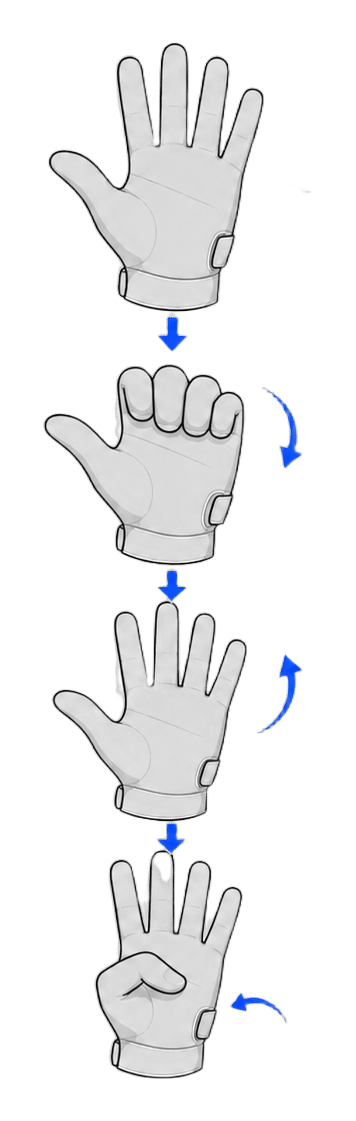 | `four_finger_L_thumb_in` | Curl four fingers into an L with the thumb tucked in, relaxed and contact-free |
| 2 |
| `four_finger_L_thumb_in` | Curl four fingers into an L with the thumb tucked in, relaxed and contact-free |
| 2 | 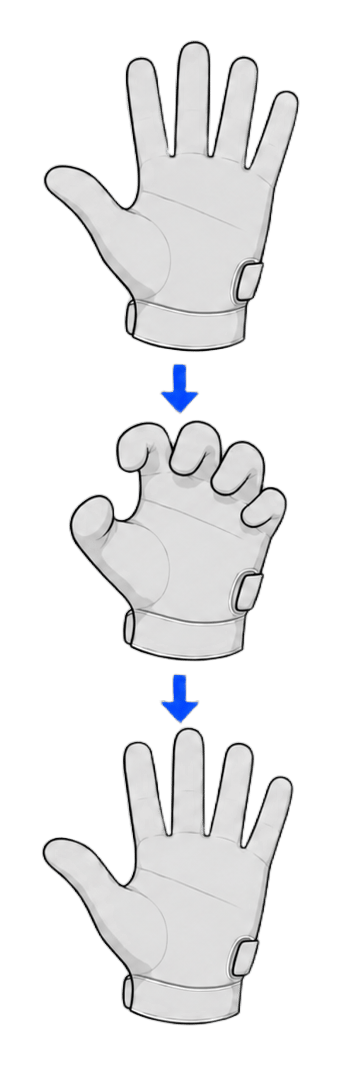 | `claw_curl` | Curl all fingers into a claw and flex repeatedly |
| 3 |
| `claw_curl` | Curl all fingers into a claw and flex repeatedly |
| 3 | 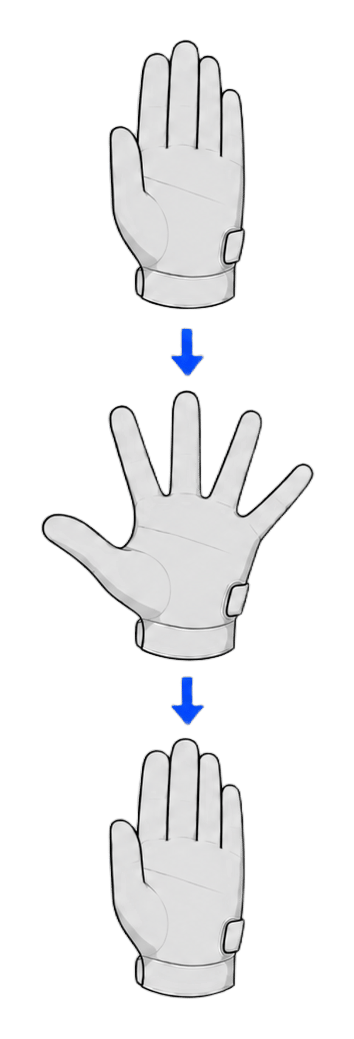 | `abduction` | Spread and close the fingers repeatedly |
| 4 |
| `abduction` | Spread and close the fingers repeatedly |
| 4 | 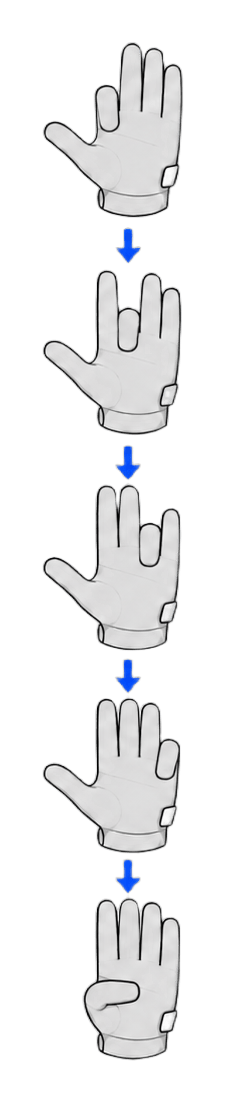 | `finger_to_palm` | Move each fingertip toward the palm in turn without touching the palm or other fingers |
Wear the glove and keep your hand empty throughout — **don't touch anything**. The collection builds the no-contact baseline, and touching the desk, your fingers, or any object contaminates the data and degrades contact detection. Repeat each motion about three times within the default 10-second collection window.
Each motion shows its guidance first — press Enter to start collecting. After a motion finishes, press Enter or k to keep it and continue, r to re-record it, or q to abort. Once every motion passes the data check, the CLI trains, verifies, and installs the model automatically.
## Options
| Option | Description |
| - | - |
| `--sn ` | Device serial number, required |
| `--seconds ` | Collection time per motion, default 10, maximum 3600 |
| `--epochs ` | Maximum training epochs, default 60, range 1–10000 |
| `--sensitivity ` | Contact sensitivity persisted with the installed model, range 0.5–3.0, default 1.0 |
| `--non-interactive` | Accept every prompt automatically, for scripted runs |
## Aborting and Exit Codes
* Press q at a prompt, or press Ctrl+C once: requests a safe cancel, waits for SDK cleanup, then exits with code 130
* Press Ctrl+C again: exits immediately without waiting, also with code 130
## Calibration Report
The command prints a result report when calibration completes. Add `--json` for structured output:
```bash theme={null}
wuji calib tactile --sn --json
```
| Field | Meaning |
| - | - |
| `success` | Whether calibration succeeded |
| `sn` | Glove serial number |
| `poses_collected` / `frames_per_pose` | Motions collected and frames per motion |
| `epochs` / `best_val_loss` | Actual training epochs and best validation loss |
| `alive_taxels` / `dead_pct` | Alive taxel count and dead-taxel percentage |
| `installed` / `model_dir` | Whether the model is installed and its storage directory |
| `verified_alive_taxels` | Alive taxel count re-checked after installation |
## Verify After Calibration
* [`wuji sub tactile`](/en/docs/wuji-cli/subscription): subscribe to the tactile matrix and press the glove to confirm signal response
* [`wuji doctor`](/en/docs/wuji-cli/doctor): check for dead taxels, rows, and columns
This documentation is built and hosted on [Mintlify](https://mintlify.com), a developer documentation platform.
| `finger_to_palm` | Move each fingertip toward the palm in turn without touching the palm or other fingers |
Wear the glove and keep your hand empty throughout — **don't touch anything**. The collection builds the no-contact baseline, and touching the desk, your fingers, or any object contaminates the data and degrades contact detection. Repeat each motion about three times within the default 10-second collection window.
Each motion shows its guidance first — press Enter to start collecting. After a motion finishes, press Enter or k to keep it and continue, r to re-record it, or q to abort. Once every motion passes the data check, the CLI trains, verifies, and installs the model automatically.
## Options
| Option | Description |
| - | - |
| `--sn ` | Device serial number, required |
| `--seconds ` | Collection time per motion, default 10, maximum 3600 |
| `--epochs ` | Maximum training epochs, default 60, range 1–10000 |
| `--sensitivity ` | Contact sensitivity persisted with the installed model, range 0.5–3.0, default 1.0 |
| `--non-interactive` | Accept every prompt automatically, for scripted runs |
## Aborting and Exit Codes
* Press q at a prompt, or press Ctrl+C once: requests a safe cancel, waits for SDK cleanup, then exits with code 130
* Press Ctrl+C again: exits immediately without waiting, also with code 130
## Calibration Report
The command prints a result report when calibration completes. Add `--json` for structured output:
```bash theme={null}
wuji calib tactile --sn --json
```
| Field | Meaning |
| - | - |
| `success` | Whether calibration succeeded |
| `sn` | Glove serial number |
| `poses_collected` / `frames_per_pose` | Motions collected and frames per motion |
| `epochs` / `best_val_loss` | Actual training epochs and best validation loss |
| `alive_taxels` / `dead_pct` | Alive taxel count and dead-taxel percentage |
| `installed` / `model_dir` | Whether the model is installed and its storage directory |
| `verified_alive_taxels` | Alive taxel count re-checked after installation |
## Verify After Calibration
* [`wuji sub tactile`](/en/docs/wuji-cli/subscription): subscribe to the tactile matrix and press the glove to confirm signal response
* [`wuji doctor`](/en/docs/wuji-cli/doctor): check for dead taxels, rows, and columns
This documentation is built and hosted on [Mintlify](https://mintlify.com), a developer documentation platform.