> ## Documentation Index
> Fetch the complete documentation index at: https://docs.wuji.tech/llms.txt
> Use this file to discover all available pages before exploring further.
# 布局预设
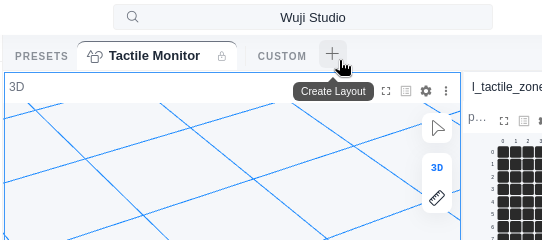
布局预设用于保存和切换不同的面板排列,按个人使用习惯组织工作区布局。预设栏位于可视化视图顶部,如下图,从左到右各元素说明见下表:
 | 元素 | 说明 |
| - | - |
| **PRESETS** | 内置预设分组,预设带锁图标,不可删除 |
| **Tactile Monitor** | 内置预设,每个预设对应一个这样的标签 |
| **CUSTOM** | 自定义预设分组,保存的布局显示在这里 |
| **+** | 创建新预设(**Create Layout**) |
| **⋯** | 更多操作,含 **Import Layout...** 与 **Export All Presets** |
| **⚙** | **Layout Entry**,切换预设入口位置:**Top Tab Bar (A)** 顶部标签栏或 **Left Sidebar (B)** 左侧栏 |
## 使用预设
### 保存预设
1. 将面板调整为目标布局。
2. 点击预设栏的 **+** 按钮(下图中的 **Create Layout**)。
3. 输入名称(最多 32 个字符),选择颜色和图标,点击 **Save**。新预设以标签形式出现在 **CUSTOM** 标记右侧。
| 元素 | 说明 |
| - | - |
| **PRESETS** | 内置预设分组,预设带锁图标,不可删除 |
| **Tactile Monitor** | 内置预设,每个预设对应一个这样的标签 |
| **CUSTOM** | 自定义预设分组,保存的布局显示在这里 |
| **+** | 创建新预设(**Create Layout**) |
| **⋯** | 更多操作,含 **Import Layout...** 与 **Export All Presets** |
| **⚙** | **Layout Entry**,切换预设入口位置:**Top Tab Bar (A)** 顶部标签栏或 **Left Sidebar (B)** 左侧栏 |
## 使用预设
### 保存预设
1. 将面板调整为目标布局。
2. 点击预设栏的 **+** 按钮(下图中的 **Create Layout**)。
3. 输入名称(最多 32 个字符),选择颜色和图标,点击 **Save**。新预设以标签形式出现在 **CUSTOM** 标记右侧。
 **Delete** 删除后不可恢复。重要布局删除前先用 **Export as JSON** 导出备份,需要时用 **Import Layout...** 导回。
### 管理预设
右键点击预设标签打开操作菜单,可用操作随预设类型不同:
* **内置预设**:支持 **Duplicate**(复制为自定义预设)和 **Export as JSON**(导出)。布局调整过后,还会出现 **Reset to Default**(恢复默认布局)。
* **自定义预设**:支持 **Rename**(重命名)、**Edit Color & Icon**(修改颜色与图标)、**Duplicate**、**Export as JSON** 和 **Delete**(删除)。布局调整过后,还会出现 **Save Changes**(保存修改)与 **Revert to Saved**(回退到已保存版本)。
修改布局但未保存时,预设标签上出现琥珀色圆点,提示有未保存的改动。
### 导入与导出
* **导出**:右键点击预设 → **Export as JSON**,或点击 **⋯** 菜单 → **Export All Presets**。
* **导入**:点击 **⋯** 菜单 → **Import Layout...**,选择 `.json` 文件。导入的预设作为自定义预设添加。
This documentation is built and hosted on [Mintlify](https://mintlify.com), a developer documentation platform.
**Delete** 删除后不可恢复。重要布局删除前先用 **Export as JSON** 导出备份,需要时用 **Import Layout...** 导回。
### 管理预设
右键点击预设标签打开操作菜单,可用操作随预设类型不同:
* **内置预设**:支持 **Duplicate**(复制为自定义预设)和 **Export as JSON**(导出)。布局调整过后,还会出现 **Reset to Default**(恢复默认布局)。
* **自定义预设**:支持 **Rename**(重命名)、**Edit Color & Icon**(修改颜色与图标)、**Duplicate**、**Export as JSON** 和 **Delete**(删除)。布局调整过后,还会出现 **Save Changes**(保存修改)与 **Revert to Saved**(回退到已保存版本)。
修改布局但未保存时,预设标签上出现琥珀色圆点,提示有未保存的改动。
### 导入与导出
* **导出**:右键点击预设 → **Export as JSON**,或点击 **⋯** 菜单 → **Export All Presets**。
* **导入**:点击 **⋯** 菜单 → **Import Layout...**,选择 `.json` 文件。导入的预设作为自定义预设添加。
This documentation is built and hosted on [Mintlify](https://mintlify.com), a developer documentation platform.