> ## Documentation Index
> Fetch the complete documentation index at: https://docs.wuji.tech/llms.txt
> Use this file to discover all available pages before exploring further.

# 产品介绍

## 产品概述

Wuji Hand 是舞肌科技 (WUJI TECH) 研发的一款具有 20 主动自由度的仿生灵巧手，面向科研实验、机器人集成、人机交互等多种应用场景。

## 产品参数

Wuji Hand 核心技术参数表涵盖结构设计、驱动控制、负载性能、动态响应和电气特性，供产品选型、仿真建模和应用集成参考。

<table>
  <thead>
    <tr>
      <th>参数分类</th>
      <th>参数项</th>
      <th>典型数值或描述</th>
    </tr>
  </thead>

  <tbody>
    <tr>
      <td rowSpan="5">结构与自由度</td>
      <td>主动自由度</td>
      <td rowSpan="2">20，每指 4 个</td>
    </tr>

    <tr>
      <td>关节数量</td>
    </tr>

    <tr>
      <td>抓指构型</td>
      <td>可全对指，支持侧摆</td>
    </tr>

    <tr>
      <td>运动学构型</td>
      <td>旋转关节串联直驱，无非线性运动学关系</td>
    </tr>

    <tr>
      <td>最大抓握直径</td>
      <td>100 mm</td>
    </tr>

    <tr>
      <td rowSpan="2">尺寸与重量</td>
      <td>自重（不含线缆）</td>
      <td>580 ± 10 g</td>
    </tr>

    <tr>
      <td>尺寸</td>
      <td>201 mm × 75 mm × 50 mm</td>
    </tr>

    <tr>
      <td rowSpan="2">驱动方式</td>
      <td>驱动方式</td>
      <td>自锁旋转直驱关节</td>
    </tr>

    <tr>
      <td>控制算法</td>
      <td>FOC 矢量控制驱动</td>
    </tr>

    <tr>
      <td rowSpan="5">控制与通信</td>
      <td>控制频率</td>
      <td>1000 Hz × 20 轴</td>
    </tr>

    <tr>
      <td>通信接口</td>
      <td>USB 2.0</td>
    </tr>

    <tr>
      <td>控制模式</td>
      <td>位控</td>
    </tr>

    <tr>
      <td>通信协议</td>
      <td>自研协议</td>
    </tr>

    <tr>
      <td>通信速率</td>
      <td>480 Mbps（理论值）</td>
    </tr>

    <tr>
      <td rowSpan="6">负载性能</td>
      <td>指尖力</td>
      <td>15 N</td>
    </tr>

    <tr>
      <td>单指最大载荷（钩握）</td>
      <td>3 kg</td>
    </tr>

    <tr>
      <td>整手抓握最大静载</td>
      <td>10 kg</td>
    </tr>

    <tr>
      <td>整手钩握最大静载</td>
      <td>10 kg</td>
    </tr>

    <tr>
      <td>整手竖抓最大静载</td>
      <td>5 kg</td>
    </tr>

    <tr>
      <td>挂握最大重量</td>
      <td>5 kg</td>
    </tr>

    <tr>
      <td rowSpan="4">动态性能</td>
      <td>最小开合时间</td>
      <td>≈ 0.3 s</td>
    </tr>

    <tr>
      <td>重复开合速度</td>
      <td>≥ 2 次/秒</td>
    </tr>

    <tr>
      <td>拇指弯曲/侧摆速度</td>
      <td>≥ 100 rpm</td>
    </tr>

    <tr>
      <td>四指弯曲速度</td>
      <td>≈ 0.25 s</td>
    </tr>

    <tr>
      <td rowSpan="3">精度与寿命</td>
      <td>重复定位精度</td>
      <td>± 1 mm</td>
    </tr>

    <tr>
      <td>空载抓握寿命</td>
      <td>≥ 300,000 次</td>
    </tr>

    <tr>
      <td>背隙</td>
      <td>≤ ± 7 mm</td>
    </tr>

    <tr>
      <td rowSpan="3">电气性能</td>
      <td>工作电压</td>
      <td>12V - 20V DC</td>
    </tr>

    <tr>
      <td>静态功耗</td>
      <td>12 W</td>
    </tr>

    <tr>
      <td>标配适配器规格</td>

      <td>
        额定输出：12V 20A<br />
        峰值功率：420 W（10 ms 瞬态）<br />
        线缆规格：14 AWG
      </td>
    </tr>

    <tr>
      <td rowSpan="2">材料与防护</td>
      <td>外壳材质</td>
      <td>铝合金</td>
    </tr>

    <tr>
      <td>防护等级</td>
      <td>IP40</td>
    </tr>
  </tbody>
</table>

## 产品结构特征

本节介绍 Wuji Hand 整体结构设计、通信与电源接口布局，以及各自由度的命名规则与运动参数，帮助用户了解产品的机械结构与使用规范。

### 结构示意图

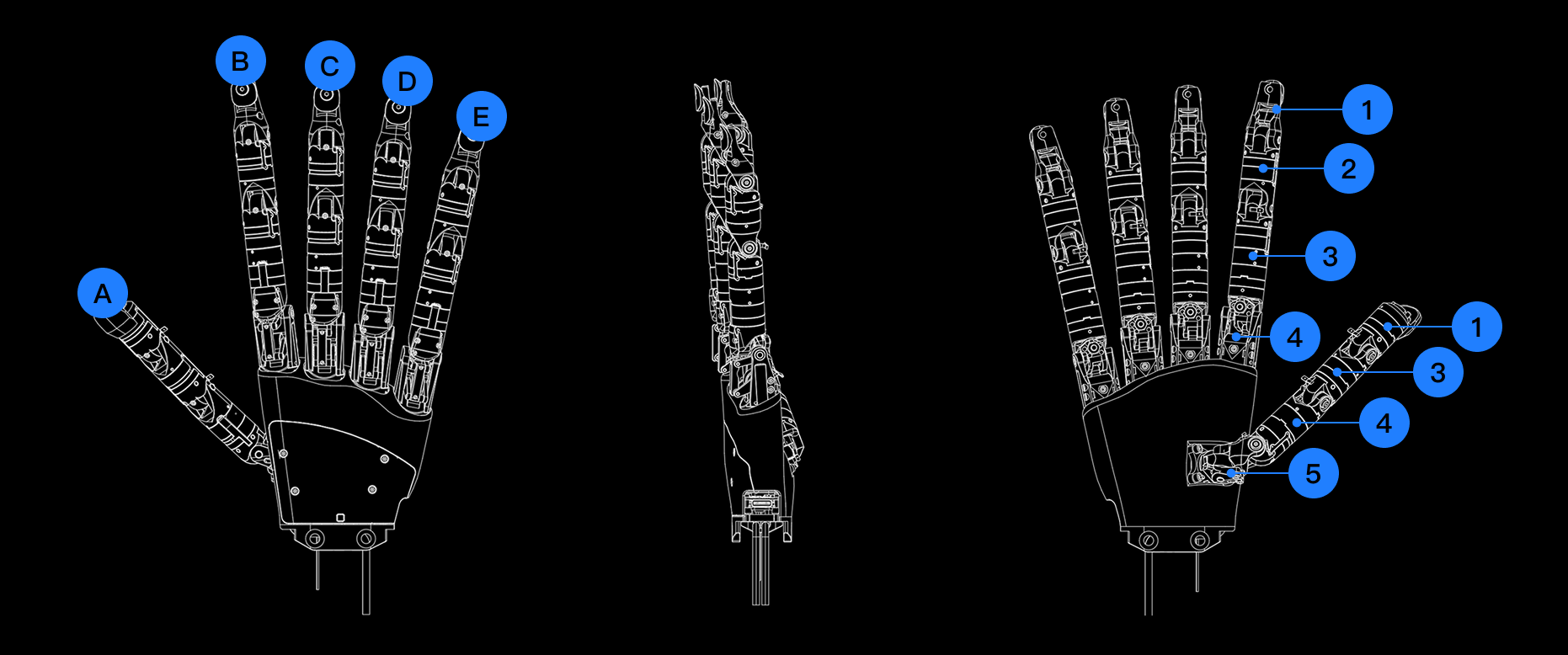
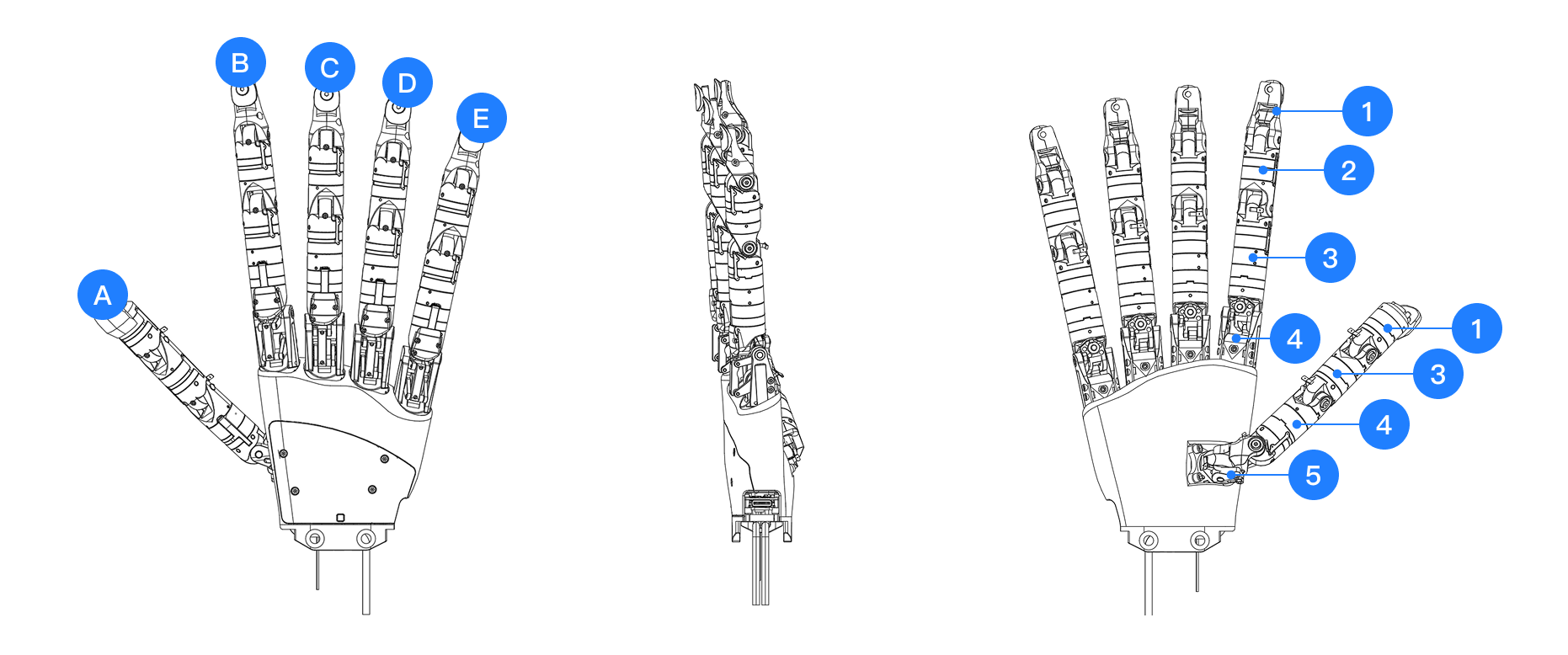
Wuji Hand 采用五指仿生结构设计，每个手指包含多个关节实现灵活运动。下图展示整体结构及主要组成部分：

<div className="dark:hidden">
  <img src="https://mintcdn.com/wuji-0bbde051/isWZkBBshh11pitl/assets/source/images/zh/wuji-hand/v1/overview/structure-schematic-2025-11.png?fit=max&auto=format&n=isWZkBBshh11pitl&q=85&s=c3fd966cb144534a8a0be4c17b120ca5" alt="结构示意图" width="1862" height="778" data-path="assets/source/images/zh/wuji-hand/v1/overview/structure-schematic-2025-11.png" />
</div>

<div className="hidden dark:block">
  <img src="https://mintcdn.com/wuji-0bbde051/isWZkBBshh11pitl/assets/source/images/zh/wuji-hand/v1/overview/structure-schematic-2025-11-dark.png?fit=max&auto=format&n=isWZkBBshh11pitl&q=85&s=75e691abcc2a717007c51cf8b74432af" alt="结构示意图" width="1862" height="778" data-path="assets/source/images/zh/wuji-hand/v1/overview/structure-schematic-2025-11-dark.png" />
</div>

* 图中 A\~E 分别对应：
  * A：拇指 (Thumb)
  * B：食指 (Index)
  * C：中指 (Middle)
  * D：无名指 (Ring)
  * E：小指 (Little)
* 图中 1\~5 对应手部常用的解剖学区域标识：
  * 1：远节指骨 (Distal phalanges)
  * 2：中节指骨 (Intermediate phalanges)
  * 3：近节指骨 (Proximal phalanges)
  * 4：掌骨 (Metacarpals)
  * 5：腕骨 (Carpals)

### Wuji Hand 自由度配置

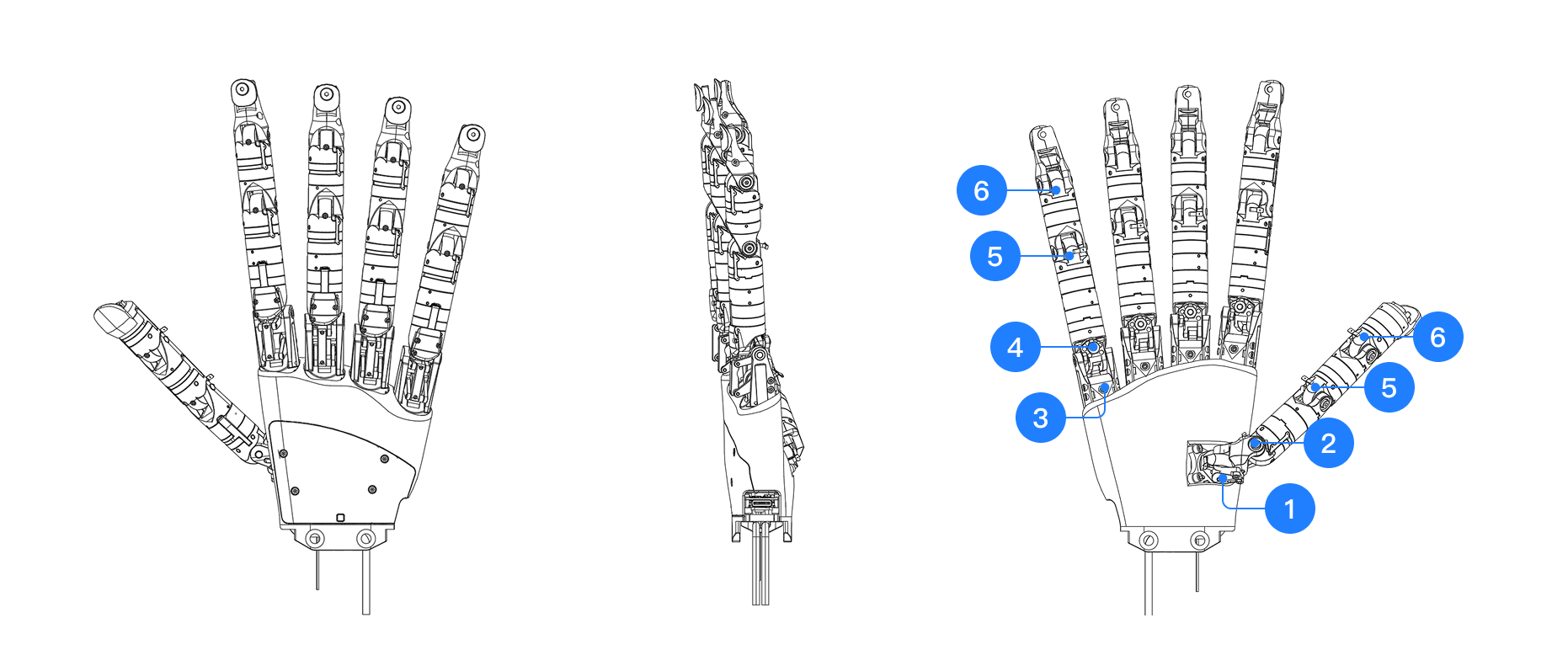
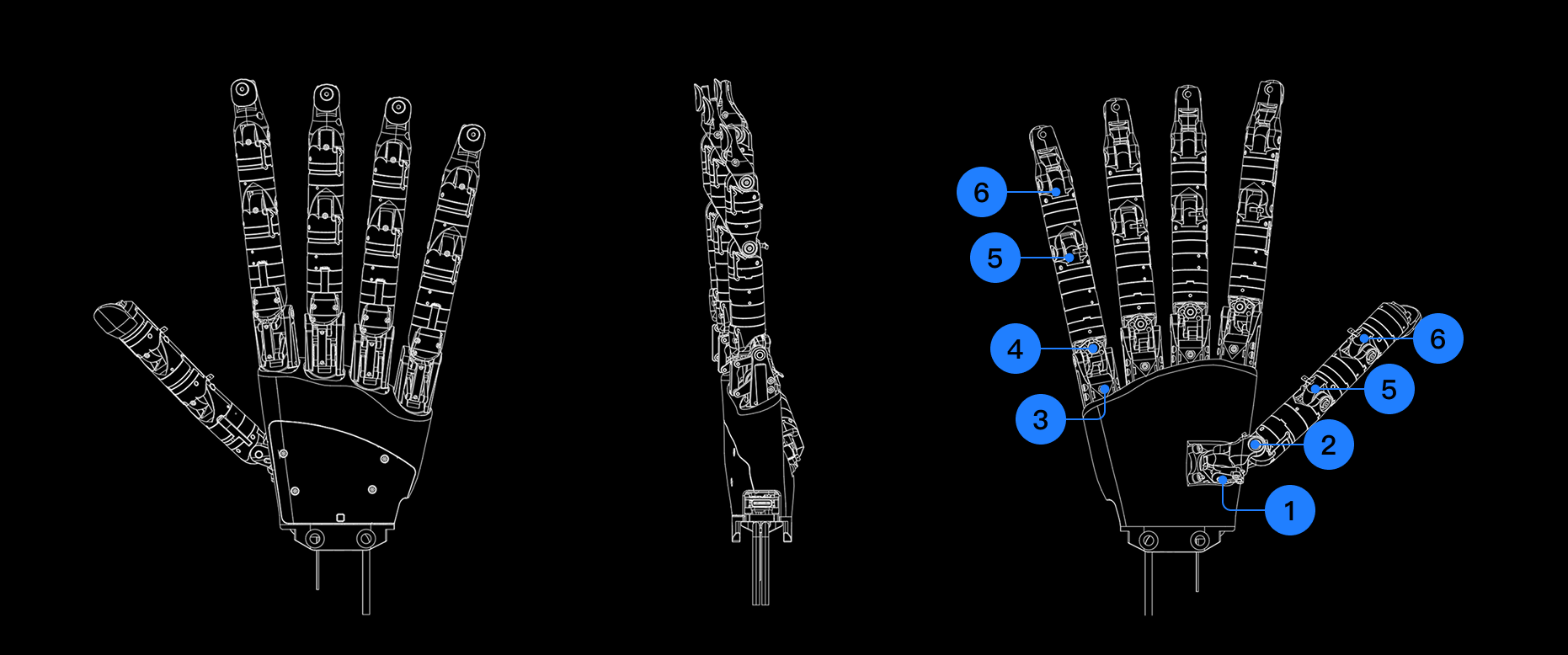
下图为 Wuji Hand 各关节的解剖学命名与对应位置关系，便于用户理解各自由度的功能定位。

<div className="dark:hidden">
  <img src="https://mintcdn.com/wuji-0bbde051/isWZkBBshh11pitl/assets/source/images/zh/wuji-hand/v1/overview/dof-configuration-2025-11.png?fit=max&auto=format&n=isWZkBBshh11pitl&q=85&s=2babb4a293e9f64c3865b35b5dabae51" alt="自由度命名规则" width="1862" height="778" data-path="assets/source/images/zh/wuji-hand/v1/overview/dof-configuration-2025-11.png" />
</div>

<div className="hidden dark:block">
  <img src="https://mintcdn.com/wuji-0bbde051/isWZkBBshh11pitl/assets/source/images/zh/wuji-hand/v1/overview/dof-configuration-2025-11-dark.png?fit=max&auto=format&n=isWZkBBshh11pitl&q=85&s=3f8264394d2918e8391a10cb6c810ae2" alt="自由度命名规则" width="1862" height="778" data-path="assets/source/images/zh/wuji-hand/v1/overview/dof-configuration-2025-11-dark.png" />
</div>

图中 1\~6 分别对应：

* 1：CMC1
* 2：CMC2
* 3：MCP1
* 4：MCP2
* 5：PIP
* 6：DIP

### 各自由度运动方向及角度范围

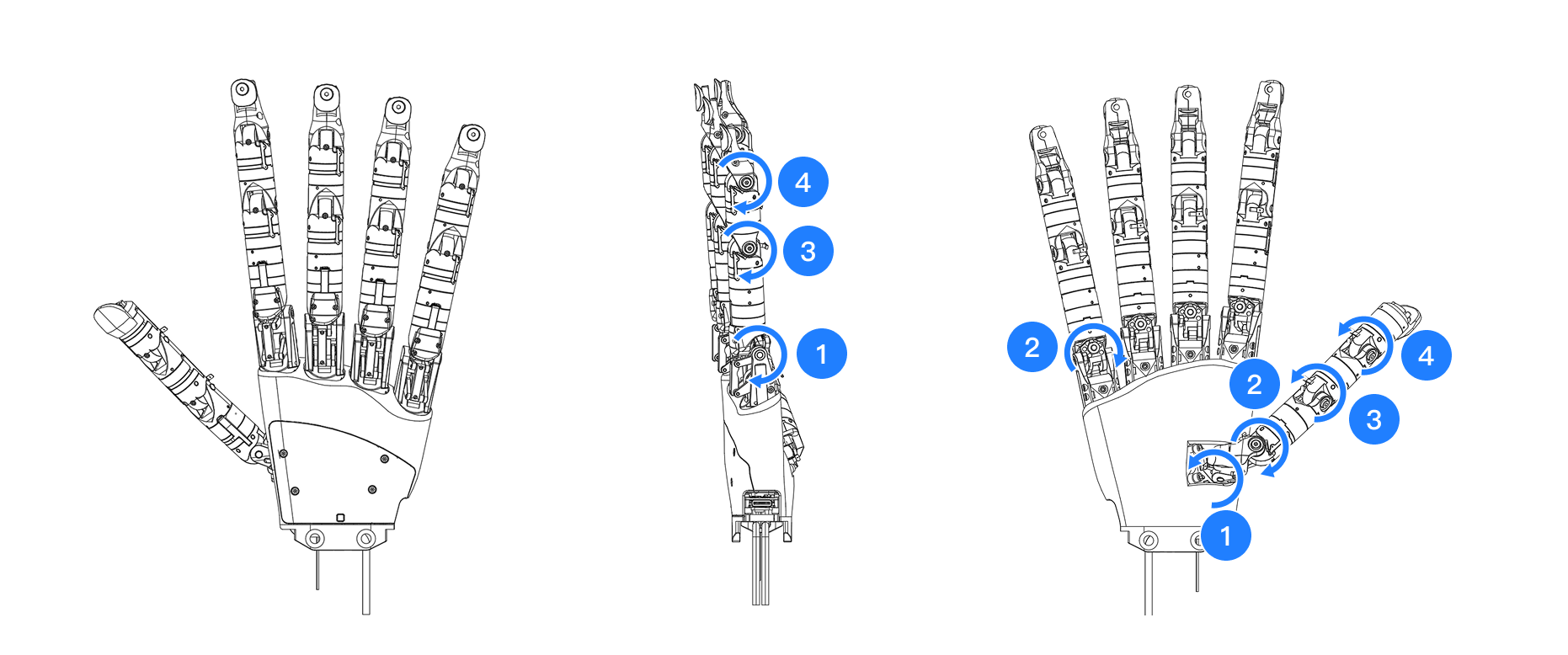
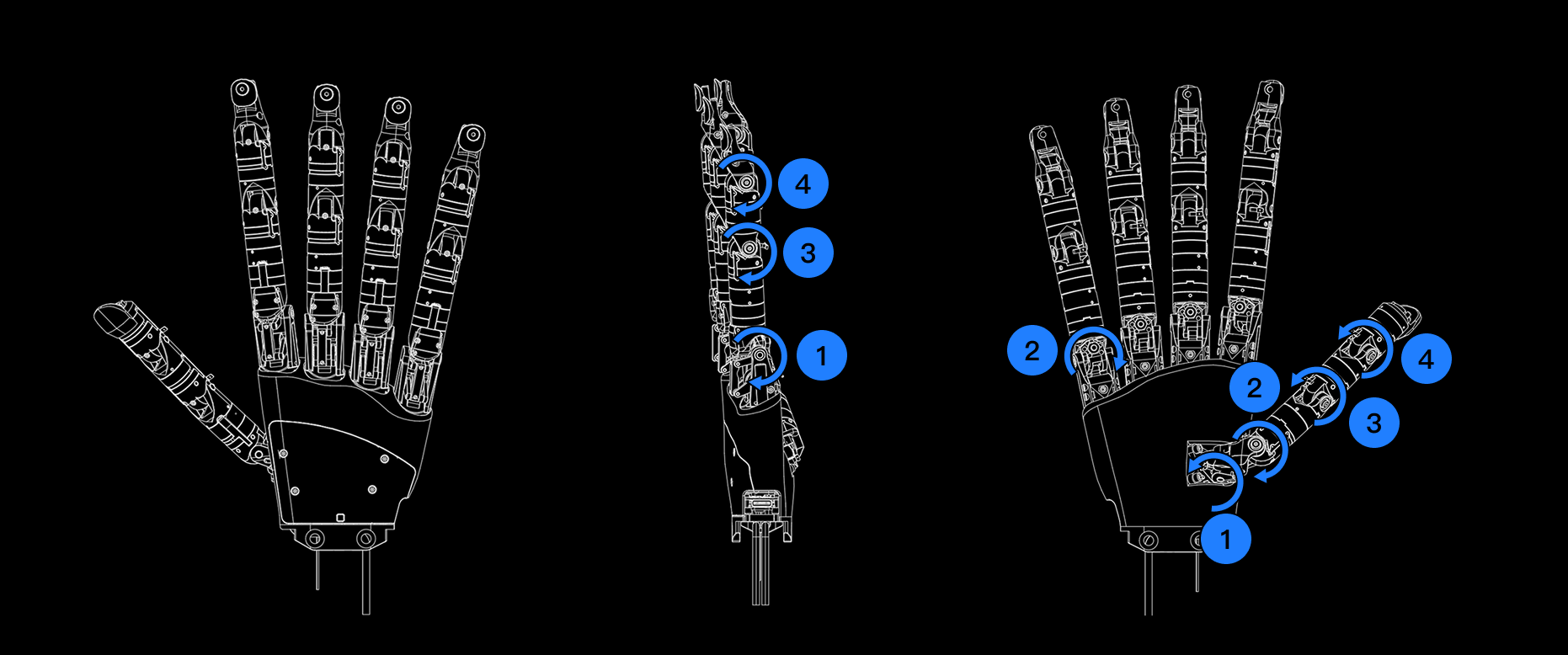
四指结构一致，单指全长约 157 mm。拇指模块结构略有差异，单指全长约 130 mm。下图以拇指和小指为例，说明各自由度的运动方向及角度范围：

<div className="dark:hidden">
  <img src="https://mintcdn.com/wuji-0bbde051/isWZkBBshh11pitl/assets/source/images/zh/wuji-hand/v1/overview/dof-motion-direction-and-range-2025-11.png?fit=max&auto=format&n=isWZkBBshh11pitl&q=85&s=e1e394941cd107947e898de4db62c6dd" alt="各自由度运动方向及角度范围" width="1862" height="778" data-path="assets/source/images/zh/wuji-hand/v1/overview/dof-motion-direction-and-range-2025-11.png" />
</div>

<div className="hidden dark:block">
  <img src="https://mintcdn.com/wuji-0bbde051/isWZkBBshh11pitl/assets/source/images/zh/wuji-hand/v1/overview/dof-motion-direction-and-range-2025-11-dark.png?fit=max&auto=format&n=isWZkBBshh11pitl&q=85&s=d5f3305e94d6b328fe7bd8dabc822f31" alt="各自由度运动方向及角度范围" width="1862" height="778" data-path="assets/source/images/zh/wuji-hand/v1/overview/dof-motion-direction-and-range-2025-11-dark.png" />
</div>

* 拇指
  * 1：掌根展收，运动范围约 100°
  * 2：掌根侧摆，运动范围约 80°
  * 3：屈伸，运动范围约 130°
  * 4：屈伸，运动范围约 130°
* 小指
  * 1：屈伸，运动范围约 125°
  * 2：侧摆，运动范围约 60°
  * 3：屈伸，运动范围约 130°
  * 4：屈伸，运动范围约 130°

### 通信与电源接口示意图

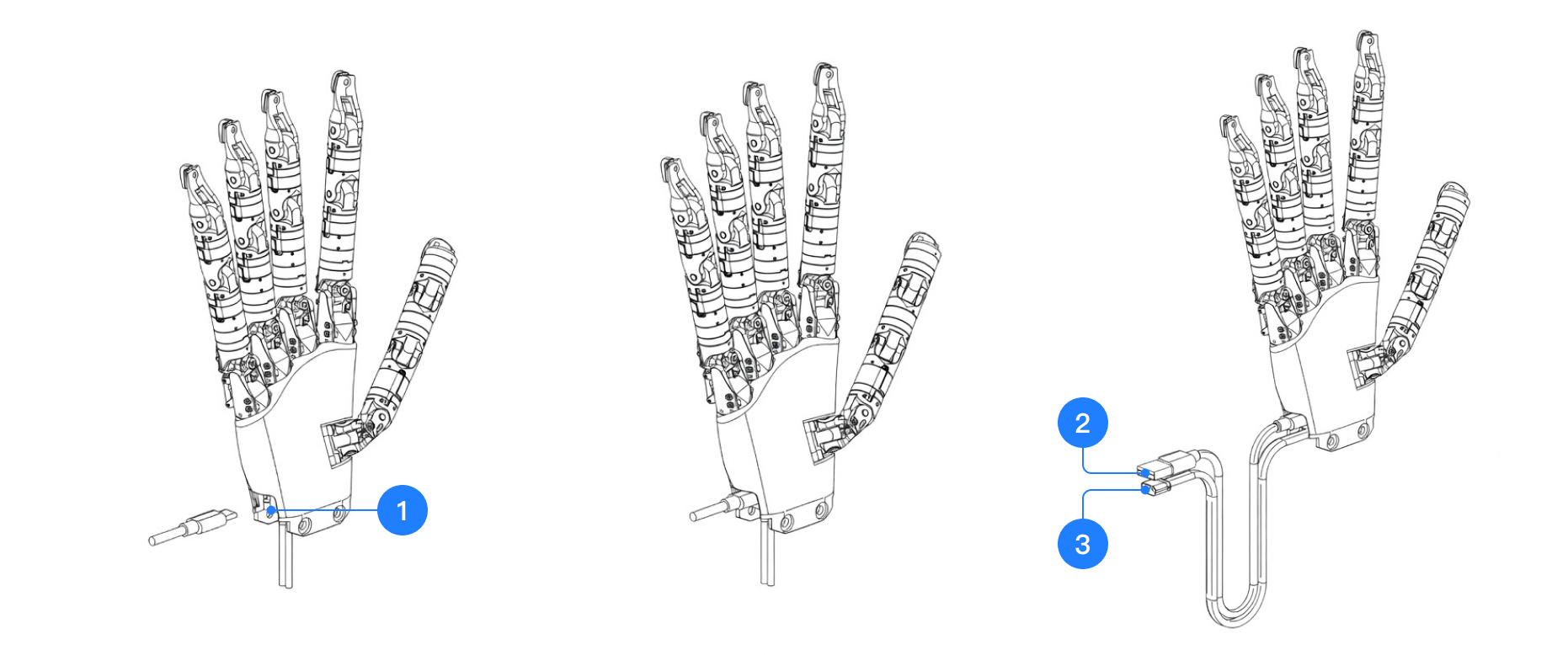
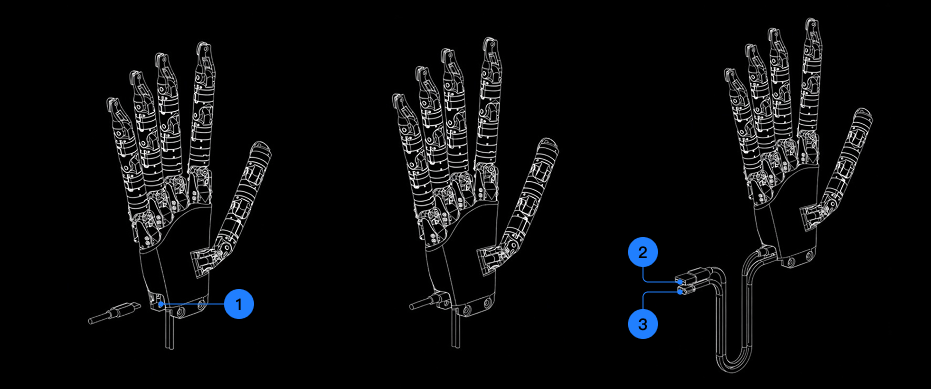
Wuji Hand 通过 USB-C 接口实现与上位机的数据通信，同时支持外部电源供电。下图展示了 Wuji Hand 的通信和电源接口位置及连接方式：

<div className="dark:hidden">
  <img src="https://mintcdn.com/wuji-0bbde051/isWZkBBshh11pitl/assets/source/images/zh/wuji-hand/v1/overview/communication-and-power-interface-schematic-2025-11.png?fit=max&auto=format&n=isWZkBBshh11pitl&q=85&s=1eeb276b24ffa99b3a77699047975683" alt="通信与电源接口" width="1862" height="778" data-path="assets/source/images/zh/wuji-hand/v1/overview/communication-and-power-interface-schematic-2025-11.png" />
</div>

<div className="hidden dark:block">
  <img src="https://mintcdn.com/wuji-0bbde051/isWZkBBshh11pitl/assets/source/images/zh/wuji-hand/v1/overview/communication-and-power-interface-schematic-2025-11-dark.png?fit=max&auto=format&n=isWZkBBshh11pitl&q=85&s=af35601cefbc6b198407717b398d4c13" alt="通信与电源接口" width="931" height="389" data-path="assets/source/images/zh/wuji-hand/v1/overview/communication-and-power-interface-schematic-2025-11-dark.png" />
</div>

* 图中 1\~3 分别为：
  * 1：USB 数据线连接端（插入灵巧手设备）
  * 2：USB 数据线另一端（连接至上位机或机器人控制器）
  * 3：XT30 电源接口，用于外部供电接入

<Info>
  注意：为保障通信稳定性与供电安全，建议使用原装配套线材
</Info>

## 产品电气特征

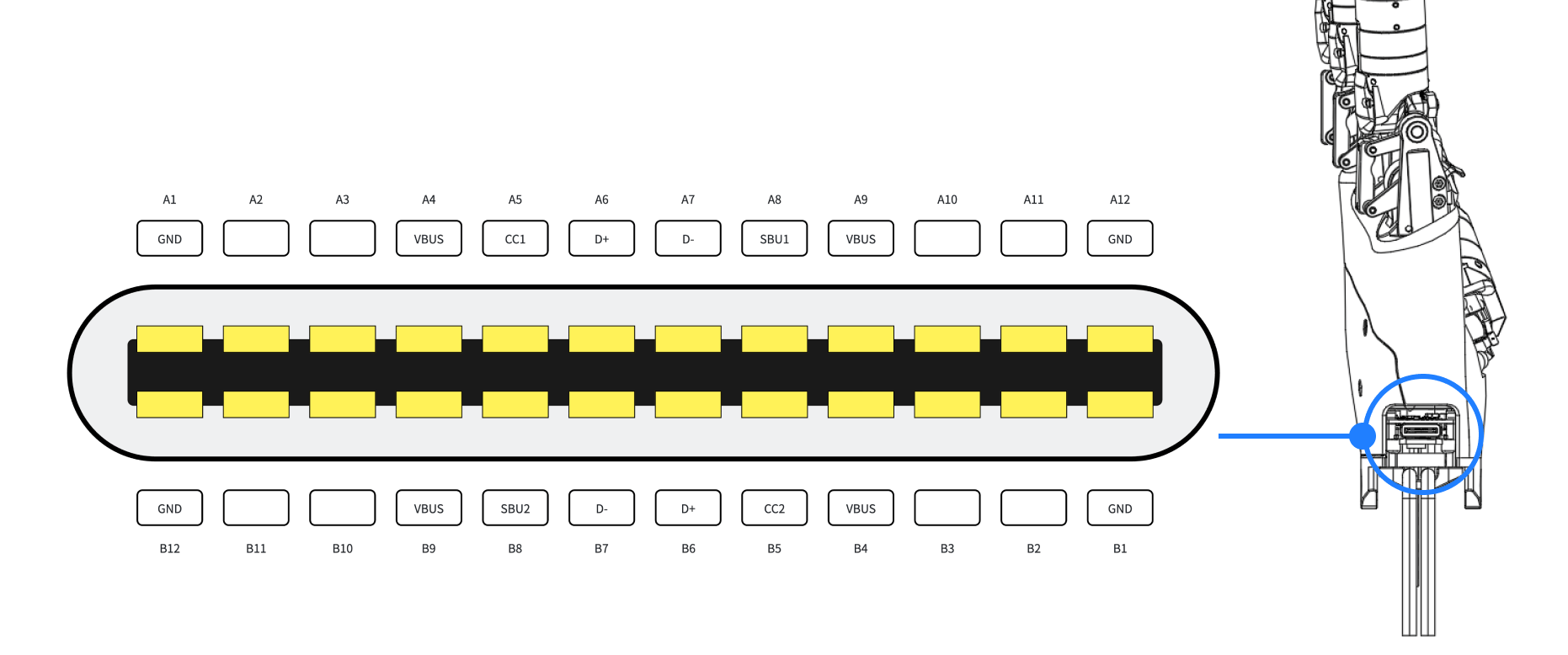
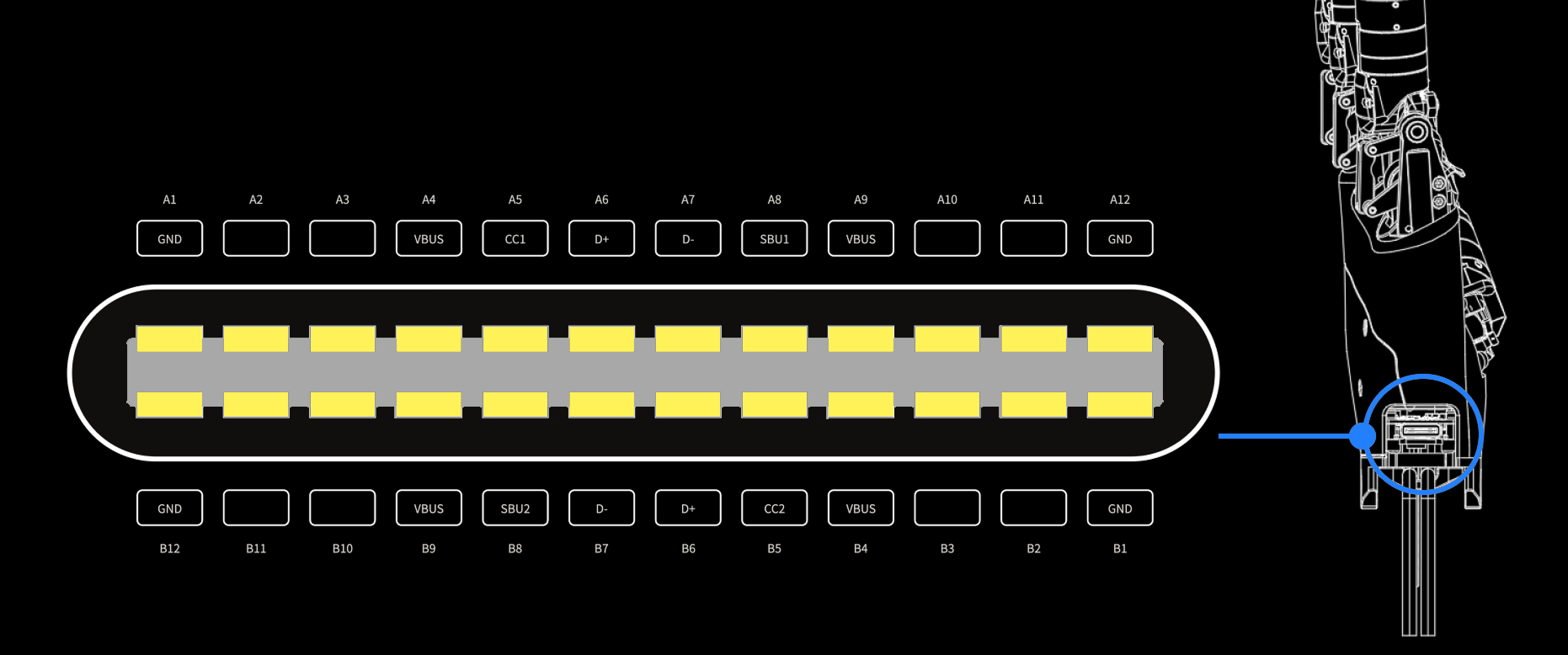
### 引脚定义

<div className="dark:hidden">
  <img src="https://mintcdn.com/wuji-0bbde051/isWZkBBshh11pitl/assets/source/images/zh/wuji-hand/v1/overview/pin-definition-2025-11.png?fit=max&auto=format&n=isWZkBBshh11pitl&q=85&s=6855a1ab29d1db4e5b064f2d9b017280" alt="引脚定义" width="1862" height="778" data-path="assets/source/images/zh/wuji-hand/v1/overview/pin-definition-2025-11.png" />
</div>

<div className="hidden dark:block">
  <img src="https://mintcdn.com/wuji-0bbde051/isWZkBBshh11pitl/assets/source/images/zh/wuji-hand/v1/overview/pin-definition-2025-11-dark.png?fit=max&auto=format&n=isWZkBBshh11pitl&q=85&s=4e9231b49d5b2ddbc107cc28e28559f9" alt="引脚定义" width="1862" height="778" data-path="assets/source/images/zh/wuji-hand/v1/overview/pin-definition-2025-11-dark.png" />
</div>

### 指示灯对照表

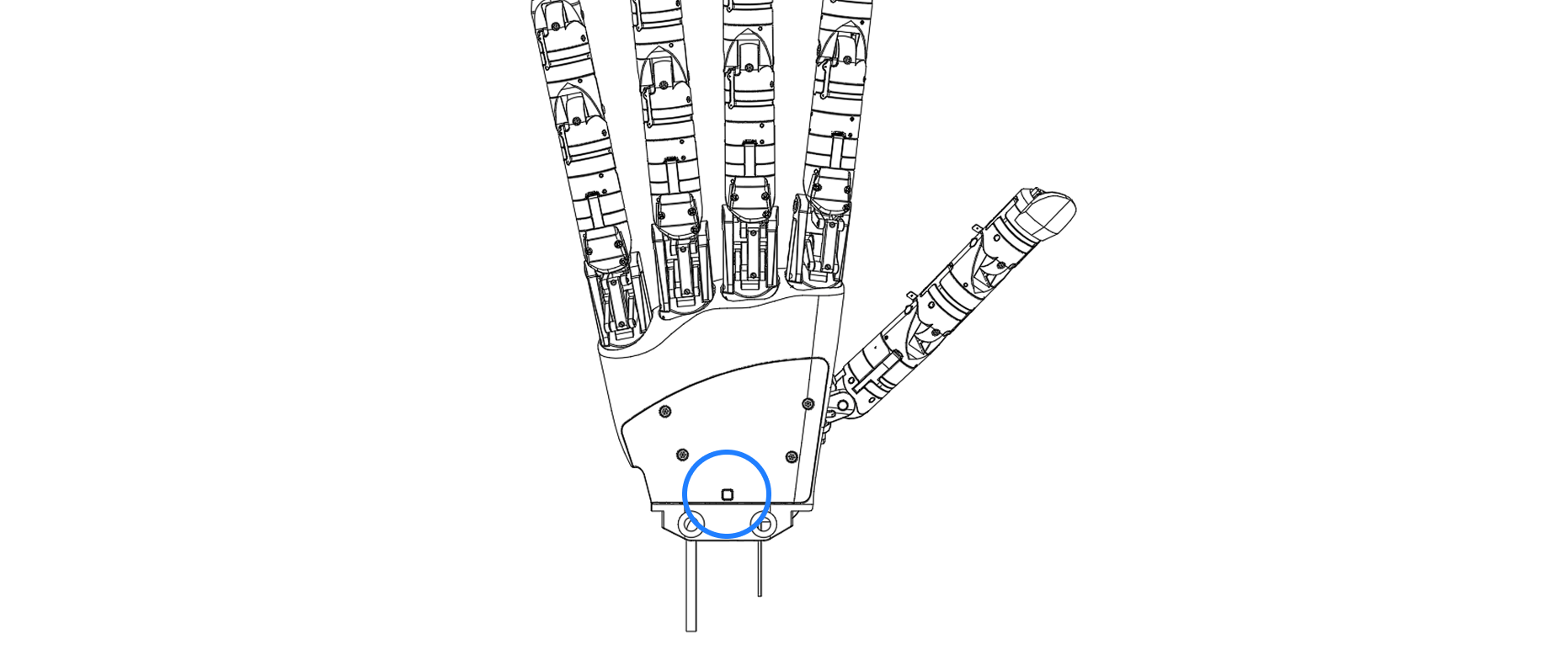
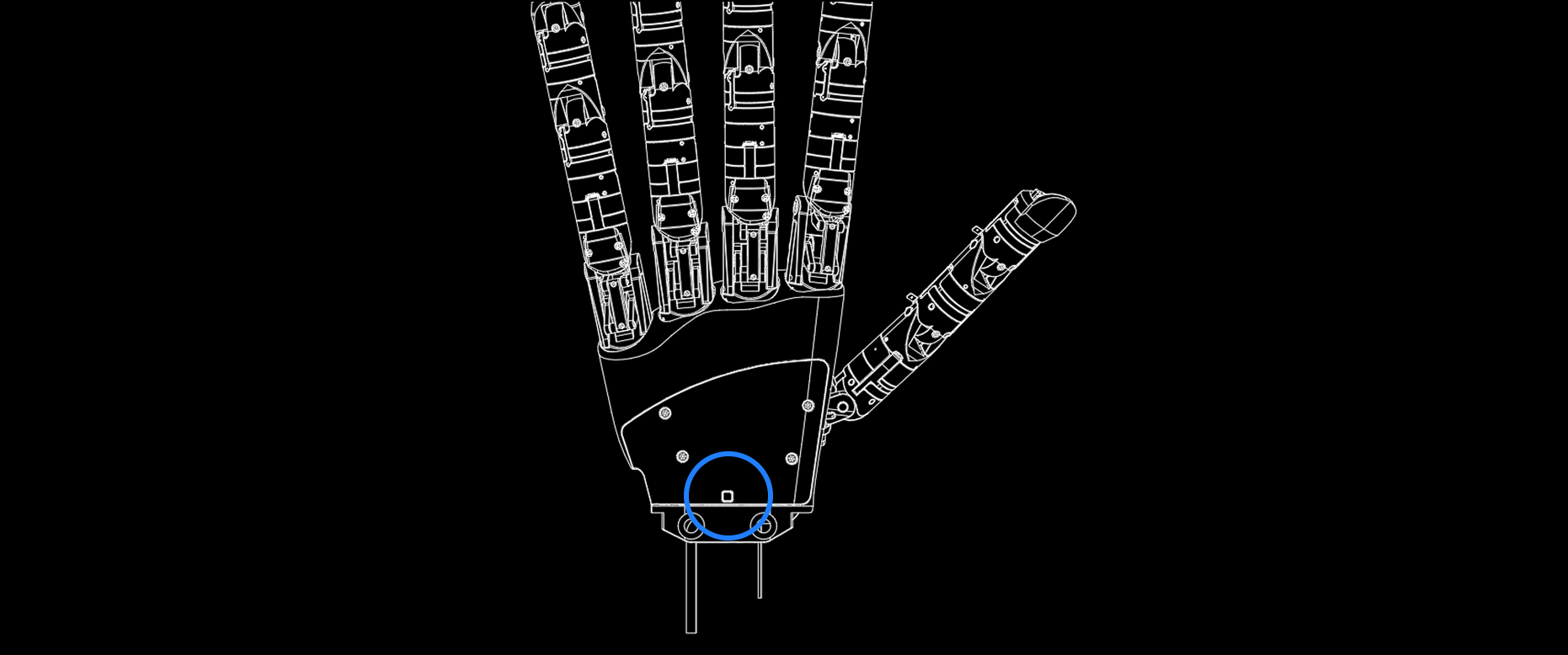
Wuji Hand 手背中下方设有 RGB 多色状态指示灯，实时反馈供电和系统运行状态。

<div className="dark:hidden">
  <img src="https://mintcdn.com/wuji-0bbde051/isWZkBBshh11pitl/assets/source/images/zh/wuji-hand/v1/overview/indicator-light-position-2025-11.png?fit=max&auto=format&n=isWZkBBshh11pitl&q=85&s=dd1cea91de0d260799c436e3ee16e333" alt="指示灯位置" width="1862" height="778" data-path="assets/source/images/zh/wuji-hand/v1/overview/indicator-light-position-2025-11.png" />
</div>

<div className="hidden dark:block">
  <img src="https://mintcdn.com/wuji-0bbde051/isWZkBBshh11pitl/assets/source/images/zh/wuji-hand/v1/overview/indicator-light-position-2025-11-dark.png?fit=max&auto=format&n=isWZkBBshh11pitl&q=85&s=aa8dd7319e4f710f51a4ea67a8712bab" alt="指示灯位置" width="1862" height="778" data-path="assets/source/images/zh/wuji-hand/v1/overview/indicator-light-position-2025-11-dark.png" />
</div>

各状态对应含义如下表所示：

<table>
  <thead>
    <tr>
      <th colSpan="2">指示灯颜色</th>
      <th>状态符号</th>
      <th>系统阶段说明</th>
      <th>说明</th>
    </tr>
  </thead>

  <tbody>
    <tr>
      <td>
        <img src="https://mintcdn.com/wuji-0bbde051/isWZkBBshh11pitl/assets/source/images/zh/wuji-hand/v1/overview/no-light-2025-11.png?fit=max&auto=format&n=isWZkBBshh11pitl&q=85&s=4dd05a24f63daf8c53999a328f8ecdfc" alt="无灯" width="446" height="128" data-path="assets/source/images/zh/wuji-hand/v1/overview/no-light-2025-11.png" />
      </td>

      <td>无灯</td>
      <td>OFF</td>
      <td>关机未上电状态</td>
      <td>供电未接通或主电源故障</td>
    </tr>

    <tr>
      <td>
        <img src="https://mintcdn.com/wuji-0bbde051/isWZkBBshh11pitl/assets/source/images/zh/wuji-hand/v1/overview/blue-solid-2025-11.png?fit=max&auto=format&n=isWZkBBshh11pitl&q=85&s=062ab96d4e5049c5e07135ce73fe10d0" alt="蓝色常亮" width="446" height="195" data-path="assets/source/images/zh/wuji-hand/v1/overview/blue-solid-2025-11.png" />
      </td>

      <td>蓝色常亮</td>
      <td>Bootloader</td>
      <td>固件更新或引导程序</td>
      <td>设备处于引导程序中，若设备正在执行固件升级，此时**严禁断电或重插线缆**，以免导致系统损坏</td>
    </tr>

    <tr>
      <td>
        <img src="https://mintcdn.com/wuji-0bbde051/isWZkBBshh11pitl/assets/source/images/zh/wuji-hand/v1/overview/green-flashing-2025-11.png?fit=max&auto=format&n=isWZkBBshh11pitl&q=85&s=bf2184af0b4ea8a877ad73b7f3da09bd" alt="绿色闪烁" width="446" height="195" data-path="assets/source/images/zh/wuji-hand/v1/overview/green-flashing-2025-11.png" />
      </td>

      <td>绿色闪烁</td>
      <td>Standby</td>
      <td>正常待机</td>
      <td>供电正常，系统正常，未连接上位机或 SDK</td>
    </tr>

    <tr>
      <td>
        <img src="https://mintcdn.com/wuji-0bbde051/isWZkBBshh11pitl/assets/source/images/zh/wuji-hand/v1/overview/green-solid-2025-11.png?fit=max&auto=format&n=isWZkBBshh11pitl&q=85&s=4cc0bebed5b4f3bc0f73f57e7e339239" alt="绿色常亮" width="446" height="195" data-path="assets/source/images/zh/wuji-hand/v1/overview/green-solid-2025-11.png" />
      </td>

      <td>绿色常亮</td>
      <td>Running</td>
      <td>正常运行</td>
      <td>供电正常，系统已启动，已正常连接上位机或 SDK</td>
    </tr>

    <tr>
      <td>
        <img src="https://mintcdn.com/wuji-0bbde051/isWZkBBshh11pitl/assets/source/images/zh/wuji-hand/v1/overview/yellow-solid-2025-11.png?fit=max&auto=format&n=isWZkBBshh11pitl&q=85&s=a3d8f8382c57ed8b748ea8fc2b2a645c" alt="黄色常亮" width="446" height="195" data-path="assets/source/images/zh/wuji-hand/v1/overview/yellow-solid-2025-11.png" />
      </td>

      <td>黄色常亮</td>
      <td>Warning</td>
      <td>设备警告</td>
      <td>系统检测到警告，如温度过高、供电波动等非致命故障，建议暂停调试，排查告警原因</td>
    </tr>

    <tr>
      <td>
        <img src="https://mintcdn.com/wuji-0bbde051/isWZkBBshh11pitl/assets/source/images/zh/wuji-hand/v1/overview/red-flashing-2025-11.png?fit=max&auto=format&n=isWZkBBshh11pitl&q=85&s=ff6bd26d165bdcc024bd196a1ef173d3" alt="红色闪烁" width="445" height="195" data-path="assets/source/images/zh/wuji-hand/v1/overview/red-flashing-2025-11.png" />
      </td>

      <td>红色闪烁</td>
      <td>Pre-fault</td>
      <td>故障预警</td>
      <td>即将发生故障的预警，如温度高接近过温阈值</td>
    </tr>

    <tr>
      <td>
        <img src="https://mintcdn.com/wuji-0bbde051/isWZkBBshh11pitl/assets/source/images/zh/wuji-hand/v1/overview/red-solid-2025-11.png?fit=max&auto=format&n=isWZkBBshh11pitl&q=85&s=8fe7875f99afe514cad84b4ef816f1f6" alt="红色常亮" width="446" height="195" data-path="assets/source/images/zh/wuji-hand/v1/overview/red-solid-2025-11.png" />
      </td>

      <td>红色常亮</td>
      <td>Fault</td>
      <td>严重故障</td>
      <td>发生严重硬件/软件故障（如主控 MCU 异常、通信失步等），应立即失能并依靠上位机排除故障（观察指示灯、终端日志、复位/恢复出厂）</td>
    </tr>
  </tbody>
</table>

## 产品配件介绍

### 产品配件表

<table>
  <thead>
    <tr>
      <th>图示</th>
      <th>名称</th>
      <th>说明</th>
    </tr>
  </thead>

  <tbody>
    <tr>
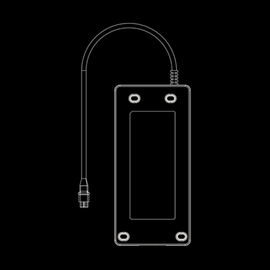
      <td>
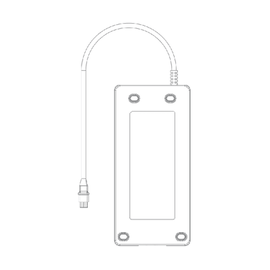
        <img src="https://mintcdn.com/wuji-0bbde051/isWZkBBshh11pitl/assets/source/images/zh/wuji-hand/v1/overview/accessories/power-adapter.png?fit=max&auto=format&n=isWZkBBshh11pitl&q=85&s=dd5d397f92116b8a2b34d2d1899fbfda" alt="电源适配器" className="dark:hidden" width="270" height="270" data-path="assets/source/images/zh/wuji-hand/v1/overview/accessories/power-adapter.png" />

        <img src="https://mintcdn.com/wuji-0bbde051/isWZkBBshh11pitl/assets/source/images/zh/wuji-hand/v1/overview/accessories/power-adapter-dark.png?fit=max&auto=format&n=isWZkBBshh11pitl&q=85&s=79defb47ad2ab693c8cd9059016b84b6" alt="电源适配器" className="hidden dark:block" width="270" height="270" data-path="assets/source/images/zh/wuji-hand/v1/overview/accessories/power-adapter-dark.png" />
      </td>

      <td style={{ whiteSpace: 'nowrap' }}>电源适配器</td>
      <td rowSpan="2">供电</td>
    </tr>

    <tr>
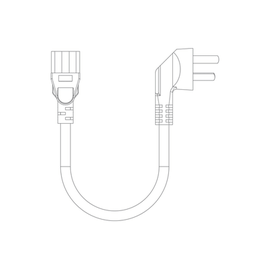
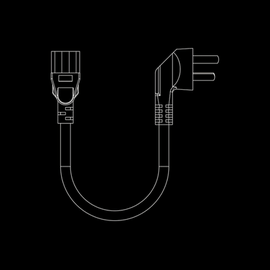
      <td>
        <img src="https://mintcdn.com/wuji-0bbde051/isWZkBBshh11pitl/assets/source/images/zh/wuji-hand/v1/overview/accessories/power-adapter-ac-cable.png?fit=max&auto=format&n=isWZkBBshh11pitl&q=85&s=208019b534907b5c849c1dced3b22030" alt="电源适配器AC线材" className="dark:hidden" width="270" height="270" data-path="assets/source/images/zh/wuji-hand/v1/overview/accessories/power-adapter-ac-cable.png" />

        <img src="https://mintcdn.com/wuji-0bbde051/isWZkBBshh11pitl/assets/source/images/zh/wuji-hand/v1/overview/accessories/power-adapter-ac-cable-dark.png?fit=max&auto=format&n=isWZkBBshh11pitl&q=85&s=f392bb663e546913b608b26546cd3546" alt="电源适配器AC线材" className="hidden dark:block" width="270" height="270" data-path="assets/source/images/zh/wuji-hand/v1/overview/accessories/power-adapter-ac-cable-dark.png" />
      </td>

      <td style={{ whiteSpace: 'nowrap' }}>电源适配器 AC 线材</td>
    </tr>

    <tr>
      <td>
        <img src="https://mintcdn.com/wuji-0bbde051/isWZkBBshh11pitl/assets/source/images/zh/wuji-hand/v1/overview/accessories/anti-impact-adapter.png?fit=max&auto=format&n=isWZkBBshh11pitl&q=85&s=331989444142ddb058a8e090d8d8a5f9" alt="抗冲击转接座" className="dark:hidden" width="270" height="270" data-path="assets/source/images/zh/wuji-hand/v1/overview/accessories/anti-impact-adapter.png" />

        <img src="https://mintcdn.com/wuji-0bbde051/isWZkBBshh11pitl/assets/source/images/zh/wuji-hand/v1/overview/accessories/anti-impact-adapter-dark.png?fit=max&auto=format&n=isWZkBBshh11pitl&q=85&s=425cbd5e643bb1ffdd2aff33690f50fc" alt="抗冲击转接座" className="hidden dark:block" width="270" height="270" data-path="assets/source/images/zh/wuji-hand/v1/overview/accessories/anti-impact-adapter-dark.png" />
      </td>

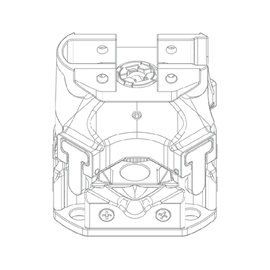
      <td style={{ whiteSpace: 'nowrap' }}>抗冲击转接座</td>
      <td>[请见抗冲击转接座](#抗冲击转接座)</td>
    </tr>

    <tr>
      <td>
        <img src="https://mintcdn.com/wuji-0bbde051/isWZkBBshh11pitl/assets/source/images/zh/wuji-hand/v1/overview/accessories/direct-adapter.png?fit=max&auto=format&n=isWZkBBshh11pitl&q=85&s=6127967b615648f73102f20cd8dd1746" alt="直连转接座" className="dark:hidden" width="270" height="270" data-path="assets/source/images/zh/wuji-hand/v1/overview/accessories/direct-adapter.png" />

        <img src="https://mintcdn.com/wuji-0bbde051/isWZkBBshh11pitl/assets/source/images/zh/wuji-hand/v1/overview/accessories/direct-adapter-dark.png?fit=max&auto=format&n=isWZkBBshh11pitl&q=85&s=7997956f7a2161cf95ce15e1e9cce28d" alt="直连转接座" className="hidden dark:block" width="270" height="270" data-path="assets/source/images/zh/wuji-hand/v1/overview/accessories/direct-adapter-dark.png" />
      </td>

      <td style={{ whiteSpace: 'nowrap' }}>直连转接座</td>
      <td>连接 Wuji Hand 与用户设备（如机械臂法兰）</td>
    </tr>

    <tr>
      <td>
        <img src="https://mintcdn.com/wuji-0bbde051/isWZkBBshh11pitl/assets/source/images/zh/wuji-hand/v1/overview/accessories/tool-kit.png?fit=max&auto=format&n=isWZkBBshh11pitl&q=85&s=25fe330a6b883fb227523f3543eb7bab" alt="工具包" className="dark:hidden" width="270" height="270" data-path="assets/source/images/zh/wuji-hand/v1/overview/accessories/tool-kit.png" />

        <img src="https://mintcdn.com/wuji-0bbde051/isWZkBBshh11pitl/assets/source/images/zh/wuji-hand/v1/overview/accessories/tool-kit-dark.png?fit=max&auto=format&n=isWZkBBshh11pitl&q=85&s=22e68da99b0db6856f7fe8b9f8e56963" alt="工具包" className="hidden dark:block" width="270" height="270" data-path="assets/source/images/zh/wuji-hand/v1/overview/accessories/tool-kit-dark.png" />
      </td>

      <td style={{ whiteSpace: 'nowrap' }}>工具包</td>
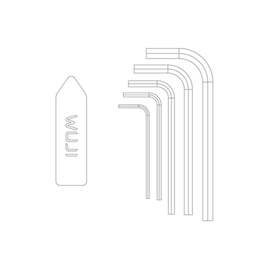
      <td><ul><li>六角扳手</li><li>撬棒：分离扣合的抗冲击转接座</li></ul></td>
    </tr>

    <tr>
      <td>
        <img src="https://mintcdn.com/wuji-0bbde051/isWZkBBshh11pitl/assets/source/images/zh/wuji-hand/v1/overview/accessories/accessory-kit.png?fit=max&auto=format&n=isWZkBBshh11pitl&q=85&s=df7dfa976ab3a6705ee76a23a248525a" alt="配件包" className="dark:hidden" width="270" height="270" data-path="assets/source/images/zh/wuji-hand/v1/overview/accessories/accessory-kit.png" />

        <img src="https://mintcdn.com/wuji-0bbde051/isWZkBBshh11pitl/assets/source/images/zh/wuji-hand/v1/overview/accessories/accessory-kit-dark.png?fit=max&auto=format&n=isWZkBBshh11pitl&q=85&s=bab56bf1e939117cd4da22a0234bcc8a" alt="配件包" className="hidden dark:block" width="270" height="270" data-path="assets/source/images/zh/wuji-hand/v1/overview/accessories/accessory-kit-dark.png" />
      </td>

      <td style={{ whiteSpace: 'nowrap' }}>配件包</td>
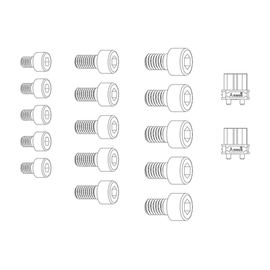
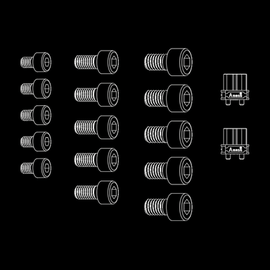
      <td><ul><li>内六角头螺钉：M4x6、M5x10、M6x10</li><li>XT30 母头</li></ul></td>
    </tr>

    <tr>
      <td>
        <img src="https://mintcdn.com/wuji-0bbde051/isWZkBBshh11pitl/assets/source/images/zh/wuji-hand/v1/overview/accessories/usb-atoc-cable.png?fit=max&auto=format&n=isWZkBBshh11pitl&q=85&s=3ede88346d2d9f8703f619d0f228b609" alt="USB A to USB C 线束" className="dark:hidden" width="270" height="270" data-path="assets/source/images/zh/wuji-hand/v1/overview/accessories/usb-atoc-cable.png" />

        <img src="https://mintcdn.com/wuji-0bbde051/isWZkBBshh11pitl/assets/source/images/zh/wuji-hand/v1/overview/accessories/usb-atoc-cable-dark.png?fit=max&auto=format&n=isWZkBBshh11pitl&q=85&s=377345bc3281a0270815bf5d10b1e7eb" alt="USB A to USB C 线束" className="hidden dark:block" width="270" height="270" data-path="assets/source/images/zh/wuji-hand/v1/overview/accessories/usb-atoc-cable-dark.png" />
      </td>

      <td style={{ whiteSpace: 'nowrap' }}>USB A to USB C 线束</td>
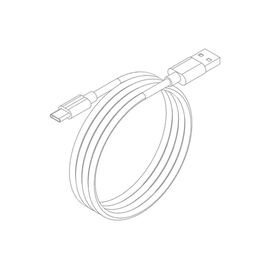
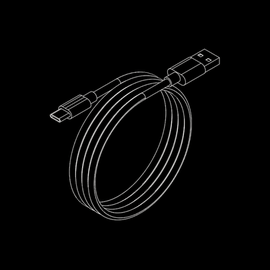
      <td>用于主机设备与 Wuji Hand 通信</td>
    </tr>

    <tr>
      <td>
        <img src="https://mintcdn.com/wuji-0bbde051/isWZkBBshh11pitl/assets/source/images/zh/wuji-hand/v1/overview/accessories/tactile-glove.png?fit=max&auto=format&n=isWZkBBshh11pitl&q=85&s=0fc9da3f83e1d73988a634de61386c35" alt="触觉感知手套" className="dark:hidden" width="270" height="270" data-path="assets/source/images/zh/wuji-hand/v1/overview/accessories/tactile-glove.png" />

        <img src="https://mintcdn.com/wuji-0bbde051/isWZkBBshh11pitl/assets/source/images/zh/wuji-hand/v1/overview/accessories/tactile-glove-dark.png?fit=max&auto=format&n=isWZkBBshh11pitl&q=85&s=734e9debe34ef0651a006025add540f4" alt="触觉感知手套" className="hidden dark:block" width="270" height="270" data-path="assets/source/images/zh/wuji-hand/v1/overview/accessories/tactile-glove-dark.png" />
      </td>

      <td style={{ whiteSpace: 'nowrap' }}>触觉感知手套（选配件）</td>
      <td>[请见触觉感知手套](#触觉感知手套)<br />是否随箱发货、配发左手或右手手套，均以实际订单为准</td>
    </tr>
  </tbody>
</table>

### 触觉感知手套

触觉感知手套（Tactile Sensing Glove）是 Wuji Hand 的选配触觉感知配件，面向科研与工程场景，可用于感知、数据采集、人机交互等任务，为算法适配、仿真建模与多模态融合提供统一的硬件基础。

* **高感知密度**：全掌均布传感器阵列，数量超过 400 个，每个传感器独立捕获接触状态，通过超分辨率进一步提升感知能力
* **高柔顺性**：完全柔性的 Nerve skin（柔性传感皮肤）可承载弯曲与拉伸形变，构建紧贴对象的动态感知阵列

#### 系统要求

<table>
  <thead>
    <tr>
      <th>分类</th>
      <th>项</th>
      <th>要求</th>
    </tr>
  </thead>

  <tbody>
    <tr>
      <td rowSpan="2">硬件准备</td>
      <td>USB-C 接口</td>
      <td>上位机至少 1 个空闲 USB-C 接口（USB 2.0 及以上）</td>
    </tr>

    <tr>
      <td>线缆</td>
      <td>配套 USB-C 数据线与短互联线（参考 <a href="#连接方式">连接方式</a>）</td>
    </tr>

    <tr>
      <td rowSpan="3">建议电脑配置</td>
      <td>CPU</td>
      <td>x86\_64 或 ARM64 架构</td>
    </tr>

    <tr>
      <td>内存</td>
      <td>≥ 16 GB，满足并行处理多个数据流与可视化显示</td>
    </tr>

    <tr>
      <td>存储</td>
      <td>≥ 1 GB 可用空间用于 SDK 与依赖安装</td>
    </tr>

    <tr>
      <td rowSpan="3">操作系统</td>
      <td>SDK 平台</td>
      <td>当前仅支持 Linux</td>
    </tr>

    <tr>
      <td>推荐发行版</td>
      <td>Ubuntu 22.04 / 24.04</td>
    </tr>

    <tr>
      <td>Windows 支持</td>
      <td>暂未支持，请等待后续版本</td>
    </tr>

    <tr>
      <td rowSpan="3">Wuji Hand SDK (wujihandpy)</td>
      <td>Python 版本</td>
      <td>3.8 – 3.14</td>
    </tr>

    <tr>
      <td>依赖</td>
      <td>numpy</td>
    </tr>

    <tr>
      <td>安装</td>
      <td><code>pip install wujihandpy</code></td>
    </tr>

    <tr>
      <td rowSpan="2">Wuji Hand SDK (wujihandcpp)</td>
      <td>发布包</td>
      <td>Deb / RPM，可直接安装</td>
    </tr>

    <tr>
      <td>构建说明</td>
      <td>详见 <a href="https://github.com/wuji-technology/wujihandpy/tree/main/wujihandcpp">wujihandcpp</a></td>
    </tr>

    <tr>
      <td>USB 设备权限（Linux）</td>
      <td>udev 规则</td>

      <td>
        添加规则后无需 sudo 访问设备：

        <pre>
          <code>
            {`echo 'SUBSYSTEM=="usb", ATTR{idVendor}=="0483", MODE="0666"' | \\
                        sudo tee /etc/udev/rules.d/95-wujihand.rules && \\
                        sudo udevadm control --reload-rules && sudo udevadm trigger`}
          </code>
        </pre>
      </td>
    </tr>
  </tbody>
</table>

#### 手套参数规格

| 参数 | 技术指标 |
| - | - |
| 压力范围 | 0 - 400 kPa |
| 测量方式 | 压力-电阻 |
| 寿命 | > 100,000 次 |
| 误差范围 | ± 6% |
| 正常使用温度范围 | 0 \~ 40 °C |
| 存储温度范围 | -20 \~ 60 °C |
| 通信频率 | 120 FPS |
| 工作电压 | 3.3 V |
| 工作电流 | 300 mA |
| 通信方式 | USB |
| 重量 | 约 50 g |
| 传感器数量 | > 400 |
| 传感器分布 | 全掌，动态分布 |
| 传感器物理分辨率 | ≤ 40 mm² |

#### 连接方式

<Warning>
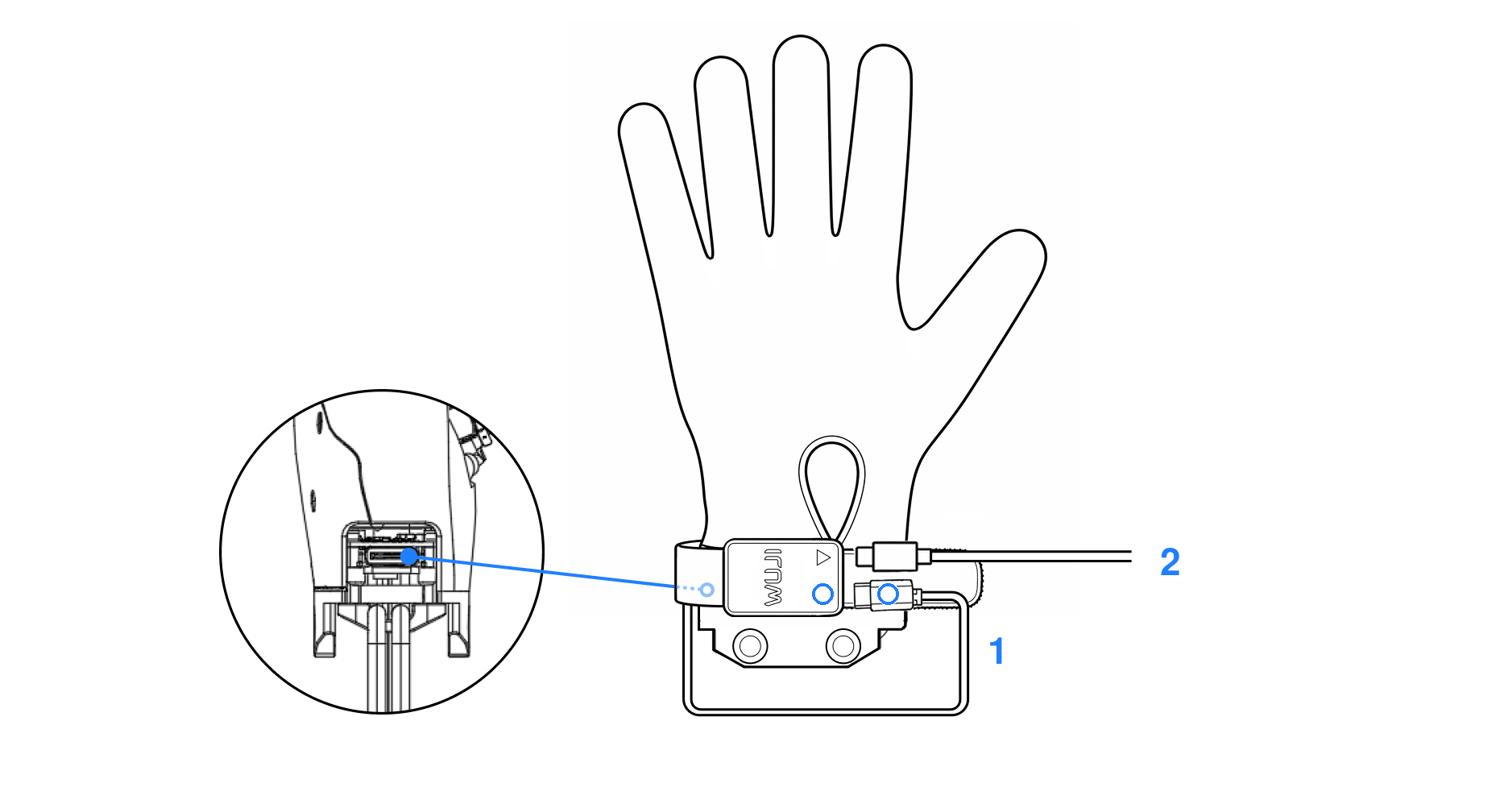
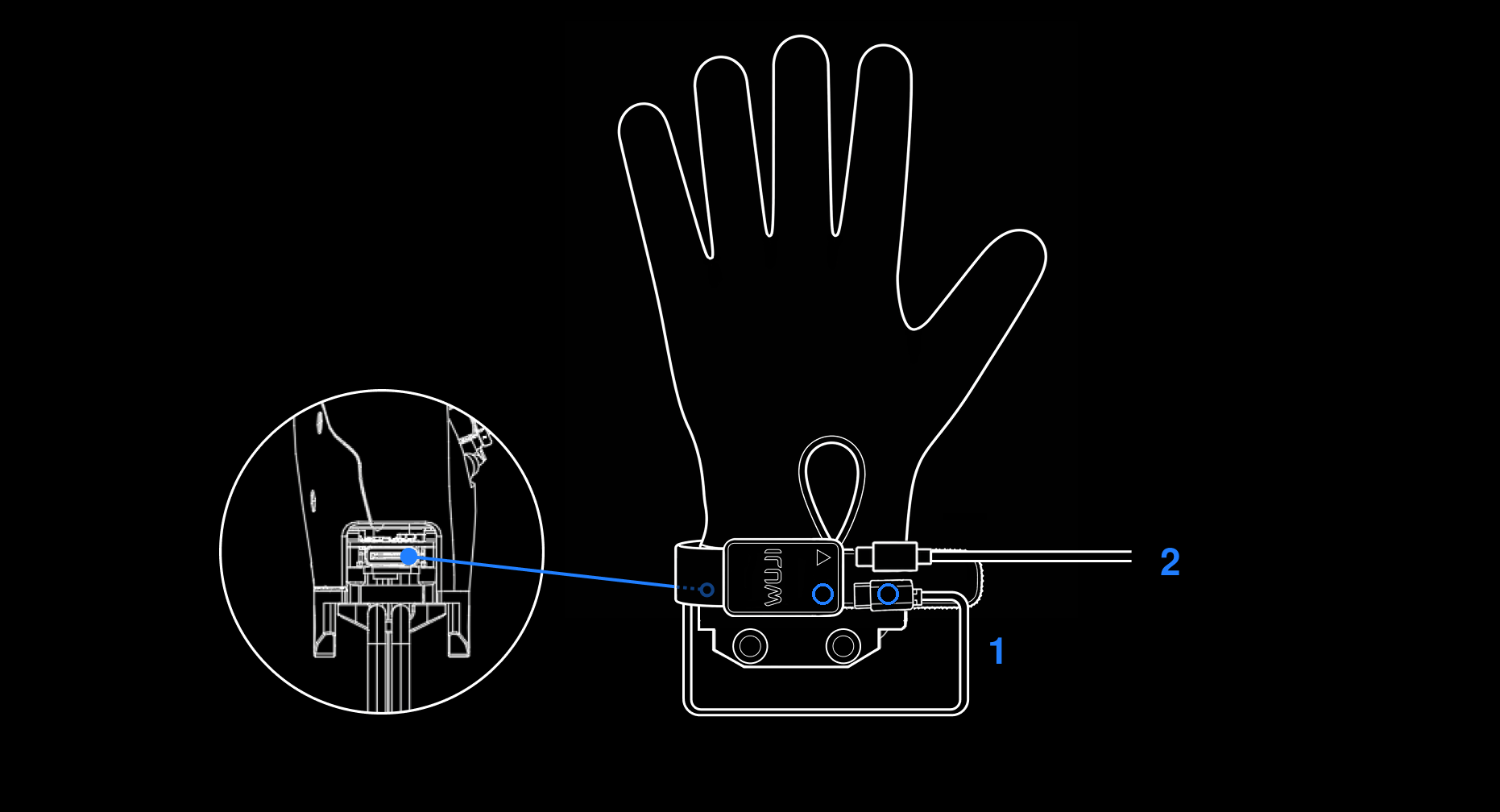
  拆装 Wuji Hand 触觉感知手套时，请先运行 Wuji Hand SDK [关节控制例程](https://github.com/wuji-technology/wujihandpy/tree/main/example/joint) 中的 `glove_donning.py`，将整手平滑切换至拇指对掌内收、其余四指基本伸直的拆装姿态，请勿强行拉扯，以免损坏手指关节。
</Warning>

<div className="dark:hidden">
  <img src="https://mintcdn.com/wuji-0bbde051/isWZkBBshh11pitl/assets/source/images/zh/wuji-hand/v1/overview/tactile-glove-connection.png?fit=max&auto=format&n=isWZkBBshh11pitl&q=85&s=c10b27485fa180d7a1232f11a8687f6a" alt="触觉感知手套连接示意图" width="1862" height="1008" data-path="assets/source/images/zh/wuji-hand/v1/overview/tactile-glove-connection.png" />
</div>

<div className="hidden dark:block">
  <img src="https://mintcdn.com/wuji-0bbde051/isWZkBBshh11pitl/assets/source/images/zh/wuji-hand/v1/overview/tactile-glove-connection-dark.png?fit=max&auto=format&n=isWZkBBshh11pitl&q=85&s=07d593aea112ff22e9b88408ed514027" alt="触觉感知手套连接示意图" width="1862" height="1008" data-path="assets/source/images/zh/wuji-hand/v1/overview/tactile-glove-connection-dark.png" />
</div>

1. 将标配短数据线标有**圆形标识**的一端连接至 Brain Watch 桥接端（**圆形标识**）。数据线另一端从 Wuji Hand 手腕内侧绕过后接入 Wuji Hand [通信接口](#通信与电源接口示意图)。
2. USB-C（USB 2.0 及以上）数据线与 PC 连接，任一 USB-C 端连接到 Brain Watch 输出端（三角标识），另一端连接至 PC。

#### 通信接口

产品当前提供单一对外通信接口，简化上位机适配与集成路径。

<table>
  <thead>
    <tr>
      <th>分类</th>
      <th>项</th>
      <th>说明</th>
    </tr>
  </thead>

  <tbody>
    <tr>
      <td>物理接口</td>
      <td>接口类型</td>
      <td>USB-C（USB 2.0 及以上）</td>
    </tr>

    <tr>
      <td rowSpan="3">传输协议</td>
      <td>模式</td>
      <td>USB CDC（虚拟串口），主机识别为标准串行设备</td>
    </tr>

    <tr>
      <td>Linux 节点</td>
      <td><code>/dev/ttyACM\*</code></td>
    </tr>

    <tr>
      <td>USB 标识</td>
      <td>VID = <code>0x0483</code><br />PID = <code>0x5700</code></td>
    </tr>

    <tr>
      <td rowSpan="2">数据流</td>
      <td>推送速率</td>
      <td>最高 120 FPS，24 × 32 浮点压力帧</td>
    </tr>

    <tr>
      <td>帧结构</td>
      <td>含序号、时间戳与 CRC 校验，SDK 完成帧同步、丢帧统计与重连</td>
    </tr>

    <tr>
      <td rowSpan="2">数据读取方式</td>
      <td>推荐</td>
      <td>官方 SDK（C++ / Python），获取结构化帧数据</td>
    </tr>

    <tr>
      <td>调试</td>
      <td>通用串口工具读取原始字节流</td>
    </tr>
  </tbody>
</table>

#### 软件支持

官方 SDK 提供完整的数据访问与设备控制能力，覆盖从算法验证到生产部署的全流程。完整 API 参考见 [SDK 使用说明 — 触觉感知手套](/docs/wujihandpy/api-reference/#触觉感知手套)。

**SDK 接口**

提供 C++ 与 Python 两套接口，共享底层实现，行为一致：

| SDK | 源码 | 安装方式 | 适用场景 |
| - | - | - | - |
| Wuji Hand SDK (wujihandpy) | [wuji-technology/wujihandpy](https://github.com/wuji-technology/wujihandpy) | `pip install wujihandpy` | 算法验证、数据采集、快速集成 |
| Wuji Hand SDK (wujihandcpp) | [wujihandpy 仓内的 wujihandcpp 目录](https://github.com/wuji-technology/wujihandpy/tree/main/wujihandcpp) | Deb / RPM / 源码构建 | 生产部署、低延迟实时控制 |

**主要 API 功能**

* 连接管理：`connect()` / `disconnect()` / `is_connected()`，支持按 USB 序列号区分多设备
* 帧读取：阻塞式 `read_frame(timeout_ms)` 或回调式流式读取 `start_streaming(callback)` / `stop_streaming()`
* 设备信息：`get_device_info()`（序列号 / 硬件版本 / 固件版本）、`get_fw_build()`、`get_handedness()`
* 诊断统计：`get_diagnostics()`（上电时长 / 帧计数 / CRC 错误 / 丢帧 / USB 重置）、`reset_counters()`
* 运行配置：`get_sample_rate_hz()` / `set_sample_rate_hz()`（1–120 Hz）、`set_streaming(enable)`
* 时间同步：`get_device_time()`、`sync_host_epoch(host_unix_ns)`，便于多设备时间对齐
* 生命周期：`reset_device()` 软复位
* 异常处理：USB 断连自动触发 DisconnectCallback，C++ 抛出 `ConnectionLostError`，Python 抛出对应异常

**联合使用**

触觉手套与 Wuji Hand 使用独立的 USB 传输与线程，可在同一进程内并行操作（参见 `example/joint_with_tactile.py`），实现触觉反馈驱动运动控制等闭环场景。

### 抗冲击转接座

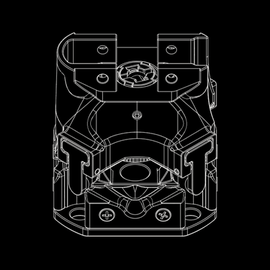
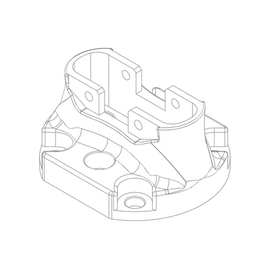
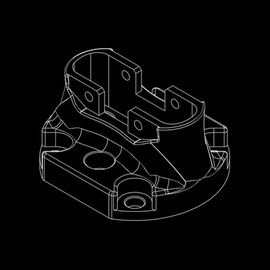
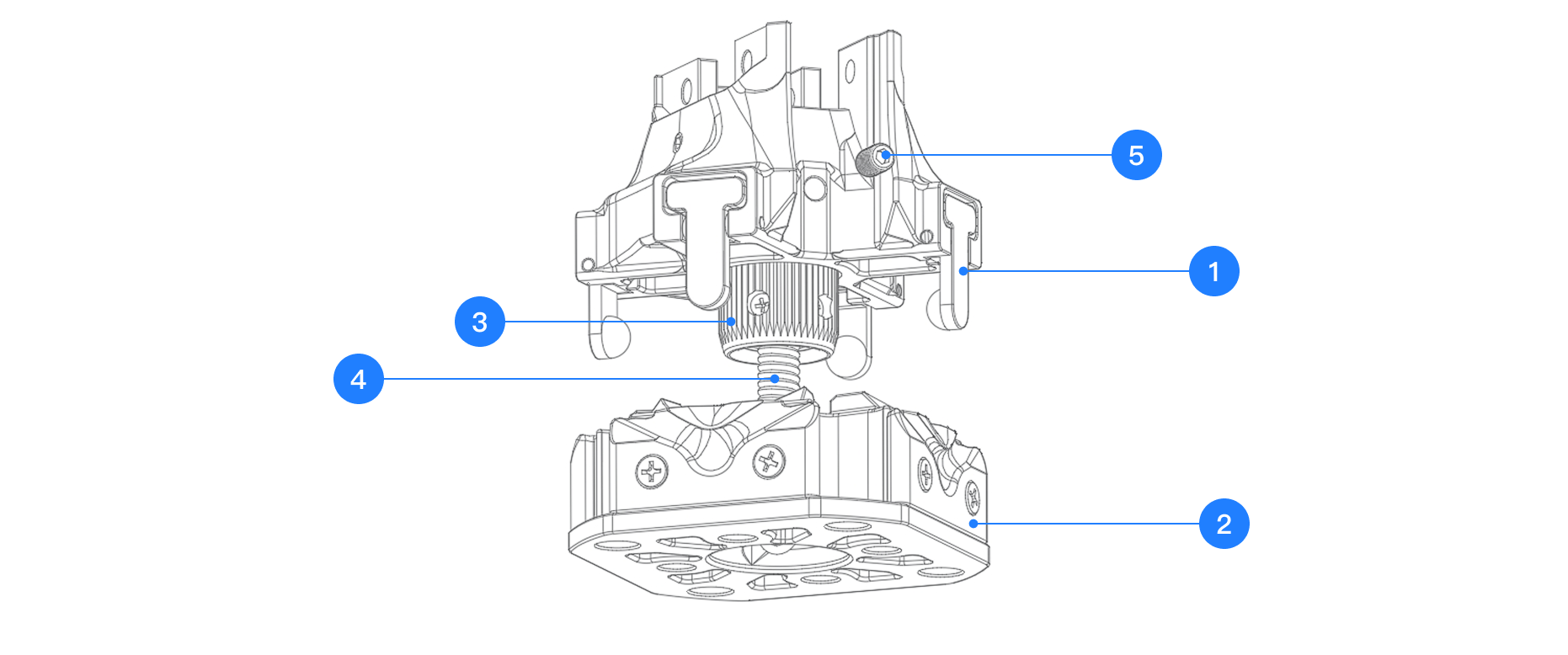
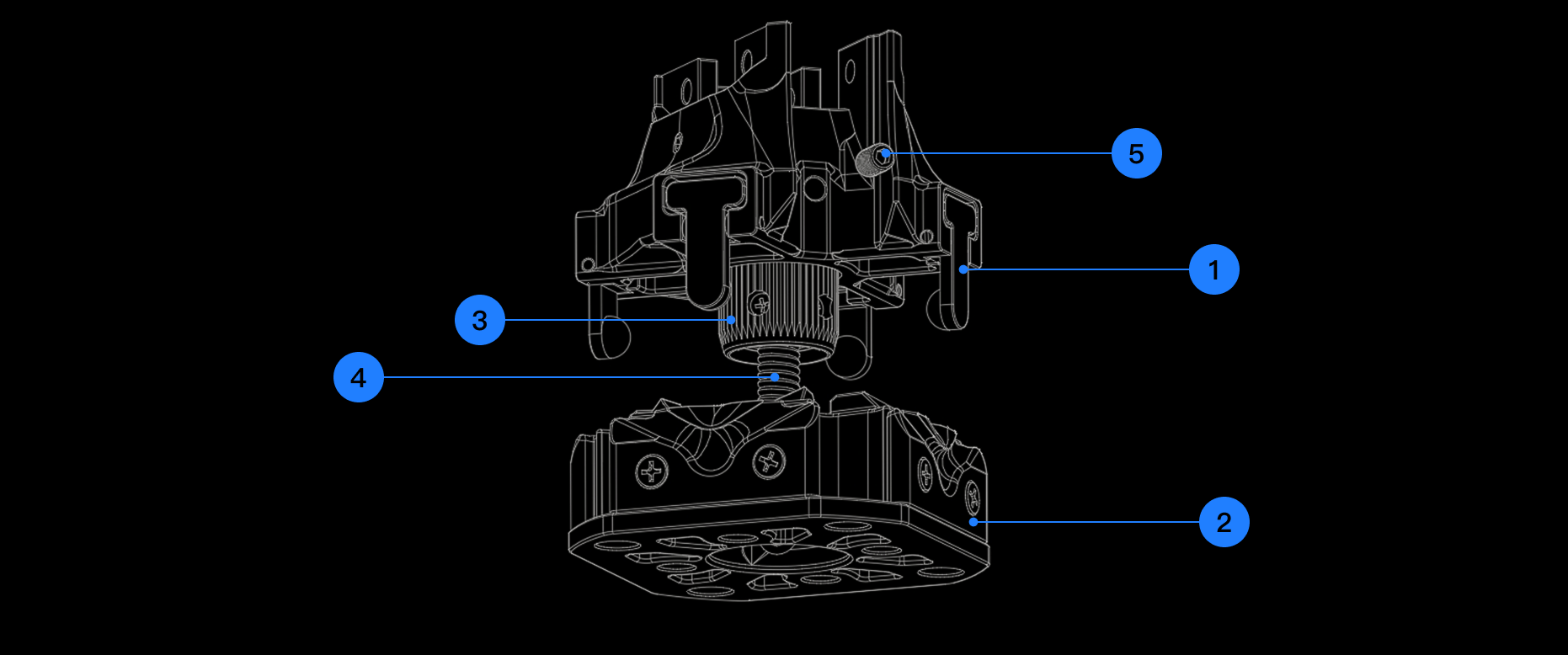
抗冲击转接座采用旋扣和卡槽的锁定结构，在正常状态下保持高刚性连接。当遭遇超过安全阈值的外力冲击（如机械臂失控或末端强烈碰撞）时， Wuji Hand 与机械臂端将触发主动分离，保护关键部件（关节、电机、减速器等）免于损坏。此设计确保在提升可靠性的同时，最大限度降低维护与维修风险。

* **正常状态：** 旋扣与紧定螺丝锁紧，保证结构稳定，不会因日常振动或小幅冲击而松脱。
* **异常状态：** 超过安全阈值时自动释放，Wuji Hand 通过安全链悬挂，避免二次冲击或跌落隐患。

<Info>
  该触发机制经过工程优化，确保在日常小幅度震动或常规操作下不会误触发，只针对超过安全阈值的剧烈冲击有效。该机制主要覆盖大部分常见的冲击与易损场景，并不能完全避免所有极端情况下的潜在损伤。
</Info>

<div className="dark:hidden">
  <img src="https://mintcdn.com/wuji-0bbde051/isWZkBBshh11pitl/assets/source/images/zh/wuji-hand/v1/overview/anti-impact-adapter-components-2025-11.png?fit=max&auto=format&n=isWZkBBshh11pitl&q=85&s=9d48e4a3cac0e457572ad77baf0069c6" alt="抗冲击转接座组件名称" width="1862" height="778" data-path="assets/source/images/zh/wuji-hand/v1/overview/anti-impact-adapter-components-2025-11.png" />
</div>

<div className="hidden dark:block">
  <img src="https://mintcdn.com/wuji-0bbde051/isWZkBBshh11pitl/assets/source/images/zh/wuji-hand/v1/overview/anti-impact-adapter-components-2025-11-dark.png?fit=max&auto=format&n=isWZkBBshh11pitl&q=85&s=c2a030d3ad58e3cb664446895c27eaa0" alt="抗冲击转接座组件名称" width="1862" height="778" data-path="assets/source/images/zh/wuji-hand/v1/overview/anti-impact-adapter-components-2025-11-dark.png" />
</div>

| 序号 | 组件名称 |
| :-: | :- |
| 1 | 四爪锁扣 |
| 2 | 沟槽法兰 |
| 3 | 旋扣 |
| 4 | 安全链 |
| 5 | 紧定螺丝 |

## 安装与拆卸

<Warning>
  **安全警示**：

  * 拆装过程中必须在断电状态下进行，禁止带电操作
  * 安装完成后，确认旋扣完全旋紧并已锁定紧定螺丝，方可启动机械臂
</Warning>

### 安装步骤

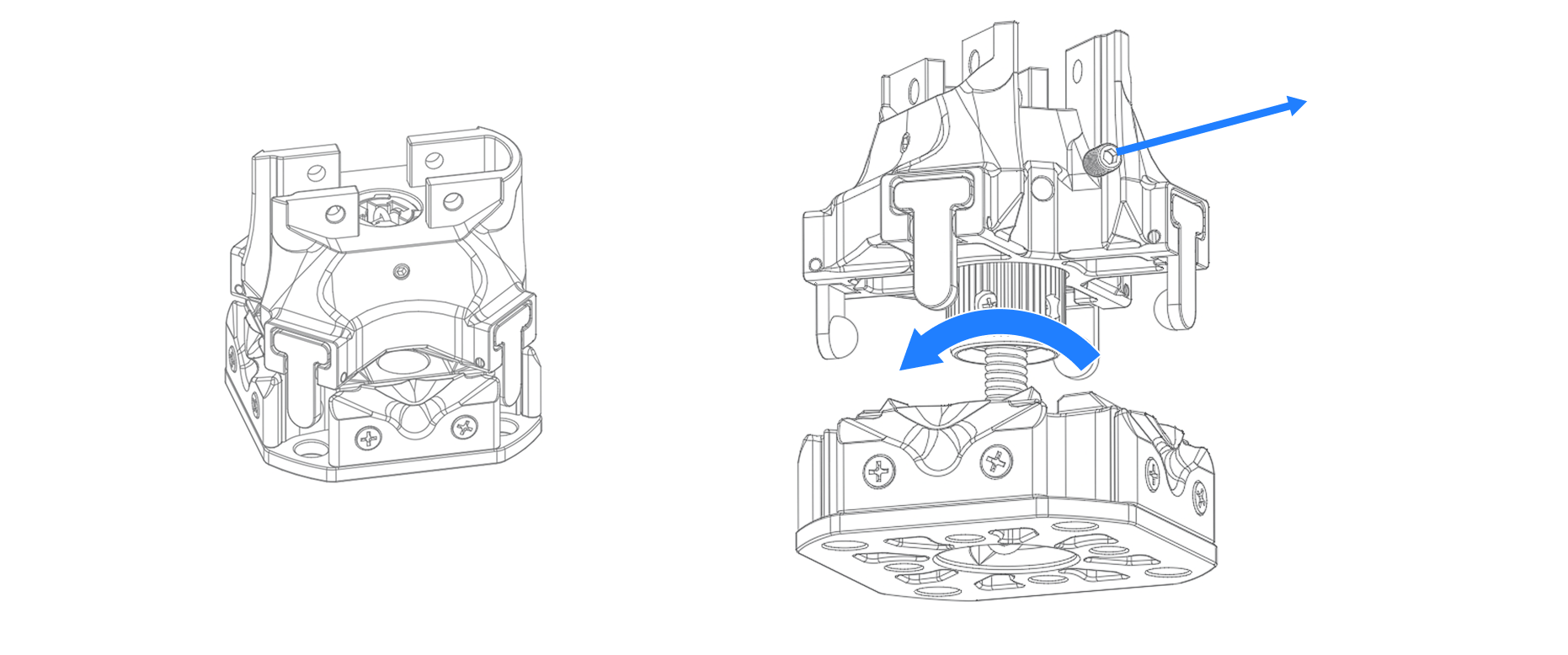
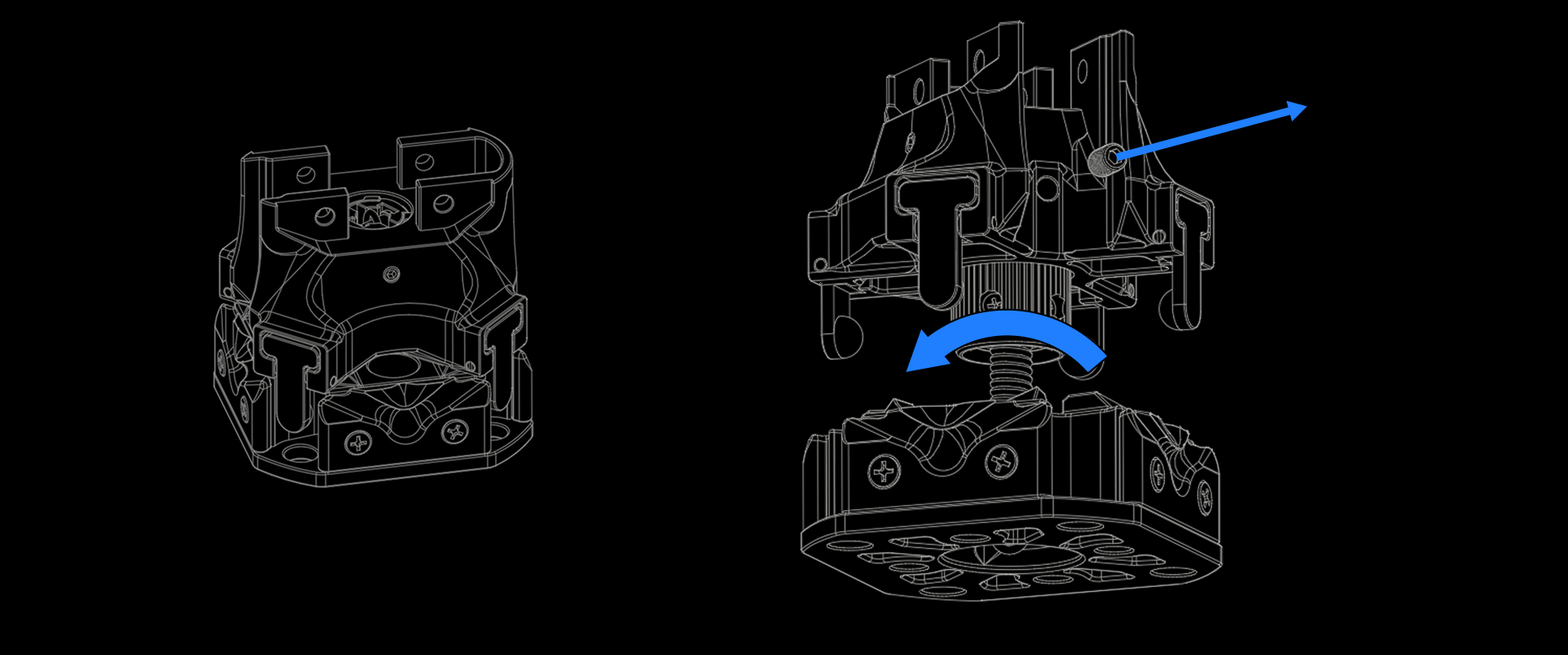
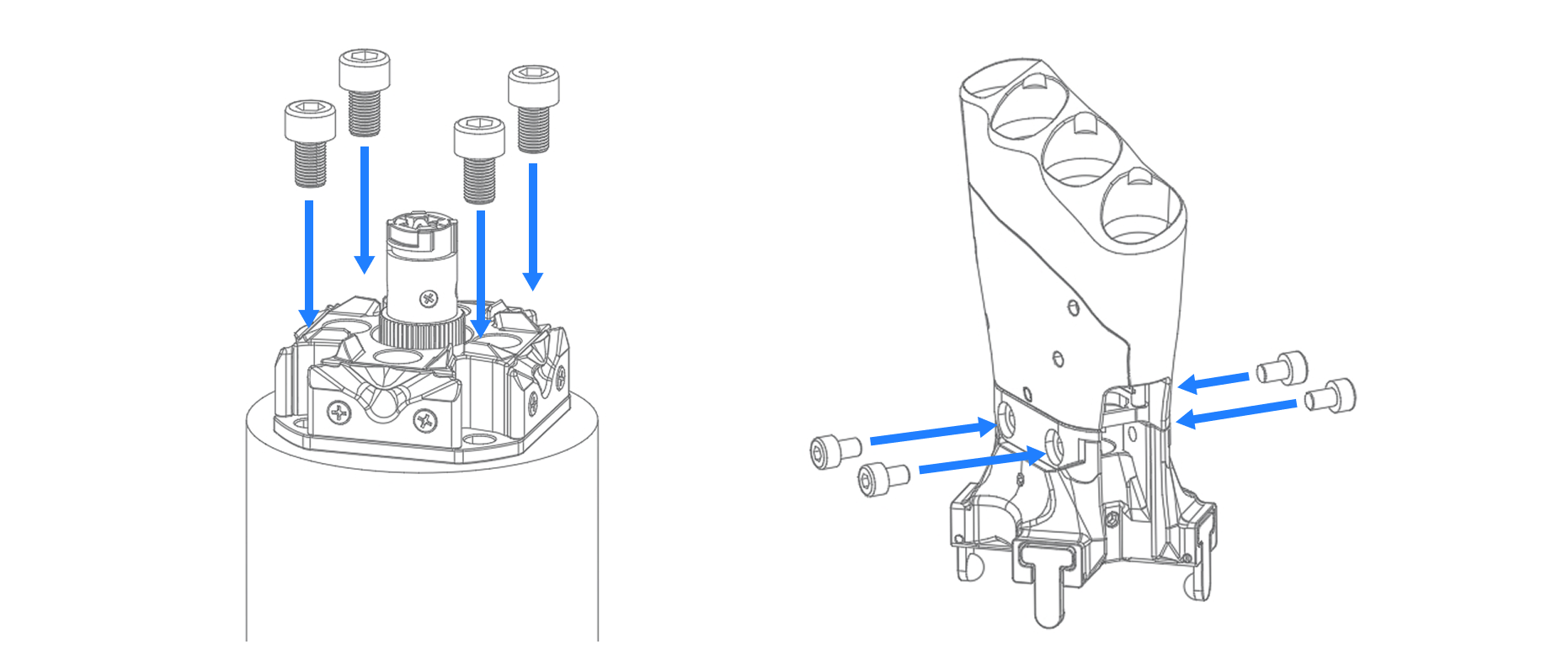
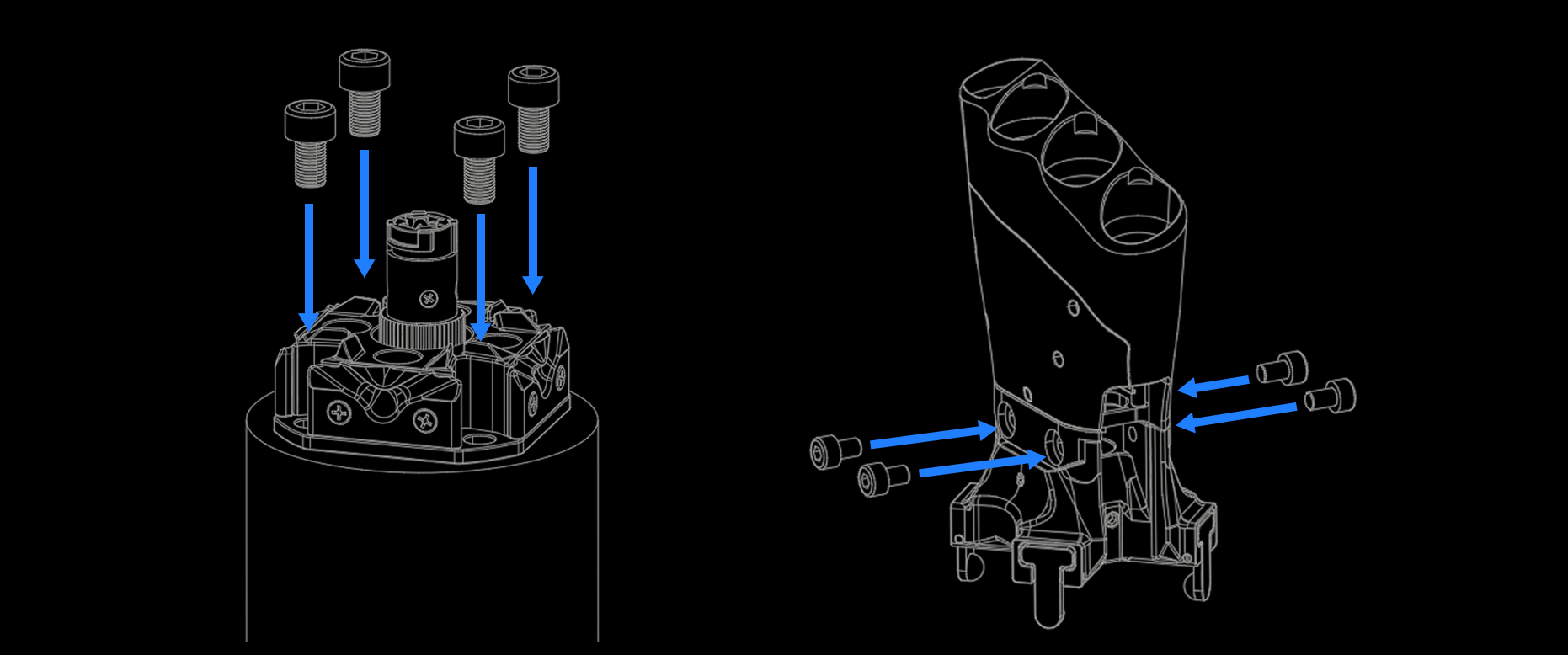
**步骤 1：** 将抗冲击转接座从包装中取出（图左），将四爪锁扣与沟槽法兰拉开（图右），取下紧定螺丝并逆时针旋开旋扣，分离上下两个部件。

<div className="dark:hidden">
  <img src="https://mintcdn.com/wuji-0bbde051/isWZkBBshh11pitl/assets/source/images/zh/wuji-hand/v1/overview/anti-impact-adapter-step1.png?fit=max&auto=format&n=isWZkBBshh11pitl&q=85&s=1c101f6120691a2ff111a8776d0a393a" alt="抗冲击转接座" width="1862" height="778" data-path="assets/source/images/zh/wuji-hand/v1/overview/anti-impact-adapter-step1.png" />
</div>

<div className="hidden dark:block">
  <img src="https://mintcdn.com/wuji-0bbde051/isWZkBBshh11pitl/assets/source/images/zh/wuji-hand/v1/overview/anti-impact-adapter-step1-dark.png?fit=max&auto=format&n=isWZkBBshh11pitl&q=85&s=08c8979a8456cf5cc0d6997e4298f432" alt="抗冲击转接座" width="1862" height="778" data-path="assets/source/images/zh/wuji-hand/v1/overview/anti-impact-adapter-step1-dark.png" />
</div>

**步骤 2：** 使用螺钉将沟槽法兰连接到用户设备上（如机械臂），沟槽法兰上提供了两种孔位尺寸，配套的螺钉尺寸分别为 M5×10、M6×10。使用尺寸为 M4×6 的螺钉将 Wuji Hand 与四爪锁扣连接。

<div className="dark:hidden">
  <img src="https://mintcdn.com/wuji-0bbde051/isWZkBBshh11pitl/assets/source/images/zh/wuji-hand/v1/overview/anti-impact-adapter-step2-3.png?fit=max&auto=format&n=isWZkBBshh11pitl&q=85&s=841b872a2e47046f878663562e77a3fd" alt="沟槽法兰与四爪锁扣连接" width="1862" height="778" data-path="assets/source/images/zh/wuji-hand/v1/overview/anti-impact-adapter-step2-3.png" />
</div>

<div className="hidden dark:block">
  <img src="https://mintcdn.com/wuji-0bbde051/isWZkBBshh11pitl/assets/source/images/zh/wuji-hand/v1/overview/anti-impact-adapter-step2-3-dark.png?fit=max&auto=format&n=isWZkBBshh11pitl&q=85&s=9c8be8f305ab4cb36e187c79ba26abab" alt="沟槽法兰与四爪锁扣连接" width="1862" height="778" data-path="assets/source/images/zh/wuji-hand/v1/overview/anti-impact-adapter-step2-3-dark.png" />
</div>

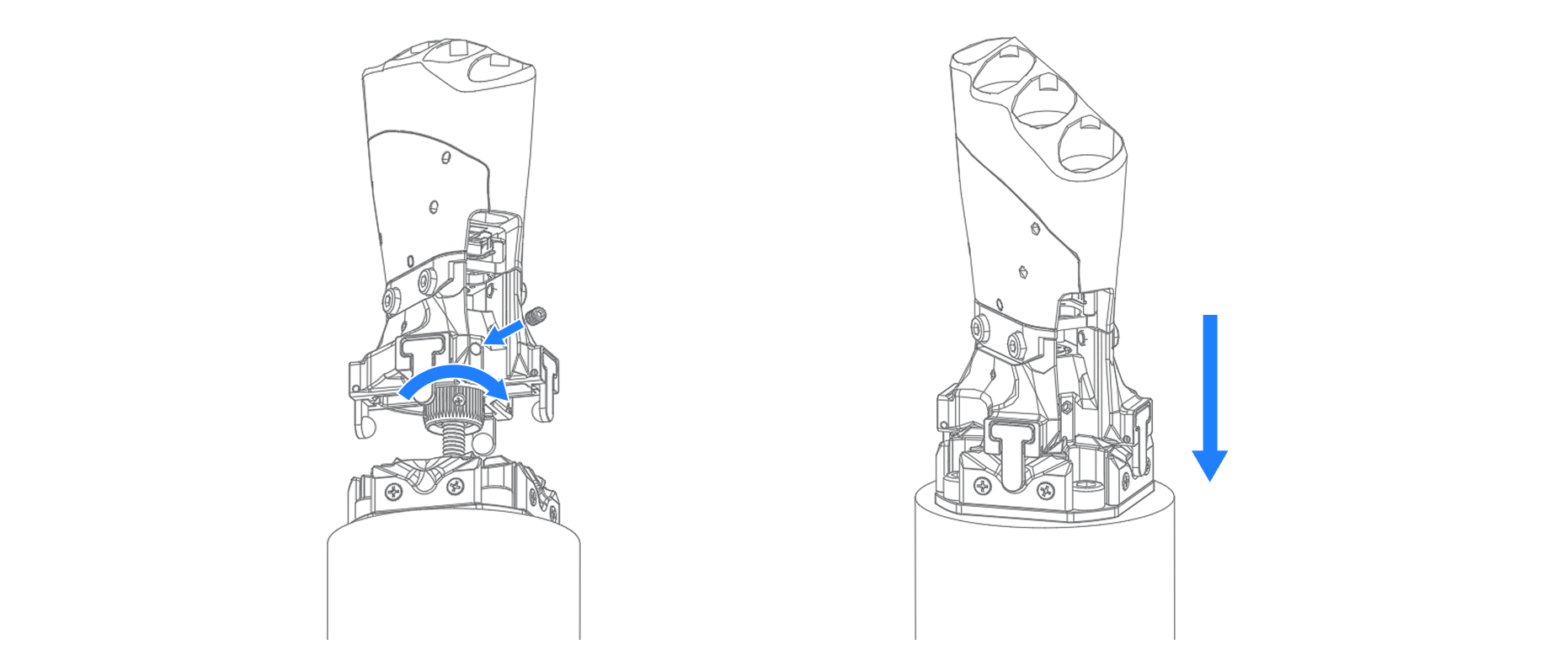
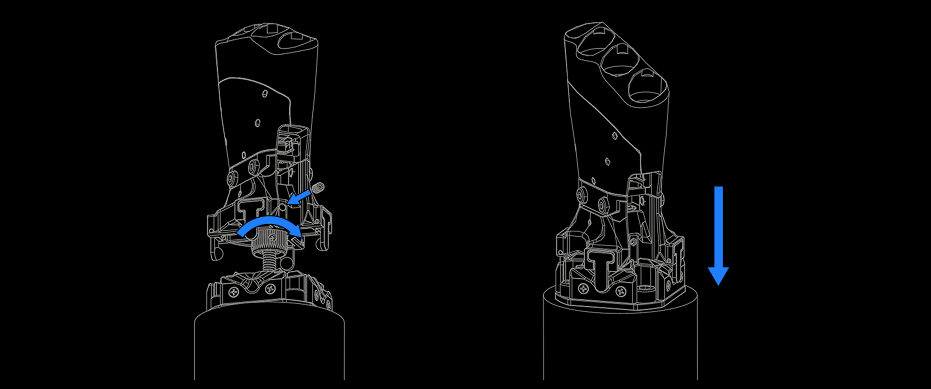
**步骤 3：** 将旋扣插入四爪锁扣中，并顺时针旋紧（轻扯安全链，旋扣不会滑脱）。拧上紧定螺丝。将四爪锁扣对准沟槽法兰的定位槽，按下扣合即完成抗冲击转接座的安装。

<div className="dark:hidden">
  <img src="https://mintcdn.com/wuji-0bbde051/isWZkBBshh11pitl/assets/source/images/zh/wuji-hand/v1/overview/anti-impact-adapter-step3-4.png?fit=max&auto=format&n=isWZkBBshh11pitl&q=85&s=2fd1df61126c672320a1557949690174" alt="旋扣旋紧与安装完成" width="1862" height="778" data-path="assets/source/images/zh/wuji-hand/v1/overview/anti-impact-adapter-step3-4.png" />
</div>

<div className="hidden dark:block">
  <img src="https://mintcdn.com/wuji-0bbde051/isWZkBBshh11pitl/assets/source/images/zh/wuji-hand/v1/overview/anti-impact-adapter-step3-4-dark.png?fit=max&auto=format&n=isWZkBBshh11pitl&q=85&s=efe4dba9162395b3e6b98365970e103b" alt="旋扣旋紧与安装完成" width="931" height="389" data-path="assets/source/images/zh/wuji-hand/v1/overview/anti-impact-adapter-step3-4-dark.png" />
</div>

### 注意事项

#### 紧固检查

* 使用推荐规格螺钉，严禁使用长度不足或规格不符的螺钉
* 建议按对角线顺序逐一紧固，以保证法兰面贴合均匀
* 若有条件，可根据螺钉规格配置推荐力矩扳手，确保拧紧力矩符合标准

#### 维护与检修

* 每次安装或拆卸后，应检查 **安全链、旋扣** 是否灵活、无磨损、挂点是否松动
* 若在运行中触发抗冲击释放，应在重新安装前检查安装螺丝是否松动、旋扣锁定机构是否完好

## Wuji SDK 数据类型

### HandJointStates

20 关节实时状态（`hand.joint_states().subscribe()` 订阅帧）。手指顺序为 finger-major：`{left,right}_finger{1..5}_joint{1..4}`。

| 字段 | 类型 | 说明 |
| - | - | - |
| `header` | `FrameHeader` | 帧头 |
| `position` | `list[float]` | 20 关节弧度位置，始终长度 20 |
| `velocity` | `list[float]` | 角速度，未提供时长度 0 |
| `effort` | `list[float]` | 关节力矩，未提供时长度 0 |

```json theme={null}
{
  "header": { "seq": 42, "timestamp_us": 1709876543210, "frame_id": "" },
  "position": [0.001, -0.012, 0.087, 0.045, ...],
  "velocity": [],
  "effort": []
}
```

### HandJointCommand

20 关节指令帧。`seq` 由客户端单调递增，便于接收方检测丢帧。

| 字段 | 类型 | 说明 |
| - | - | - |
| `seq` | `int` | 客户端自增序号 |
| `position` | `list[float]` | 目标位置，长度 20 |
| `velocity` | `list[float]` | 目标速度，可选 |
| `effort` | `list[float]` | 目标力矩，可选 |

### TactileGloveFrame

配对触觉手套的单帧压力数据，24×32 网格。

| 字段 | 类型 | 说明 |
| - | - | - |
| `handedness` | `int` | 手性（0 = 左、1 = 右，注意与 `WujiHand` SDO 端编码相反） |
| `sequence` | `int` | 帧序号 |
| `timestamp_ms` | `int` | 设备时间戳（毫秒） |
| `pressure` | `list[float]` | 768 个 f32 压力值，按 24×32 行主序 |

## Wuji Hand SDK 订阅

### Wuji Hand 数据订阅

Wuji Hand 产品文档已归档，订阅接口说明随本页维护。设备 USB 直连，Python 由 `wuji_sdk.WujiHand` 暴露，C 由 `wuji_hand_*` 系列函数暴露。

| 操作 | Python | C |
| - | - | - |
| 订阅关节状态 | `hand.joint_states().subscribe()` | `wuji_hand_subscribe_joint_states()` |
| 读取关节位置快照 | 无对应接口，从订阅帧读取 | `wuji_hand_read_joint_state()` |
| 打开实时控制会话 | `hand.realtime_controller(LowPass(cutoff_hz=...))` | `wuji_hand_realtime_controller_open()`、`wuji_hand_realtime_controller_close()` |
| 发布 20 关节指令 | `hand.joint_command().publish()`、`publisher.send(joints)` | `wuji_hand_joint_command_publish()`、`wuji_hand_joint_command_publisher_send()` |
| 写入滤波目标位置 | 无对应接口，经 publisher 下发 | `wuji_hand_realtime_controller_set_target_position()` |
| 读回实际位置与力矩 | `ctrl.get_actual_position()`、`ctrl.get_actual_effort()` | `wuji_hand_realtime_controller_get_actual_position()`、`wuji_hand_realtime_controller_get_actual_effort()` |
| 读写力矩上限 | `hand.set_all_effort_limit(amps)`、`hand.get_all_effort_limit()` | `wuji_hand_set_all_effort_limit()`、`wuji_hand_get_all_effort_limit()` |
| 探测触觉手套在位 | `hand.is_tactile_attached()` | `wuji_hand_is_tactile_attached()` |
| 订阅触觉压力帧 | `hand.tactile.subscribe_pressure_frame()` | `wuji_hand_subscribe_tactile_pressure_frame()` |
| 订阅触觉状态 | `hand.tactile_status().subscribe()` | `wuji_hand_subscribe_tactile_status()` |
| 读取触觉手套信息、诊断与手性 | 无对应接口 | `wuji_hand_get_tactile_device_info()`、`wuji_hand_get_tactile_diagnostics()`、`wuji_hand_get_tactile_handedness()` |

#### 订阅关节状态

订阅 20 关节实时位置，可选含速度与力矩：

<Tabs>
  <Tab title="Python">
    ```python theme={null}
    sub = hand.joint_states().subscribe()
    for _ in range(100):
        state = await sub.recv_async()
        print(f"seq={state.header.seq}, joint0={state.position[0]:+.3f}")
    sub.close()
    ```
  </Tab>

  <Tab title="C">
    ```c theme={null}
    void on_state(WujiFrameKind kind, const WujiHandJointStates *frame, void *user) {
        if (kind != WUJI_FRAME_KIND_OK) return;
        printf("seq=%u, joint0=%+.3f\n", frame->header.seq, frame->position[0]);
    }

    WujiSub *sub = NULL;
    wuji_hand_subscribe_joint_states(hand, on_state, NULL, &sub);
    // ... 后台接收一段时间后
    wuji_sub_close(sub);
    ```
  </Tab>
</Tabs>

Python 的 `hand.joint_states().subscribe()` 返回 `Subscription[HandJointStates]`。C 侧同一数据由 `WujiHandJointStates` 承载，`position` / `velocity` / `effort` 三个数组各带一个长度字段。

#### 发布关节指令（实时控制）

实时控制会话用低通滤波抑制高频抖动。会话内取 PUB 句柄，每次推送恰好 20 个关节指令（每项 `position` / `velocity` / `effort`），指令结构与 Wuji Hand 2 相同，控制代码可在 Wuji Hand 2 与 Wuji Hand 之间直接迁移：

<Tabs>
  <Tab title="Python">
    ```python theme={null}
    from wuji_sdk import JointCommand, LowPass

    with hand.realtime_controller(LowPass(cutoff_hz=5.0)) as ctrl:
        publisher = hand.joint_command().publish()
        joints = [JointCommand(0.0, 0.0, 0.0)] * 20
        joints[0] = JointCommand(0.3, 0.0, 0.0)
        publisher.send(joints)
        print(ctrl.get_actual_position()[0], ctrl.get_actual_effort()[0])
        publisher.close()
    ```
  </Tab>

  <Tab title="C">
    ```c theme={null}
    WujiRealtimeController *ctrl = NULL;
    WujiLowPass filter = { .cutoff_hz = 5.0 };
    wuji_hand_realtime_controller_open(hand, filter, &ctrl);

    WujiHandJointCommandPublisher *pub = NULL;
    wuji_hand_joint_command_publish(hand, &pub);

    WujiJointCommand joints[20] = {0};
    joints[0].position = 0.3f;
    wuji_hand_joint_command_publisher_send(pub, joints);

    float actual_pos[20], actual_eff[20];
    wuji_hand_realtime_controller_get_actual_position(ctrl, actual_pos);
    wuji_hand_realtime_controller_get_actual_effort(ctrl, actual_eff);
    printf("%.3f %.3f\n", actual_pos[0], actual_eff[0]);

    wuji_hand_joint_command_publisher_close(pub);
    wuji_hand_realtime_controller_close(ctrl);
    ```
  </Tab>
</Tabs>

持续控制时按固定频率（典型 100 Hz）循环下发指令。会话句柄支持随时读回实际状态：实际位置为 20 关节弧度值，实际力矩为 20 关节安培值，两者都从非阻塞缓存读取，不影响控制频率。会话句柄可以跨线程共享，不需要加锁，例如一个线程按固定频率下发目标，另一个线程读回实际位置。

C 侧的 publisher 与控制器句柄都需显式释放：`wuji_hand_joint_command_publisher_close()` 与 `wuji_hand_realtime_controller_close()` 对空指针安全，但漏调会泄漏资源。

#### 电机力矩上限

把 20 个关节的力矩上限统一设为指定安培值，并读回长度 20 的数组：

<Tabs>
  <Tab title="Python">
    ```python theme={null}
    hand.set_all_effort_limit(1.5)
    limits = hand.get_all_effort_limit()
    ```
  </Tab>

  <Tab title="C">
    ```c theme={null}
    wuji_hand_set_all_effort_limit(hand, 1.5f);

    float limits[20];   // finger-major 排列
    wuji_hand_get_all_effort_limit(hand, limits);
    ```
  </Tab>
</Tabs>

* 默认值 1.5 A，适用于大多数场景
* 合法范围 0.0–3.5 A，超过 3.5 会被限制到 3.5

修改力矩上限会改变关节最大输出能力。固件还会根据关节温度自动降低实际生效的值。完整说明与风险提示见 [Wuji Hand SDK 使用说明 — joint\_effort\_limit](/docs/wujihandpy/api-reference/#joint_effort_limit)。

#### 触觉感知手套同步数据

手与触觉感知手套同 USB 总线接入且手性匹配时，SDK 在连接过程中自动配对。检测配对状态并订阅压力帧：

<Tabs>
  <Tab title="Python">
    ```python theme={null}
    if hand.is_tactile_attached():
        tactile_sub = hand.tactile.subscribe_pressure_frame()
        frame = await tactile_sub.recv_async()
        print(f"max pressure: {max(frame.pressure):.2f}")
        tactile_sub.close()
    ```
  </Tab>

  <Tab title="C">
    ```c theme={null}
    void on_pressure(WujiFrameKind kind, const WujiTactileGloveFrame *frame, void *user) {
        if (kind != WUJI_FRAME_KIND_OK) return;
        float max = 0.0f;
        for (size_t i = 0; i < frame->pressure_len; i++) {
            if (frame->pressure[i] > max) max = frame->pressure[i];
        }
        printf("max pressure: %.2f\n", max);
    }

    bool attached = false;
    wuji_hand_is_tactile_attached(hand, &attached);
    if (attached) {
        WujiSub *tactile_sub = NULL;
        wuji_hand_subscribe_tactile_pressure_frame(hand, on_pressure, NULL, &tactile_sub);
        // ... 后台接收一段时间后
        wuji_sub_close(tactile_sub);
    }
    ```
  </Tab>
</Tabs>

C 侧另有三个触觉信息读取接口：`wuji_hand_get_tactile_device_info`（写入 `WujiTactileGloveDeviceInfo`）、`wuji_hand_get_tactile_diagnostics`（写入 `WujiTactileGloveDiagnostics`）与 `wuji_hand_get_tactile_handedness`（写入 `uint8_t`）。前两个函数返回 `WUJI_STATUS_OK` 时 `out` 持有堆字段，用完分别调用 `wuji_tactile_glove_device_info_free` 与 `wuji_tactile_glove_diagnostics_free` 释放，非 OK 状态下不要释放。手套不在位或故障时，这些调用返回错误状态，具体原因通过 `wuji_last_error()` 获取。

<Warning>
  `wuji_hand_get_handedness` 与 `wuji_hand_get_tactile_handedness` 都返回原始 `uint8_t`，但编码彼此相反，不能混用。`wuji_hand_get_handedness` 是 `0` = 右、`1` = 左，与 `WujiHandedness` 枚举相反，直接套用枚举会把左右颠倒。`wuji_hand_get_tactile_handedness` 是 `0` = 左、`1` = 右，与枚举一致。
</Warning>


This documentation is built and hosted on [Mintlify](https://mintlify.com), a developer documentation platform.