> ## Documentation Index
> Fetch the complete documentation index at: https://docs.wuji.tech/llms.txt
> Use this file to discover all available pages before exploring further.

# 面板介绍

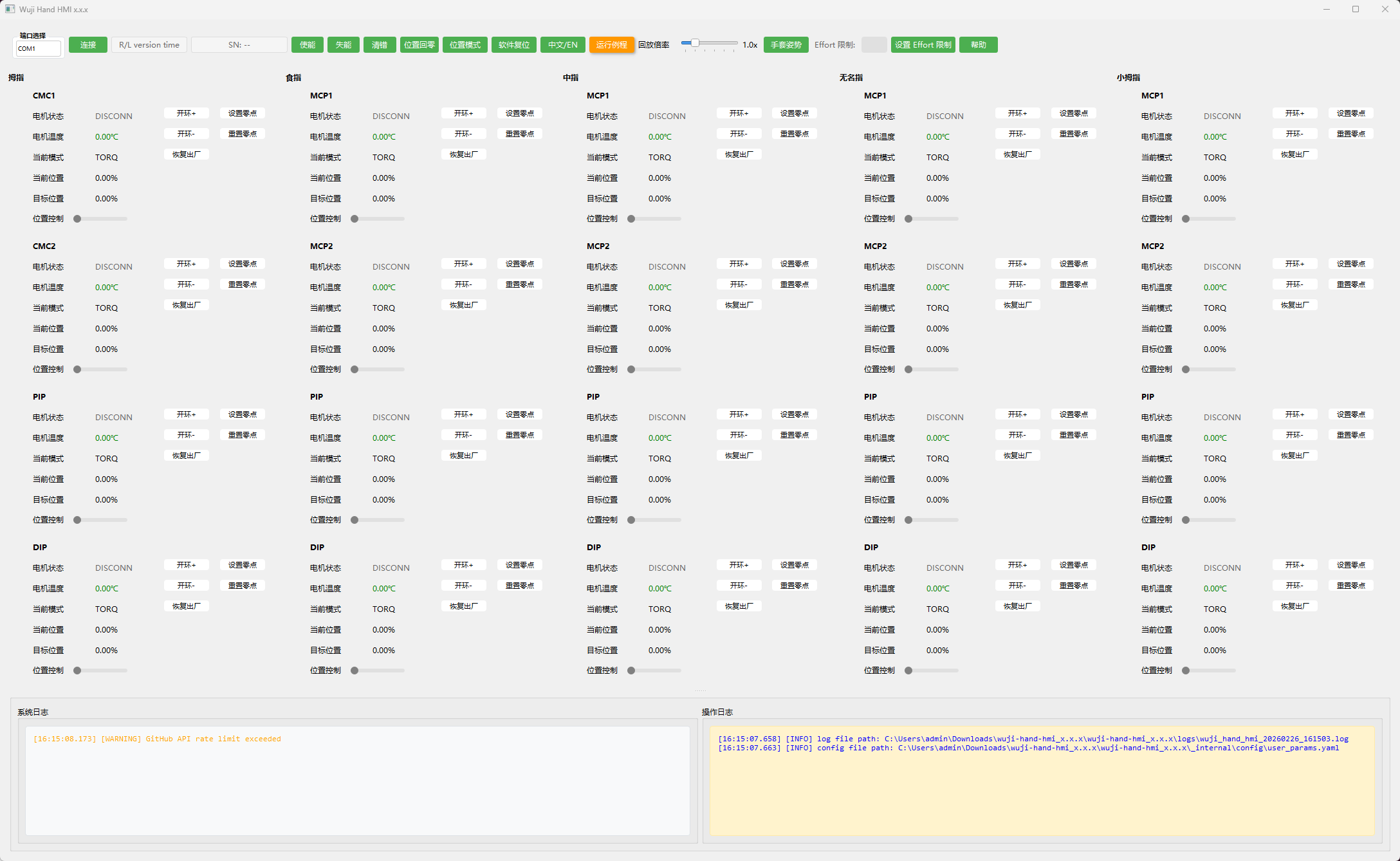
Wuji Hand HMI 软件面板由[全局面板](#全局面板)、[单轴面板](#单轴面板)、[日志面板](#日志面板)构成。

<img src="https://mintcdn.com/wuji-0bbde051/GsT0bEnPZ_18e5HL/assets/source/images/zh/wuji-hand-hmi/panel-introduction.png?fit=max&auto=format&n=GsT0bEnPZ_18e5HL&q=85&s=e236ba95a86bba3f8d62ed56fb6d22ee" alt="面板总览" width="2176" height="1338" data-path="assets/source/images/zh/wuji-hand-hmi/panel-introduction.png" />

### 全局面板

全局面板用于整手级操作与状态查看，操作对象是整手，反馈信息来源于脊髓板。

<img src="https://mintcdn.com/wuji-0bbde051/GsT0bEnPZ_18e5HL/assets/source/images/zh/wuji-hand-hmi/global-screen.png?fit=max&auto=format&n=GsT0bEnPZ_18e5HL&q=85&s=1bf544658c31bad2a16616b7e9ff6ba7" alt="全局面板" width="1469" height="73" data-path="assets/source/images/zh/wuji-hand-hmi/global-screen.png" />

<table>
  <thead>
    <tr>
      <th>名称</th>
      <th>说明</th>
    </tr>
  </thead>

  <tbody>
    <tr>
      <td style={{ whiteSpace: 'nowrap' }}>**端口选择**</td>

      <td>
        Linux 版 HMI 自动筛选端口。Windows 版 HMI 不自动筛选端口，**先启动 HMI，再连接灵巧手**，可在[日志面板](#日志面板)的操作日志中看到 `[INFO] New ports: ['COM XX']` 提示，据此确定 Wuji Hand 所在端口。
      </td>
    </tr>

    <tr>
      <td style={{ whiteSpace: 'nowrap' }}>**连接** / **断开**</td>
      <td>选择正确端口后点击**连接**建立通信，需要结束会话时点击**断开**。</td>
    </tr>

    <tr>
      <td style={{ whiteSpace: 'nowrap' }}>**脊髓板状态显示框**</td>
      <td>显示：左/右手、系统固件版本号、在线时长，如 `Left 1.2.0 24m59s`。</td>
    </tr>

    <tr>
      <td style={{ whiteSpace: 'nowrap' }}>**SN**</td>
      <td>显示设备序列号。</td>
    </tr>

    <tr>
      <td style={{ whiteSpace: 'nowrap' }}>**使能**</td>
      <td>点击**使能**所有关节轴电机使能，电机状态为 `RUN`。</td>
    </tr>

    <tr>
      <td style={{ whiteSpace: 'nowrap' }}>**失能**</td>
      <td>点击**失能**所有关节轴电机失能，电机状态为 `READY`。</td>
    </tr>

    <tr>
      <td style={{ whiteSpace: 'nowrap' }}>**清错**</td>
      <td>若出现 `WARNING/ERROR/FATAL`，请先点击**清错**，状态恢复后再尝试使能。</td>
    </tr>

    <tr>
      <td style={{ whiteSpace: 'nowrap' }}>**位置模式** / **位置回零**</td>
      <td>点击**位置模式**将电机模式设为 `RT_FCL`，在使能状态下点击**位置回零**，整手恢复到零点姿态。</td>
    </tr>

    <tr>
      <td style={{ whiteSpace: 'nowrap' }}>**软件复位**</td>
      <td>需要重启整手驱动时，点击**软件复位**，电机状态短暂为 `DISCONN`，完成后电机状态为 `READY`。</td>
    </tr>

    <tr>
      <td style={{ whiteSpace: 'nowrap' }}>**中文 / EN**</td>
      <td>中英文切换。</td>
    </tr>

    <tr>
      <td style={{ whiteSpace: 'nowrap' }}>**运行例程**</td>
      <td>点击**运行例程**后，按预置执行动作序列。用于快速验证通信与基础运动链路。</td>
    </tr>

    <tr>
      <td style={{ whiteSpace: 'nowrap' }}>**回放倍率**</td>
      <td>控制例程回放的速度倍数，拖动滑条调节。范围 0.5x \~ 3.0x，默认 1.0x。</td>
    </tr>

    <tr>
      <td style={{ whiteSpace: 'nowrap' }}>**手套姿势**</td>
      <td>点击**手套姿势**后，整手自动调整至适合拆装的姿态，供拆装软体/手套时便于操作。</td>
    </tr>

    <tr>
      <td style={{ whiteSpace: 'nowrap' }}>**Effort 限制**</td>
      <td>Effort 限制输入框，用于填写目标值，配合**设置 Effort 限制**按钮使用。</td>
    </tr>

    <tr>
      <td style={{ whiteSpace: 'nowrap' }}>**设置 Effort 限制**</td>

      <td>
        设置关节允许的最大 effort 输出。范围为 0-3.5 (A)，默认值为 1.5 (A)。在输入框中填入目标值后点击**设置 Effort 限制**。

        <Info>
          **什么是 Effort？**

          Effort 是电流空间的执行器作用量，经过滤波处理后输出。它不是实际测量的电流值，应将其理解为相对驱动强度，适用于负载监控和碰撞检测等场景。
        </Info>

        <Warning>
          **警告：修改 Effort 限制 可能导致设备损坏**

          提高 Effort 限制 值会提升电机输出扭矩，同时增加电机发热。如因调整设置导致设备损坏，用户需自行承担责任。

          * 影响相关关节运动寿命，加速各零件磨损且无法预估影响大小
          * 可能在某工况下直接造成相关关节出现不可逆的损坏
          * 可能加速关节热保护触发，减少持续运动时间
          * 可能出现除以上情况下的其他严重后果
        </Warning>
      </td>
    </tr>

    <tr>
      <td style={{ whiteSpace: 'nowrap' }}>**帮助**</td>
      <td>点击**帮助**跳转到本篇文档。</td>
    </tr>
  </tbody>
</table>

### 单轴面板

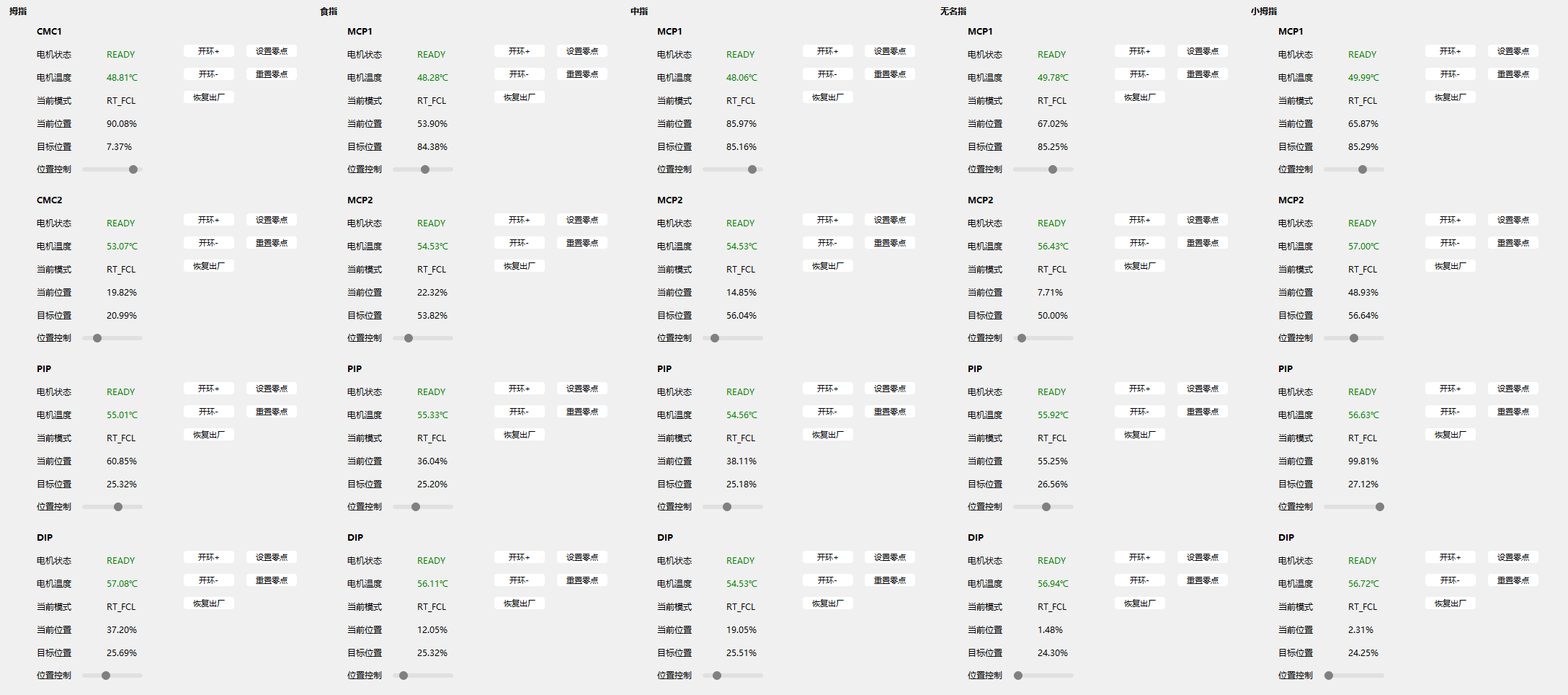
单轴面板用于单轴操作与状态查看，操作对象是单个关节轴，反馈信息来源于驱动板。

<img src="https://mintcdn.com/wuji-0bbde051/GsT0bEnPZ_18e5HL/assets/source/images/zh/wuji-hand-hmi/single-axis-panel-2025-11.png?fit=max&auto=format&n=GsT0bEnPZ_18e5HL&q=85&s=12c5bd9e4b33a5b52127caafb2cf2289" alt="单轴面板" width="2176" height="964" data-path="assets/source/images/zh/wuji-hand-hmi/single-axis-panel-2025-11.png" />

<table>
  <thead>
    <tr>
      <th>名称</th>
      <th>说明</th>
    </tr>
  </thead>

  <tbody>
    <tr>
      <td style={{ whiteSpace: 'nowrap' }}>**关节**</td>
      <td>关节名称。</td>
    </tr>

    <tr>
      <td style={{ whiteSpace: 'nowrap' }}>**电机状态**</td>

      <td>
        * `DEFAULT`：默认状态，当读取到预设状态之外的异常状态会显示为 `DEFAULT`<br />
        * `READY`：就绪状态，表明电机当前处于失能状态<br />
        * `RUN`：运行状态，表明电机当前处于使能状态<br />
        * `CALIBRATE`：标定状态，表明电机当前处于标定状态，请不要再次标定或其它操作<br />
        * `DISCONN`：断联状态，表明电机当前与脊髓板断开连接或上位机没有连接灵巧手<br />
        * `WARNING`：警告状态，表明电机当前运行状态出现异常，可以通过[全局面板](#全局面板)中的**清错**恢复正常状态<br />
        * `ERROR`：错误状态，表明电机当前运行状态出现错误，可以通过[全局面板](#全局面板)中的**清错**恢复正常状态<br />
        * `FATAL`：严重错误状态，表明电机当前运行状态出现不可逆的错误，若多次重新上电后仍无法恢复，请联系售后
      </td>
    </tr>

    <tr>
      <td style={{ whiteSpace: 'nowrap' }}>**电机温度**</td>
      <td>显示当前电机温度。</td>
    </tr>

    <tr>
      <td style={{ whiteSpace: 'nowrap' }}>**当前模式**</td>
      <td>显示当前控制模式，如 `RT_FCL`。</td>
    </tr>

    <tr>
      <td style={{ whiteSpace: 'nowrap' }}>**当前位置**</td>
      <td>显示位置反馈在限位标定行程范围之内的百分比。</td>
    </tr>

    <tr>
      <td style={{ whiteSpace: 'nowrap' }}>**目标位置**</td>
      <td>显示位置期望在限位标定行程范围之内的百分比。</td>
    </tr>

    <tr>
      <td style={{ whiteSpace: 'nowrap' }}>**位置控制**</td>
      <td>当前模式为 `RT_FCL` 且电机状态为 `RUN` 时，拖动滑条设定目标位置。</td>
    </tr>

    <tr>
      <td style={{ whiteSpace: 'nowrap' }}>**开环+** / **开环-**</td>
      <td>对应电机运动的顺时针/逆时针两个极性，长按**开环+**或**开环-**，电机朝向一侧转动。</td>
    </tr>

    <tr>
      <td style={{ whiteSpace: 'nowrap' }}>**恢复出厂**</td>

      <td>
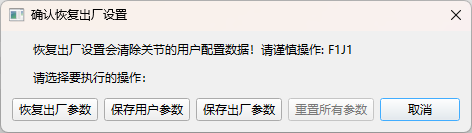
        点击**恢复出厂**出现弹窗：

        <img src="https://mintcdn.com/wuji-0bbde051/GsT0bEnPZ_18e5HL/assets/source/images/zh/wuji-hand-hmi/factory-reset-2025-11.png?fit=max&auto=format&n=GsT0bEnPZ_18e5HL&q=85&s=1d9b1af101cfc846bbe5421bcea2e78c" alt="恢复出厂" width="472" height="133" data-path="assets/source/images/zh/wuji-hand-hmi/factory-reset-2025-11.png" />

        * **恢复**：恢复部分参数到出厂值

        <Info>
          恢复出厂后，点击[全局面板](#全局面板)中的**软件复位**按钮，变更参数即可生效。
        </Info>

        * **保存用户参数**：保存现有参数到 Flash<br />
        * **保存**：保存出厂标定参数到 Flash<br />
        * **重置所有参数**：将所有参数恢复到出厂值
      </td>
    </tr>

    <tr>
      <td style={{ whiteSpace: 'nowrap' }}>**设置零点** / **重置零点**</td>

      <td>
        <Warning>
          由于出厂时标定的零点可能与 URDF 零点存在细微偏差，为满足用户 Sim2Real 需要，可以手动设置一个接近 URDF 零点的用户零点。
        </Warning>

        * **设置零点**：将用户零点设置为当前位置反馈所在的位置<br />
        * **重置零点**：将零点恢复到出厂时标定的零点
      </td>
    </tr>
  </tbody>
</table>

### 日志面板

<img src="https://mintcdn.com/wuji-0bbde051/GsT0bEnPZ_18e5HL/assets/source/images/zh/wuji-hand-hmi/log-panel-2025-11.png?fit=max&auto=format&n=GsT0bEnPZ_18e5HL&q=85&s=a2391a0c9b7582959981b9c06002413f" alt="日志面板" width="2142" height="240" data-path="assets/source/images/zh/wuji-hand-hmi/log-panel-2025-11.png" />

日志面板分为左右两栏。左侧为**系统日志**，记录 WARNING 等级及以上的警告或错误。右侧为**操作日志**，记录必要的初始化信息及用户操作过程。在日志区域右键，可执行：

* **复制系统日志** / **复制操作日志**：复制所选日志内容到剪贴板。
* **导出日志**：打包导出系统日志与操作日志全部内容，用于问题排查。
* **清除系统日志** / **清除操作日志**：清除对应区域的日志记录。
* **清除所有日志**：同时清除系统日志与操作日志。

<Warning>
  当设备或上位机出现异常时，请先在日志面板导出日志并保存，再与问题现象描述一并提供给售后，以便快速定位原因。
</Warning>


This documentation is built and hosted on [Mintlify](https://mintlify.com), a developer documentation platform.