> ## Documentation Index
> Fetch the complete documentation index at: https://docs.wuji.tech/llms.txt
> Use this file to discover all available pages before exploring further.
# 触觉
```python theme={null}
# 触觉矩阵
sub = glove.tactile().subscribe()
frame = await sub.recv_async()
print(f"最大压力值: {max(frame.data):.2f}")
# 分区数据
sub = glove.tactile_zones().subscribe()
zones = await sub.recv_async()
print(f"手掌: {zones.palm}, 拇指: {zones.thumb}")
```
```c theme={null}
// C 使用 typed callback 接收触觉帧和分区数据。
wuji_glove_subscribe_tactile(dev, on_tactile, user, &tactile_sub);
wuji_glove_subscribe_tactile_zones(dev, on_zones, user, &zones_sub);
```
接触检测与接触残差数据流([TactileBinary](#tactilebinary)、[TactileResidual](#tactileresidual))依赖训练好的接触模型。首次使用前,先运行 `wuji calib tactile` 完成[触觉标定](/docs/wuji-cli/tactile-calibration/),模型按 SDK 用户与手套序列号自动加载。
## 触觉矩阵布局
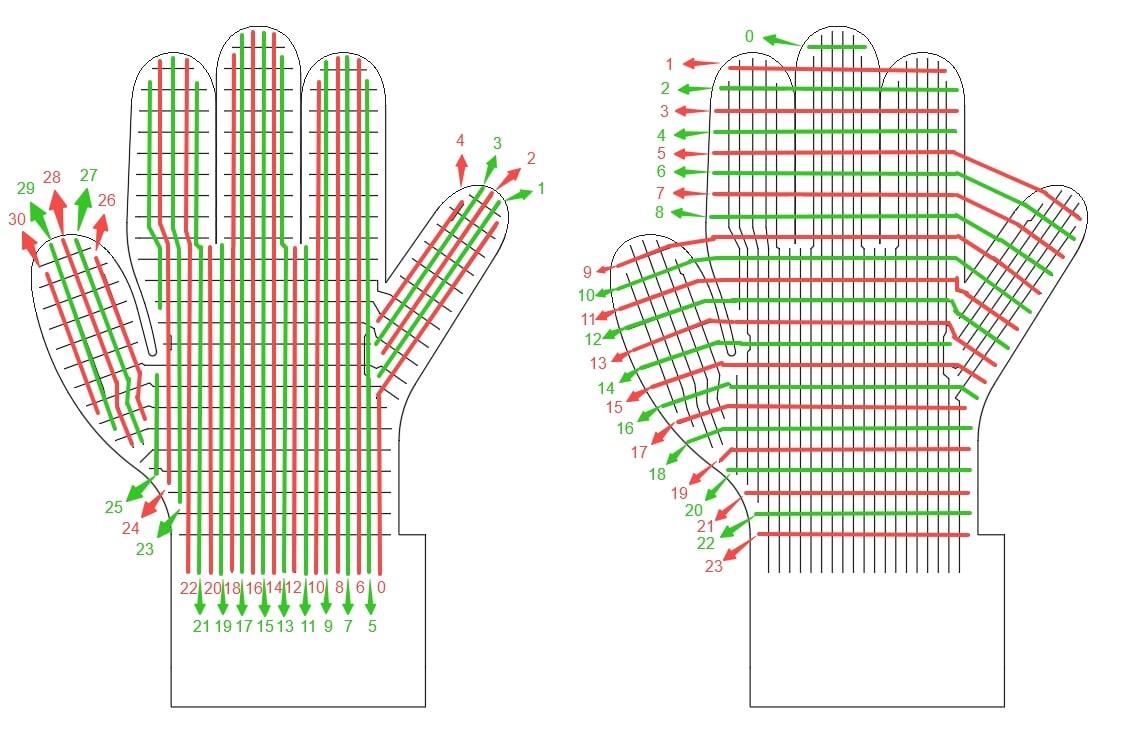
触觉数据来自压阻阵列的 24×31 压力矩阵,共 744 个位置,其中 526 个为有效触点。[TactileFrame](#tactileframe)、[TactileBinary](#tactilebinary)、[TactileResidual](#tactileresidual) 均采用该布局,按 24×31 row-major 排列。访问第 row 行第 col 列:`data[row * 31 + col]`(row 为 0–23,col 为 0–30)。
下图标注了行、列索引在手套上对应的物理触点位置(左:列索引,右:行索引),可据此把矩阵索引(或导出点云中的点顺序)对应到手套的具体部位。
 ### 布局变更
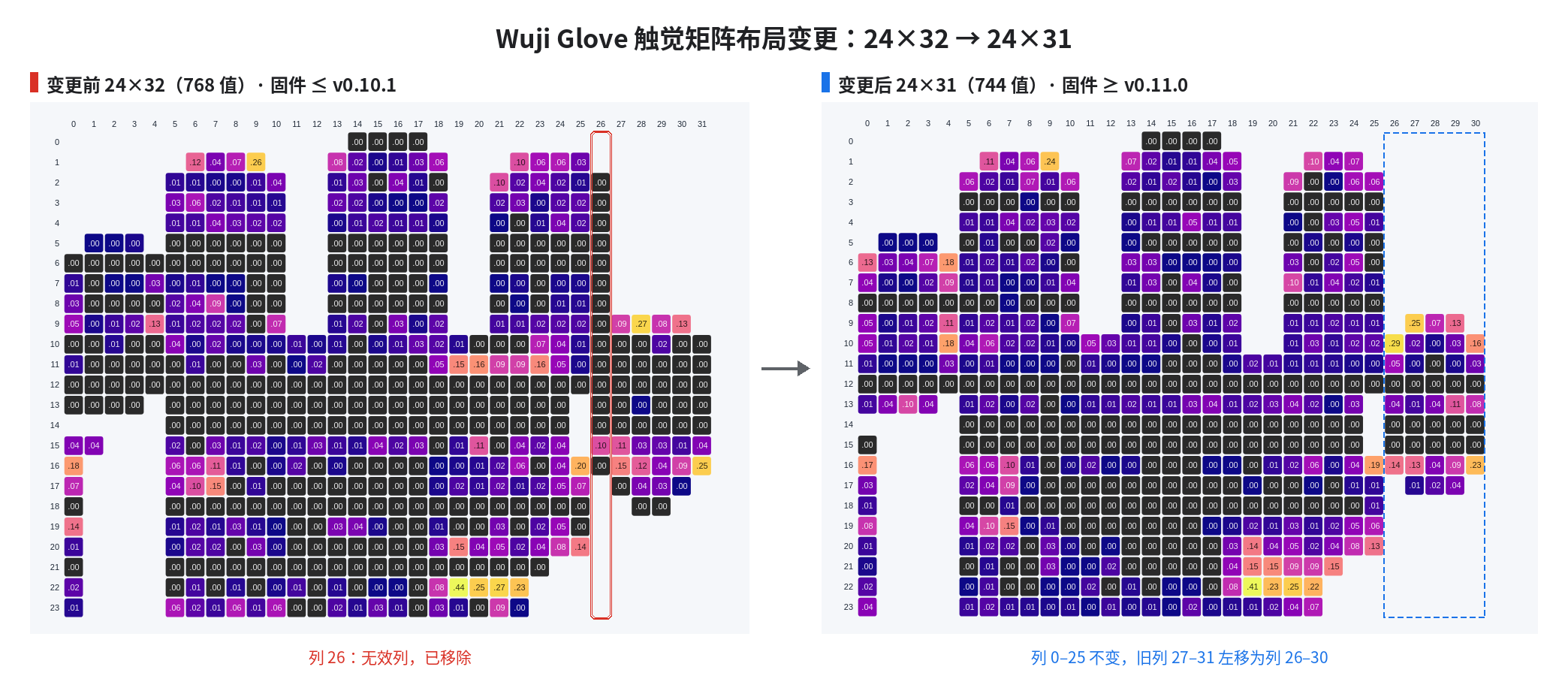
固件 v0.11.0 起,触觉矩阵从 24×32(768 值)调整为 24×31(744 值),移除 24×32 布局中的无效列 26。其余列相对顺序不变:列 0–25 索引保持原样,列 27–31 左移为列 26–30。
### 布局变更
固件 v0.11.0 起,触觉矩阵从 24×32(768 值)调整为 24×31(744 值),移除 24×32 布局中的无效列 26。其余列相对顺序不变:列 0–25 索引保持原样,列 27–31 左移为列 26–30。
 ## TactileFrame
标定后的触觉矩阵数据。帧率:**120 FPS**。
| 字段 | 类型 | 说明 |
| - | - | - |
| `header` | [FrameHeader](/docs/wuji-sdk/data-reference#frameheader) | 帧头 |
| `data` | `List[float]` | 744 个值,其中 526 个为有效触点(压力值 `0.0~1.0`),其余为无效触点,固定为 `-1.0` |
`data` 为 744 个值的数组,按 24×31 row-major 排列。访问第 row 行第 col 列:`data[row * 31 + col]`。无效位置固定为 `-1.0`,可据此与有效触点的零压力 `0.0` 区分。
```json theme={null}
{
"header": {
"seq": 42,
"timestamp_us": 1709876543210,
"frame_id": ""
},
"data": [-1.0, 0.12, 0.45, 0.78, -1.0, 0.33, ...] // 共 744 个值,526 个有效,无效点为 -1.0
}
```
## TactileZones
按手指区域聚合的触觉数据。每个区域是一块矩形,按 row-major 排列。矩形内属于该区域的位置给出压力值,其余位置固定为 `-1.0`。
| 字段 | 类型 | 数组长度 | 有效触点 | 说明 |
| - | - | - | - | - |
| `header` | [FrameHeader](/docs/wuji-sdk/data-reference#frameheader) | — | — | 帧头 |
| `palm` | `List[float]` | 308 | 288 | 手掌区域,14 × 22 |
| `thumb` | `List[float]` | 50 | 41 | 拇指区域,10 × 5 |
| `index` | `List[float]` | 45 | 43 | 食指区域,9 × 5 |
| `middle` | `List[float]` | 60 | 58 | 中指区域,10 × 6 |
| `ring` | `List[float]` | 54 | 52 | 无名指区域,9 × 6 |
| `pinky` | `List[float]` | 55 | 44 | 小指区域,11 × 5 |
六个区域的有效触点合计 526,与 [TactileFrame](#tactileframe) 同掩码。数组长度是矩形的格数,按上表取值即可避免越界。
```json theme={null}
{
"header": {
"seq": 42,
"timestamp_us": 1709876543210,
"frame_id": ""
},
"palm": [0.0, 0.12, 0.45, ...], // 308 个值,其中 288 个有效触点
// 以下各指的数组长度与有效触点数见上表
"thumb": [0.0, 0.85, 0.92, ...],
"index": [0.0, 0.67, 0.23, ...],
"middle": [0.0, 0.34, ...],
"ring": [0.0, 0.11, ...],
"pinky": [0.0, 0.05, ...]
}
```
## PointField
点云字段描述。
| 字段 | 类型 | 说明 |
| - | - | - |
| `name` | `str` | 字段名称 |
| `offset` | `int` | 字节偏移 |
| `type` | `int` | 数据的数值类型编码,固定为 `7`(float32) |
## PointCloud
触觉点云数据:每帧给出手套 526 个有效触点的 3D 位置和压力。位置通过线性混合蒙皮(LBS)从手部骨架解出,坐标系 `l_wrist` / `r_wrist`。每点除 `x` / `y` / `z` 还带 `pressure`(0.0–1.0 归一化压力),可按压力着色做 3D 可视化。
`glove.tactile_point_cloud()` 的空间位置依赖 EMF 链路解算的手部姿态,输出率跟随 `emf_poses` 的实际输出率同步变化,见 [输出率调节](/docs/wuji-glove/sdk-data-reference/hand-tracking#输出率调节)。
字节布局沿用 ROS `sensor_msgs/PointCloud2` 的自描述格式:`data` 是扁平字节流,`point_stride` 是每点字节数,`fields` 描述每点内部的字段(名字、字节偏移、类型)。当前实现 4 个字段,每点 16 字节,`data` 共 `point_count × 16` 字节,按点顺序排布。新增字段时只需在 `fields` 追加一项,`PointCloud` 自身的消息定义不变。
```text theme={null}
┌─────── point 0 (16 bytes) ────┐┌─────── point 1 (16 bytes) ────┐
data = │ x0 (4B) y0 (4B) z0 (4B) p0 4B ││ x1 (4B) y1 (4B) z1 (4B) p1 4B │ ...
└───────────────────────────────┘└───────────────────────────────┘
offset 0 offset 16 offset 32
```
按字节切回每个点:
```text theme={null}
start = i × point_stride
点 i 的 x = float32(data[start + 0 : start + 4])
点 i 的 y = float32(data[start + 4 : start + 8])
点 i 的 z = float32(data[start + 8 : start + 12])
点 i 的 pressure = float32(data[start + 12 : start + 16])
```
| 字段 | 类型 | 说明 |
| - | - | - |
| `header` | [FrameHeader](/docs/wuji-sdk/data-reference#frameheader) | 帧头 |
| `frame_id` | `str` | 坐标系 |
| `point_stride` | `int` | 每个点占用的字节数 |
| `fields` | `List[PointField]` | 每个点内部字段的描述列表 |
| `data` | `List[int]` | 扁平字节流,长度 = `point_count` × `point_stride` |
| 方法 | 返回 | 说明 |
| - | - | - |
| `point_count()` | `int` | 获取点数量 |
```json theme={null}
{
"header": {
"seq": 42,
"timestamp_us": 1709876543210,
"frame_id": "l_wrist"
},
"frame_id": "l_wrist",
"point_stride": 16,
"fields": [
{ "name": "x", "offset": 0, "type": 7 },
{ "name": "y", "offset": 4, "type": 7 },
{ "name": "z", "offset": 8, "type": 7 },
{ "name": "pressure", "offset": 12, "type": 7 }
],
"data": [0, 0, 128, 63, ...] // 原始字节流,每点 16 字节(4 字段 × 4 字节)
}
```
获取 PointCloud 后按字段布局解包:
```python theme={null}
import struct
# 当前布局:x, y, z, pressure 都是 float32,每点 16 字节
raw = bytes(cloud.data)
for i in range(cloud.point_count()):
x, y, z, pressure = struct.unpack_from('
接触判定依赖一个训练好的接触模型,模型经 [Wuji CLI 触觉标定](/docs/wuji-cli/tactile-calibration/) 或 SDK 标定接口 `glove.calibrate_tactile()` 训练,并按当前 SDK 用户与手套序列号自动加载。未加载模型时,数据流仍以 120 FPS 发布,但所有有效触点恒为 `0.0`(无接触),无效触点为 `-1.0`,不会出现 `1.0`。
从旧版本升级后请重新标定一次:此前训练的模型不会迁移到新的模型目录,SDK 不再加载它,表现与未标定一致。
### 训练接触模型
接触模型训练一次,按当前 SDK 用户与手套序列号保存(目录规则见 [触觉数据路径](/docs/wuji-sdk/device-params/#触觉数据路径)),订阅时 SDK 自动加载,无需配置路径。训练入口有两个:
* **Wuji CLI**:运行 `wuji calib tactile`,按终端提示完成 4 个动作的采集,CLI 随后自动训练、验证并安装模型。用法见 [触觉标定](/docs/wuji-cli/tactile-calibration/)。
* **SDK 标定接口**:`await glove.calibrate_tactile()`(或阻塞版 `glove.calibrate_tactile_blocking()`)按提示录制几组动作,SDK 自动完成训练与安装。每组录制结束可以保留、重录或停止,传入 `on_pose_prompt` 回调即可交互控制,不传则全程自动执行。完整用法见示例 `7.tactile_calibration.py`(Python)与 `4_tactile_calibration.c`(C,接口说明见[触觉接触标定](#触觉接触标定))。
### 跨机器迁移模型
推荐用 [`wuji user export` 与 `wuji user import`](/docs/wuji-cli/user/#在机器间迁移标定) 整体迁移。手动迁移时必须满足两点:
* 拷贝全部 3 个模型文件:`contact.safetensors`、`contact.npz` 与 `contact.json`(位置见 [触觉数据路径](/docs/wuji-sdk/device-params/#触觉数据路径))。`contact.json` 是模型的提交标记,缺少该文件时模型不会被加载。
* 放入 `manager.tactile_model_paths(user_id, sn)` 返回的 `paths["dir"]` 目录。
切换 SDK 用户或重新训练模型后,SDK 会自动热重载。
```python theme={null}
from wuji_sdk import SdkManager
# 查询该用户与手套对应的模型目录(wuji calib tactile 标定后写入)
manager = SdkManager.instance()
user_id = manager.current_user()["user_id"]
paths = manager.tactile_model_paths(user_id, "WujiGlove-12345")
print(paths["dir"]) # 把 contact.safetensors、contact.npz 与 contact.json 放到这里
sub = glove.tactile_binary().subscribe()
frame = await sub.recv_async()
contacts = sum(1 for v in frame.data if v == 1.0)
print(f"接触触点数: {contacts}")
```
```json theme={null}
{
"header": {
"seq": 42,
"timestamp_us": 1709876543210,
"frame_id": ""
},
"data": [-1.0, 0.0, 1.0, 1.0, -1.0, 0.0, ...] // 共 744 个值,526 个有效
}
```
## TactileResidual
每像素有符号接触残差,基于触觉数据推断,帧率:**120 FPS**,与 `glove.tactile()` 同频发布。
| 字段 | 类型 | 说明 |
| - | - | - |
| `header` | [FrameHeader](/docs/wuji-sdk/data-reference#frameheader) | 帧头 |
| `data` | `List[float]` | 744 个残差值。正值 = 压力高于基线(接触),约 `0` = 无接触,负值 = 压力低于基线,`-1.0` 表示无效触点 |
`data` 按 24×31 row-major 排列,与 [TactileFrame](#tactileframe) 同形、同掩码(526 个有效触点)。访问第 row 行第 col 列:`data[row * 31 + col]`。
残差信号不平滑、不归一化、不二值化,业务侧自行定阈值与后处理。和 [TactileBinary](#tactilebinary) 共享同一接触模型,同时订阅两者只运行一次模型推断。
残差解算依赖一个训练好的接触模型,模型经 [Wuji CLI 触觉标定](/docs/wuji-cli/tactile-calibration/) 或 SDK 标定接口 `glove.calibrate_tactile()` 训练,并按当前 SDK 用户与手套序列号自动加载。未加载模型时,数据流仍以 120 FPS 发布,但所有有效触点恒接近静止零点,无法反映真实压力变化。
从旧版本升级后请重新标定一次:此前训练的模型不会迁移到新的模型目录,SDK 不再加载它,表现与未标定一致。
`tactile_residual` 与 `tactile_binary` 共享同一个模型目录,同样按当前 SDK 用户与手套序列号自动加载,模型的训练入口与迁移方式见 [TactileBinary](#tactilebinary)。切换 SDK 用户或重新训练模型后,SDK 会自动热重载。
```python theme={null}
from wuji_sdk import SdkManager
# 查询该用户与手套对应的模型目录(wuji calib tactile 标定后写入)
manager = SdkManager.instance()
user_id = manager.current_user()["user_id"]
paths = manager.tactile_model_paths(user_id, "WujiGlove-12345")
print(paths["dir"]) # 把 contact.safetensors、contact.npz 与 contact.json 放到这里
sub = glove.tactile_residual().subscribe()
frame = await sub.recv_async()
valid = [v for v in frame.data if v != -1.0]
print(f"残差范围: [{min(valid):.2f}, {max(valid):.2f}]")
```
```json theme={null}
{
"header": {
"seq": 42,
"timestamp_us": 1709876543210,
"frame_id": ""
},
"data": [-1.0, 0.05, 1.23, 0.87, -1.0, -0.02, ...] // 共 744 个值,526 个有效
}
```
C 侧接口与本页 Python 接口语义一致,函数前缀 `wuji_glove_`。初始化约定、内存管理、错误码与工程构建见 [C 接口参考](/docs/wuji-sdk/data-reference/)。
## 触觉接触灵敏度
`wuji_glove_set_tactile_binary_sensitivity` 设置当前 SDK 用户的 `tactile_binary` 灵敏度倍率。SDK 在本地保存该倍率。设置立即生效,重新连接后仍然保留。传入有限正数,值高于 `1.0` 时接触检测更灵敏。
`wuji_glove_get_tactile_binary_sensitivity` 返回当前生效的倍率。返回值限制在 `0.5–3.0`。没有有效值时,getter 返回 `1.0`。
```c theme={null}
double sensitivity = 0.0;
if (wuji_glove_get_tactile_binary_sensitivity(dev, &sensitivity) == WUJI_STATUS_OK) {
printf("effective sensitivity: %.2f\n", sensitivity);
}
```
`dev` 与 `out_sensitivity` 都不能为 `NULL`。任一指针为 `NULL` 时,getter 返回 `WUJI_STATUS_ERR_INVALID_ARG`。`out_sensitivity` 有效时,调用失败不修改 `*out_sensitivity`。用 `wuji_last_error()` 获取详情。
## 触觉接触标定
`wuji_glove_calibrate_tactile_blocking` 一次调用完成引导式触觉接触标定:按提示录制几组动作,SDK 依次完成采集、数据校验与训练。
调用前先决定 `install`:
* `install = true`:训练后执行加载校验并安装,模型按当前 SDK 用户与手套序列号保存,订阅 `tactile_binary` / `tactile_residual` 时自动加载。可选灵敏度参数(`has_sensitivity` 置 true 并填 `sensitivity`)仅此模式接受,否则调用直接报错。
* `install = false`:只训练不安装,跳过加载校验与安装,产物保存在本次运行目录,不会自动加载。适合先离线评估训练效果、再决定是否安装的场景。
调用方式:
```c theme={null}
// uint32_t on_feedback(const WujiTactileCalibrationFeedback* event, void* user);
// uint32_t on_pose_prompt(const WujiTactilePromptRequest* request, void* user);
WujiTactileCalibrationOptions options = {
.seconds_per_pose = 10.0f,
.epochs = 60,
.install = true,
.timeout_s = 1800.0,
};
WujiTactileCalibrationCallbacks callbacks = {
.on_feedback = on_feedback, // 采集与训练进度
.on_pose_prompt = on_pose_prompt, // 每组动作前后交互:继续、重录或停止
};
WujiTactileCalibrationSummary summary = {0};
if (wuji_glove_calibrate_tactile_blocking(dev, &options, &callbacks, &summary) == WUJI_STATUS_OK) {
// 读取 summary 后释放堆字段
wuji_tactile_calibration_summary_free(&summary);
}
```
`on_pose_prompt` 让流程可交互:每组动作开始前与录制结束后各回调一次,参数为 `WujiTactilePromptRequest`,返回 `0` 继续、`1` 重录、`2` 停止,其他取值一律按停止处理。`on_feedback` 上报采集与训练进度,返回 `0` 继续、`1` 中止,其他取值一律按中止处理。两个回调都可不设置,此时全程自动执行。回调收到的事件指针仅在回调期间有效。`timeout_s` 是协作式超时:超时触发取消,但函数会先等在途的采集或训练与正在执行的回调返回,因此函数返回后不再有任何回调触发。若 `on_pose_prompt` 内部无限阻塞(如等待控制台输入),超时无法强制它返回。
成功返回后从 `summary` 读取结果,`model_dir` 两种取值按 `installed` 区分:
* `installed = true`:`model_dir` 指向已安装的模型目录,订阅时自动加载。
* `installed = false`:`model_dir` 指向本次运行保存的模型,不会被自动加载。
`verified_alive_taxels` 仅在 `has_verified_alive_taxels` 为 true 时有效。读完调用 `wuji_tactile_calibration_summary_free` 释放堆字段。
失败原因通过 `wuji_last_error()` 获取。库构建时未启用 `model-export` 特性会返回 `WUJI_STATUS_ERR_UNSUPPORTED`。Python 对应接口为 `glove.calibrate_tactile_blocking()`(阻塞)。异步版 `glove.calibrate_tactile()` 仅 Python 提供,C 侧无异步入口。
实时观察接触与残差的操作见 SDK 使用实践的[触觉接触网格视图](/docs/wuji-glove/sdk-practice/tactile-contact-view)与[触觉残差网格视图](/docs/wuji-glove/sdk-practice/tactile-residual-view)。
This documentation is built and hosted on [Mintlify](https://mintlify.com), a developer documentation platform.
## TactileFrame
标定后的触觉矩阵数据。帧率:**120 FPS**。
| 字段 | 类型 | 说明 |
| - | - | - |
| `header` | [FrameHeader](/docs/wuji-sdk/data-reference#frameheader) | 帧头 |
| `data` | `List[float]` | 744 个值,其中 526 个为有效触点(压力值 `0.0~1.0`),其余为无效触点,固定为 `-1.0` |
`data` 为 744 个值的数组,按 24×31 row-major 排列。访问第 row 行第 col 列:`data[row * 31 + col]`。无效位置固定为 `-1.0`,可据此与有效触点的零压力 `0.0` 区分。
```json theme={null}
{
"header": {
"seq": 42,
"timestamp_us": 1709876543210,
"frame_id": ""
},
"data": [-1.0, 0.12, 0.45, 0.78, -1.0, 0.33, ...] // 共 744 个值,526 个有效,无效点为 -1.0
}
```
## TactileZones
按手指区域聚合的触觉数据。每个区域是一块矩形,按 row-major 排列。矩形内属于该区域的位置给出压力值,其余位置固定为 `-1.0`。
| 字段 | 类型 | 数组长度 | 有效触点 | 说明 |
| - | - | - | - | - |
| `header` | [FrameHeader](/docs/wuji-sdk/data-reference#frameheader) | — | — | 帧头 |
| `palm` | `List[float]` | 308 | 288 | 手掌区域,14 × 22 |
| `thumb` | `List[float]` | 50 | 41 | 拇指区域,10 × 5 |
| `index` | `List[float]` | 45 | 43 | 食指区域,9 × 5 |
| `middle` | `List[float]` | 60 | 58 | 中指区域,10 × 6 |
| `ring` | `List[float]` | 54 | 52 | 无名指区域,9 × 6 |
| `pinky` | `List[float]` | 55 | 44 | 小指区域,11 × 5 |
六个区域的有效触点合计 526,与 [TactileFrame](#tactileframe) 同掩码。数组长度是矩形的格数,按上表取值即可避免越界。
```json theme={null}
{
"header": {
"seq": 42,
"timestamp_us": 1709876543210,
"frame_id": ""
},
"palm": [0.0, 0.12, 0.45, ...], // 308 个值,其中 288 个有效触点
// 以下各指的数组长度与有效触点数见上表
"thumb": [0.0, 0.85, 0.92, ...],
"index": [0.0, 0.67, 0.23, ...],
"middle": [0.0, 0.34, ...],
"ring": [0.0, 0.11, ...],
"pinky": [0.0, 0.05, ...]
}
```
## PointField
点云字段描述。
| 字段 | 类型 | 说明 |
| - | - | - |
| `name` | `str` | 字段名称 |
| `offset` | `int` | 字节偏移 |
| `type` | `int` | 数据的数值类型编码,固定为 `7`(float32) |
## PointCloud
触觉点云数据:每帧给出手套 526 个有效触点的 3D 位置和压力。位置通过线性混合蒙皮(LBS)从手部骨架解出,坐标系 `l_wrist` / `r_wrist`。每点除 `x` / `y` / `z` 还带 `pressure`(0.0–1.0 归一化压力),可按压力着色做 3D 可视化。
`glove.tactile_point_cloud()` 的空间位置依赖 EMF 链路解算的手部姿态,输出率跟随 `emf_poses` 的实际输出率同步变化,见 [输出率调节](/docs/wuji-glove/sdk-data-reference/hand-tracking#输出率调节)。
字节布局沿用 ROS `sensor_msgs/PointCloud2` 的自描述格式:`data` 是扁平字节流,`point_stride` 是每点字节数,`fields` 描述每点内部的字段(名字、字节偏移、类型)。当前实现 4 个字段,每点 16 字节,`data` 共 `point_count × 16` 字节,按点顺序排布。新增字段时只需在 `fields` 追加一项,`PointCloud` 自身的消息定义不变。
```text theme={null}
┌─────── point 0 (16 bytes) ────┐┌─────── point 1 (16 bytes) ────┐
data = │ x0 (4B) y0 (4B) z0 (4B) p0 4B ││ x1 (4B) y1 (4B) z1 (4B) p1 4B │ ...
└───────────────────────────────┘└───────────────────────────────┘
offset 0 offset 16 offset 32
```
按字节切回每个点:
```text theme={null}
start = i × point_stride
点 i 的 x = float32(data[start + 0 : start + 4])
点 i 的 y = float32(data[start + 4 : start + 8])
点 i 的 z = float32(data[start + 8 : start + 12])
点 i 的 pressure = float32(data[start + 12 : start + 16])
```
| 字段 | 类型 | 说明 |
| - | - | - |
| `header` | [FrameHeader](/docs/wuji-sdk/data-reference#frameheader) | 帧头 |
| `frame_id` | `str` | 坐标系 |
| `point_stride` | `int` | 每个点占用的字节数 |
| `fields` | `List[PointField]` | 每个点内部字段的描述列表 |
| `data` | `List[int]` | 扁平字节流,长度 = `point_count` × `point_stride` |
| 方法 | 返回 | 说明 |
| - | - | - |
| `point_count()` | `int` | 获取点数量 |
```json theme={null}
{
"header": {
"seq": 42,
"timestamp_us": 1709876543210,
"frame_id": "l_wrist"
},
"frame_id": "l_wrist",
"point_stride": 16,
"fields": [
{ "name": "x", "offset": 0, "type": 7 },
{ "name": "y", "offset": 4, "type": 7 },
{ "name": "z", "offset": 8, "type": 7 },
{ "name": "pressure", "offset": 12, "type": 7 }
],
"data": [0, 0, 128, 63, ...] // 原始字节流,每点 16 字节(4 字段 × 4 字节)
}
```
获取 PointCloud 后按字段布局解包:
```python theme={null}
import struct
# 当前布局:x, y, z, pressure 都是 float32,每点 16 字节
raw = bytes(cloud.data)
for i in range(cloud.point_count()):
x, y, z, pressure = struct.unpack_from('
接触判定依赖一个训练好的接触模型,模型经 [Wuji CLI 触觉标定](/docs/wuji-cli/tactile-calibration/) 或 SDK 标定接口 `glove.calibrate_tactile()` 训练,并按当前 SDK 用户与手套序列号自动加载。未加载模型时,数据流仍以 120 FPS 发布,但所有有效触点恒为 `0.0`(无接触),无效触点为 `-1.0`,不会出现 `1.0`。
从旧版本升级后请重新标定一次:此前训练的模型不会迁移到新的模型目录,SDK 不再加载它,表现与未标定一致。
### 训练接触模型
接触模型训练一次,按当前 SDK 用户与手套序列号保存(目录规则见 [触觉数据路径](/docs/wuji-sdk/device-params/#触觉数据路径)),订阅时 SDK 自动加载,无需配置路径。训练入口有两个:
* **Wuji CLI**:运行 `wuji calib tactile`,按终端提示完成 4 个动作的采集,CLI 随后自动训练、验证并安装模型。用法见 [触觉标定](/docs/wuji-cli/tactile-calibration/)。
* **SDK 标定接口**:`await glove.calibrate_tactile()`(或阻塞版 `glove.calibrate_tactile_blocking()`)按提示录制几组动作,SDK 自动完成训练与安装。每组录制结束可以保留、重录或停止,传入 `on_pose_prompt` 回调即可交互控制,不传则全程自动执行。完整用法见示例 `7.tactile_calibration.py`(Python)与 `4_tactile_calibration.c`(C,接口说明见[触觉接触标定](#触觉接触标定))。
### 跨机器迁移模型
推荐用 [`wuji user export` 与 `wuji user import`](/docs/wuji-cli/user/#在机器间迁移标定) 整体迁移。手动迁移时必须满足两点:
* 拷贝全部 3 个模型文件:`contact.safetensors`、`contact.npz` 与 `contact.json`(位置见 [触觉数据路径](/docs/wuji-sdk/device-params/#触觉数据路径))。`contact.json` 是模型的提交标记,缺少该文件时模型不会被加载。
* 放入 `manager.tactile_model_paths(user_id, sn)` 返回的 `paths["dir"]` 目录。
切换 SDK 用户或重新训练模型后,SDK 会自动热重载。
```python theme={null}
from wuji_sdk import SdkManager
# 查询该用户与手套对应的模型目录(wuji calib tactile 标定后写入)
manager = SdkManager.instance()
user_id = manager.current_user()["user_id"]
paths = manager.tactile_model_paths(user_id, "WujiGlove-12345")
print(paths["dir"]) # 把 contact.safetensors、contact.npz 与 contact.json 放到这里
sub = glove.tactile_binary().subscribe()
frame = await sub.recv_async()
contacts = sum(1 for v in frame.data if v == 1.0)
print(f"接触触点数: {contacts}")
```
```json theme={null}
{
"header": {
"seq": 42,
"timestamp_us": 1709876543210,
"frame_id": ""
},
"data": [-1.0, 0.0, 1.0, 1.0, -1.0, 0.0, ...] // 共 744 个值,526 个有效
}
```
## TactileResidual
每像素有符号接触残差,基于触觉数据推断,帧率:**120 FPS**,与 `glove.tactile()` 同频发布。
| 字段 | 类型 | 说明 |
| - | - | - |
| `header` | [FrameHeader](/docs/wuji-sdk/data-reference#frameheader) | 帧头 |
| `data` | `List[float]` | 744 个残差值。正值 = 压力高于基线(接触),约 `0` = 无接触,负值 = 压力低于基线,`-1.0` 表示无效触点 |
`data` 按 24×31 row-major 排列,与 [TactileFrame](#tactileframe) 同形、同掩码(526 个有效触点)。访问第 row 行第 col 列:`data[row * 31 + col]`。
残差信号不平滑、不归一化、不二值化,业务侧自行定阈值与后处理。和 [TactileBinary](#tactilebinary) 共享同一接触模型,同时订阅两者只运行一次模型推断。
残差解算依赖一个训练好的接触模型,模型经 [Wuji CLI 触觉标定](/docs/wuji-cli/tactile-calibration/) 或 SDK 标定接口 `glove.calibrate_tactile()` 训练,并按当前 SDK 用户与手套序列号自动加载。未加载模型时,数据流仍以 120 FPS 发布,但所有有效触点恒接近静止零点,无法反映真实压力变化。
从旧版本升级后请重新标定一次:此前训练的模型不会迁移到新的模型目录,SDK 不再加载它,表现与未标定一致。
`tactile_residual` 与 `tactile_binary` 共享同一个模型目录,同样按当前 SDK 用户与手套序列号自动加载,模型的训练入口与迁移方式见 [TactileBinary](#tactilebinary)。切换 SDK 用户或重新训练模型后,SDK 会自动热重载。
```python theme={null}
from wuji_sdk import SdkManager
# 查询该用户与手套对应的模型目录(wuji calib tactile 标定后写入)
manager = SdkManager.instance()
user_id = manager.current_user()["user_id"]
paths = manager.tactile_model_paths(user_id, "WujiGlove-12345")
print(paths["dir"]) # 把 contact.safetensors、contact.npz 与 contact.json 放到这里
sub = glove.tactile_residual().subscribe()
frame = await sub.recv_async()
valid = [v for v in frame.data if v != -1.0]
print(f"残差范围: [{min(valid):.2f}, {max(valid):.2f}]")
```
```json theme={null}
{
"header": {
"seq": 42,
"timestamp_us": 1709876543210,
"frame_id": ""
},
"data": [-1.0, 0.05, 1.23, 0.87, -1.0, -0.02, ...] // 共 744 个值,526 个有效
}
```
C 侧接口与本页 Python 接口语义一致,函数前缀 `wuji_glove_`。初始化约定、内存管理、错误码与工程构建见 [C 接口参考](/docs/wuji-sdk/data-reference/)。
## 触觉接触灵敏度
`wuji_glove_set_tactile_binary_sensitivity` 设置当前 SDK 用户的 `tactile_binary` 灵敏度倍率。SDK 在本地保存该倍率。设置立即生效,重新连接后仍然保留。传入有限正数,值高于 `1.0` 时接触检测更灵敏。
`wuji_glove_get_tactile_binary_sensitivity` 返回当前生效的倍率。返回值限制在 `0.5–3.0`。没有有效值时,getter 返回 `1.0`。
```c theme={null}
double sensitivity = 0.0;
if (wuji_glove_get_tactile_binary_sensitivity(dev, &sensitivity) == WUJI_STATUS_OK) {
printf("effective sensitivity: %.2f\n", sensitivity);
}
```
`dev` 与 `out_sensitivity` 都不能为 `NULL`。任一指针为 `NULL` 时,getter 返回 `WUJI_STATUS_ERR_INVALID_ARG`。`out_sensitivity` 有效时,调用失败不修改 `*out_sensitivity`。用 `wuji_last_error()` 获取详情。
## 触觉接触标定
`wuji_glove_calibrate_tactile_blocking` 一次调用完成引导式触觉接触标定:按提示录制几组动作,SDK 依次完成采集、数据校验与训练。
调用前先决定 `install`:
* `install = true`:训练后执行加载校验并安装,模型按当前 SDK 用户与手套序列号保存,订阅 `tactile_binary` / `tactile_residual` 时自动加载。可选灵敏度参数(`has_sensitivity` 置 true 并填 `sensitivity`)仅此模式接受,否则调用直接报错。
* `install = false`:只训练不安装,跳过加载校验与安装,产物保存在本次运行目录,不会自动加载。适合先离线评估训练效果、再决定是否安装的场景。
调用方式:
```c theme={null}
// uint32_t on_feedback(const WujiTactileCalibrationFeedback* event, void* user);
// uint32_t on_pose_prompt(const WujiTactilePromptRequest* request, void* user);
WujiTactileCalibrationOptions options = {
.seconds_per_pose = 10.0f,
.epochs = 60,
.install = true,
.timeout_s = 1800.0,
};
WujiTactileCalibrationCallbacks callbacks = {
.on_feedback = on_feedback, // 采集与训练进度
.on_pose_prompt = on_pose_prompt, // 每组动作前后交互:继续、重录或停止
};
WujiTactileCalibrationSummary summary = {0};
if (wuji_glove_calibrate_tactile_blocking(dev, &options, &callbacks, &summary) == WUJI_STATUS_OK) {
// 读取 summary 后释放堆字段
wuji_tactile_calibration_summary_free(&summary);
}
```
`on_pose_prompt` 让流程可交互:每组动作开始前与录制结束后各回调一次,参数为 `WujiTactilePromptRequest`,返回 `0` 继续、`1` 重录、`2` 停止,其他取值一律按停止处理。`on_feedback` 上报采集与训练进度,返回 `0` 继续、`1` 中止,其他取值一律按中止处理。两个回调都可不设置,此时全程自动执行。回调收到的事件指针仅在回调期间有效。`timeout_s` 是协作式超时:超时触发取消,但函数会先等在途的采集或训练与正在执行的回调返回,因此函数返回后不再有任何回调触发。若 `on_pose_prompt` 内部无限阻塞(如等待控制台输入),超时无法强制它返回。
成功返回后从 `summary` 读取结果,`model_dir` 两种取值按 `installed` 区分:
* `installed = true`:`model_dir` 指向已安装的模型目录,订阅时自动加载。
* `installed = false`:`model_dir` 指向本次运行保存的模型,不会被自动加载。
`verified_alive_taxels` 仅在 `has_verified_alive_taxels` 为 true 时有效。读完调用 `wuji_tactile_calibration_summary_free` 释放堆字段。
失败原因通过 `wuji_last_error()` 获取。库构建时未启用 `model-export` 特性会返回 `WUJI_STATUS_ERR_UNSUPPORTED`。Python 对应接口为 `glove.calibrate_tactile_blocking()`(阻塞)。异步版 `glove.calibrate_tactile()` 仅 Python 提供,C 侧无异步入口。
实时观察接触与残差的操作见 SDK 使用实践的[触觉接触网格视图](/docs/wuji-glove/sdk-practice/tactile-contact-view)与[触觉残差网格视图](/docs/wuji-glove/sdk-practice/tactile-residual-view)。
This documentation is built and hosted on [Mintlify](https://mintlify.com), a developer documentation platform.