> ## Documentation Index
> Fetch the complete documentation index at: https://docs.wuji.tech/llms.txt
> Use this file to discover all available pages before exploring further.
# 触觉标定
> 用 wuji calib tactile 引导式标定手套触觉,一条命令完成采集、训练、验证与安装
Wuji Glove 的触觉接触检测依赖按手套训练的接触模型。`wuji calib tactile` 提供引导式标定:跟随提示完成 4 个动作的采集,CLI 随后自动训练、验证并安装模型,标定完成即生效。
模型按当前 SDK 用户与手套序列号存储,SDK 运行时自动加载。同一 SDK 用户下的各客户端共用一份模型,切换 SDK 用户后需重新标定。
## 用法
```bash theme={null}
wuji calib tactile --sn
```
序列号用 `wuji devices` 查询。命令连接手套后依次引导 4 个采集动作:
| 步骤 | 图示 | 动作 | 要领 |
| - | - | - | - |
| 1 | 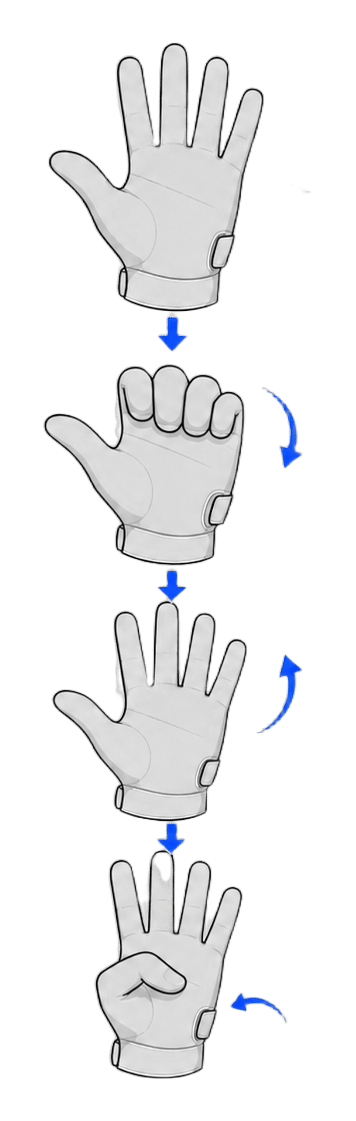 | `four_finger_L_thumb_in` | 四指弯成 L 形、拇指收拢,保持放松无接触 |
| 2 |
| `four_finger_L_thumb_in` | 四指弯成 L 形、拇指收拢,保持放松无接触 |
| 2 | 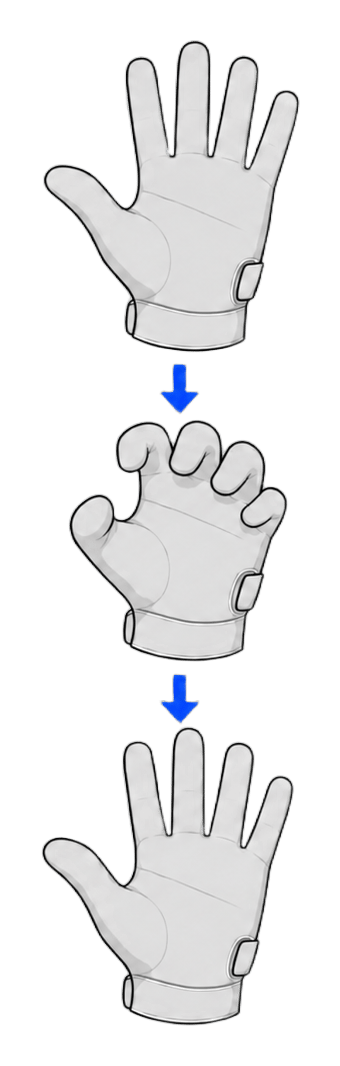 | `claw_curl` | 五指蜷成爪形反复屈伸 |
| 3 |
| `claw_curl` | 五指蜷成爪形反复屈伸 |
| 3 | 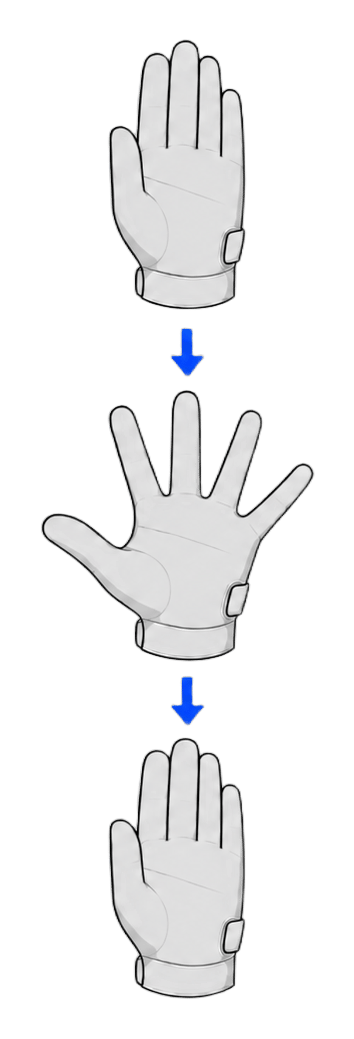 | `abduction` | 手指反复张开、并拢 |
| 4 |
| `abduction` | 手指反复张开、并拢 |
| 4 | 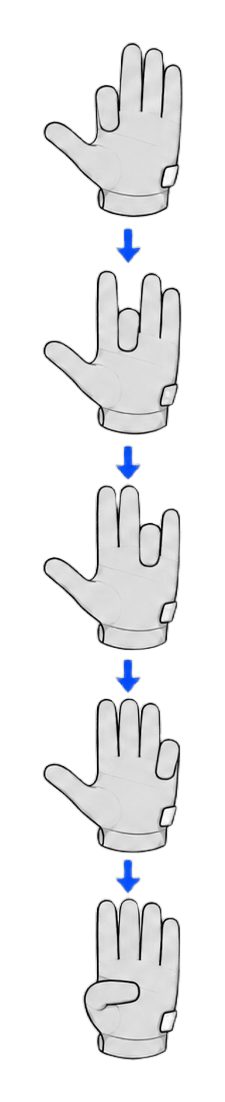 | `finger_to_palm` | 各指尖依次移向掌心,不触碰掌心和其他手指 |
全程戴着手套做空手动作,**不要触碰任何物体**。采集在建立「未接触」基线,碰到桌面、手指或其他物体都会污染数据,导致接触判定不准。默认 10 秒的采集时间内把该动作重复做 3 次。
每个动作先显示要领,按 Enter 开始采集。单个动作采集完成后可选择:按 Enter 或 k 保留并继续,按 r 重录当前动作,按 q 中止标定。全部动作通过数据检查后,CLI 自动完成训练、验证与安装。
## 选项
| 参数 | 说明 |
| - | - |
| `--sn ` | 设备序列号,必填 |
| `--seconds <秒>` | 每个动作的采集时长,默认 10,最大 3600 |
| `--epochs <轮数>` | 最大训练轮数,默认 60,范围 1–10000 |
| `--sensitivity <值>` | 随模型安装持久化的接触灵敏度,范围 0.5–3.0,默认 1.0 |
| `--non-interactive` | 自动确认全部提示,适合脚本化运行 |
## 中止与退出码
* 在提示符处按 q,或按一次 Ctrl+C:请求安全取消,等待 SDK 完成清理后退出,退出码 130
* 再按一次 Ctrl+C:跳过清理立即退出,退出码同为 130
## 标定报告
标定完成后输出结果报告,加 `--json` 得到结构化输出:
```bash theme={null}
wuji calib tactile --sn --json
```
| 字段 | 含义 |
| - | - |
| `success` | 标定是否成功 |
| `sn` | 手套序列号 |
| `poses_collected` / `frames_per_pose` | 采集的动作数与每个动作的帧数 |
| `epochs` / `best_val_loss` | 实际训练轮数与最优验证损失 |
| `alive_taxels` / `dead_pct` | 有效触觉点数与坏点占比 |
| `installed` / `model_dir` | 模型是否已安装及其存储目录 |
| `verified_alive_taxels` | 安装后复验的有效触觉点数 |
## 标定后验证
* [`wuji sub tactile`](/docs/wuji-cli/subscription):订阅触觉矩阵,按压手套确认信号响应
* [`wuji doctor`](/docs/wuji-cli/doctor):检查触觉坏点、坏行与坏列
This documentation is built and hosted on [Mintlify](https://mintlify.com), a developer documentation platform.
| `finger_to_palm` | 各指尖依次移向掌心,不触碰掌心和其他手指 |
全程戴着手套做空手动作,**不要触碰任何物体**。采集在建立「未接触」基线,碰到桌面、手指或其他物体都会污染数据,导致接触判定不准。默认 10 秒的采集时间内把该动作重复做 3 次。
每个动作先显示要领,按 Enter 开始采集。单个动作采集完成后可选择:按 Enter 或 k 保留并继续,按 r 重录当前动作,按 q 中止标定。全部动作通过数据检查后,CLI 自动完成训练、验证与安装。
## 选项
| 参数 | 说明 |
| - | - |
| `--sn ` | 设备序列号,必填 |
| `--seconds <秒>` | 每个动作的采集时长,默认 10,最大 3600 |
| `--epochs <轮数>` | 最大训练轮数,默认 60,范围 1–10000 |
| `--sensitivity <值>` | 随模型安装持久化的接触灵敏度,范围 0.5–3.0,默认 1.0 |
| `--non-interactive` | 自动确认全部提示,适合脚本化运行 |
## 中止与退出码
* 在提示符处按 q,或按一次 Ctrl+C:请求安全取消,等待 SDK 完成清理后退出,退出码 130
* 再按一次 Ctrl+C:跳过清理立即退出,退出码同为 130
## 标定报告
标定完成后输出结果报告,加 `--json` 得到结构化输出:
```bash theme={null}
wuji calib tactile --sn --json
```
| 字段 | 含义 |
| - | - |
| `success` | 标定是否成功 |
| `sn` | 手套序列号 |
| `poses_collected` / `frames_per_pose` | 采集的动作数与每个动作的帧数 |
| `epochs` / `best_val_loss` | 实际训练轮数与最优验证损失 |
| `alive_taxels` / `dead_pct` | 有效触觉点数与坏点占比 |
| `installed` / `model_dir` | 模型是否已安装及其存储目录 |
| `verified_alive_taxels` | 安装后复验的有效触觉点数 |
## 标定后验证
* [`wuji sub tactile`](/docs/wuji-cli/subscription):订阅触觉矩阵,按压手套确认信号响应
* [`wuji doctor`](/docs/wuji-cli/doctor):检查触觉坏点、坏行与坏列
This documentation is built and hosted on [Mintlify](https://mintlify.com), a developer documentation platform.