> ## Documentation Index
> Fetch the complete documentation index at: https://docs.wuji.tech/llms.txt
> Use this file to discover all available pages before exploring further.
# 手部模型标定
> 用 wuji calib hand-model 在终端完成手套手部模型标定,产物按用户 Profile 保存
`wuji calib hand-model` 在终端完成 Wuji Glove 的手部模型标定:选择设备、跟随提示完成动作采集,标定产物保存到当前用户 Profile 并立即生效。
手部模型标定按用户隔离,默认用户(Default)不能标定。终端交互模式可在连接设备前新建或切换到命名 Profile。结构化输出或重定向输出时,新建 Profile 使用 `wuji user create --switch`,切换到已有 Profile 使用 `wuji user switch `。
## 用法
```bash theme={null}
wuji calib hand-model # 网内唯一设备时自动选择
wuji calib hand-model --sn # 按序列号选择
wuji calib hand-model --handedness left # 按左右手选择
```
| 参数 | 说明 |
| - | - |
| `--sn `、`--address <地址>`、`--handedness ` | 显式选择设备,网内唯一设备时可省略 |
| `--timeout-s <秒>` | 标定总超时,默认 900 |
## 交互流程
终端交互模式会引导完成整个标定流程:
1. 查看当前 Profile,并选择继续使用、切换或新建命名 Profile。
2. 选择 Wuji Glove。列表显示序列号、连接方式和端点。
3. 当前 Profile 已有同侧手部模型时,确认是否替换,默认选择 **No**。选择 **No** 会取消本次标定并释放设备。
4. 依次完成 6 个动作:食指、中指、无名指和小指分别捏合,四指弯曲约 90 度,以及手掌平展张开。
5. 根据实时稳定性与约束反馈调整姿势,动作采集完成后等待求解器发布模型。
终端会展示动作进度和最多 8 条当前诊断。窗口不小于 81 列、38 行时还会显示固定尺寸的动作图示,空间不足时改为文字提示,并建议放大窗口后重新开始。按一次 Ctrl+C 可安全取消并释放设备。
### 姿态总览
| 步骤 | 图示 | 姿态 | 约束条件 | 操作要点 |
| - | - | - | - | - |
| 1 | 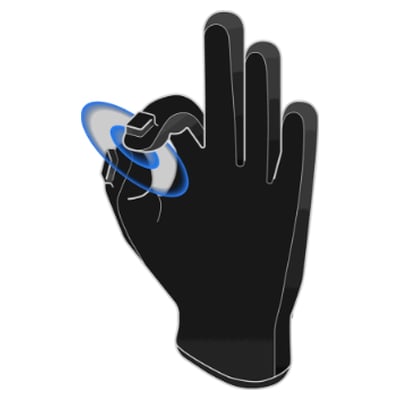 | 拇指与食指指尖捏合 | 拇指与食指 EMF 距离 \< 5 cm,且两指尖朝向相对、夹角 > 100°(指尖对指尖,而非指腹相贴) | 只让拇指与食指指尖相碰,不要压紧指腹 |
| 2 |
| 拇指与食指指尖捏合 | 拇指与食指 EMF 距离 \< 5 cm,且两指尖朝向相对、夹角 > 100°(指尖对指尖,而非指腹相贴) | 只让拇指与食指指尖相碰,不要压紧指腹 |
| 2 | 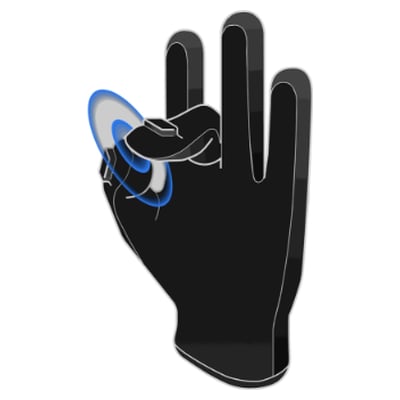 | 拇指与中指指尖捏合 | 拇指与中指 EMF 距离 \< 5 cm,且两指尖朝向相对、夹角 > 100°(指尖对指尖,而非指腹相贴) | 只让拇指与中指指尖相碰,不要压紧指腹,其他手指自然放松 |
| 3 |
| 拇指与中指指尖捏合 | 拇指与中指 EMF 距离 \< 5 cm,且两指尖朝向相对、夹角 > 100°(指尖对指尖,而非指腹相贴) | 只让拇指与中指指尖相碰,不要压紧指腹,其他手指自然放松 |
| 3 | 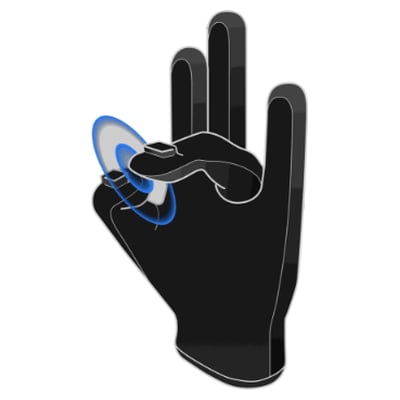 | 拇指与无名指指尖捏合 | 拇指与无名指 EMF 距离 \< 5 cm,且两指尖朝向相对、夹角 > 100°(指尖对指尖,而非指腹相贴) | 只让拇指与无名指指尖相碰,不要压紧指腹 |
| 4 |
| 拇指与无名指指尖捏合 | 拇指与无名指 EMF 距离 \< 5 cm,且两指尖朝向相对、夹角 > 100°(指尖对指尖,而非指腹相贴) | 只让拇指与无名指指尖相碰,不要压紧指腹 |
| 4 | 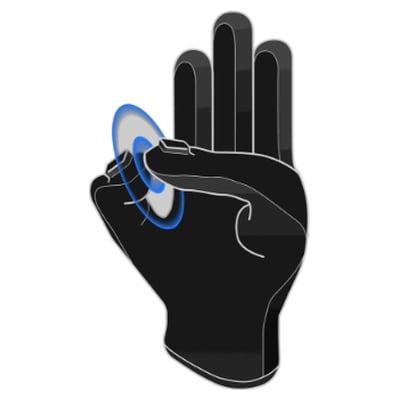 | 拇指与小指指尖捏合 | 拇指与小指 EMF 距离 \< 5 cm,且两指尖朝向相对、夹角 > 100°(指尖对指尖,而非指腹相贴) | 只让拇指与小指指尖相碰,不要压紧指腹 |
| 5 |
| 拇指与小指指尖捏合 | 拇指与小指 EMF 距离 \< 5 cm,且两指尖朝向相对、夹角 > 100°(指尖对指尖,而非指腹相贴) | 只让拇指与小指指尖相碰,不要压紧指腹 |
| 5 | 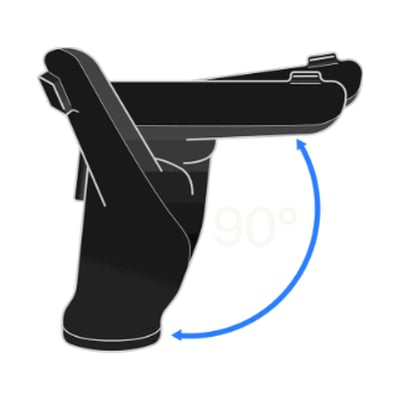 | 四指弯曲约 90 度 | 食、中、无名、小四指角度与目标姿态接近(拇指不参与) | 四根手指一起弯曲到约 90 度,像半握拳但不要握紧,拇指自然放松 |
| 6 |
| 四指弯曲约 90 度 | 食、中、无名、小四指角度与目标姿态接近(拇指不参与) | 四根手指一起弯曲到约 90 度,像半握拳但不要握紧,拇指自然放松 |
| 6 | 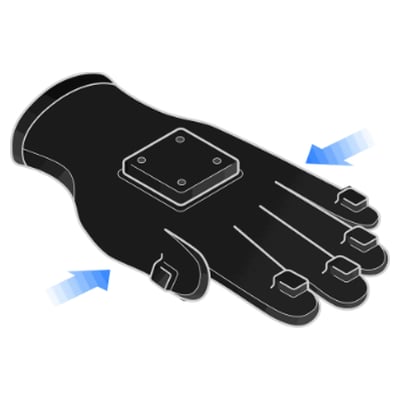 | 手掌平展张开 | 食、中、无名、小四指角度与目标姿态接近(拇指不参与) | 手掌完全张开,四根手指伸直并尽量并拢,保持手掌平稳,拇指自然放松 |
## 标定结果
成功后展示 Profile、手别,以及产物(`left_hand.urdf` 或 `right_hand.urdf`)的路径、大小与时间,结果立即生效。选择 **User show** 查看完整 Profile,选择 **Recalibrate** 开始下一次手部模型标定,或选择 **Finish** 退出。用 `wuji user export` 可在机器间迁移结果。
## 自动化调用
`--json` 输出最终结果对象。`--jsonl` 流式输出 `progress` 事件,并以 `result`、`error` 或 `cancelled` 事件结束。所有对象均带 `schema_version: 2` 与 `calibration: "hand_model"`,脚本可据此识别和解析。这两种模式不显示 Profile、设备或覆盖确认。开始前需选好命名 Profile,并检查当前 Profile 是否已有同侧手部模型。命令会直接开始标定,并在完成时尝试替换已有模型。如果新模型发布失败,原模型保持不变。
| 退出码(`error.code`) | 含义 |
| - | - |
| 0 | 标定成功 |
| 5 | 默认用户不允许手部模型标定 |
| 9 | 用户取消 |
| 1 | 其他运行时错误 |
This documentation is built and hosted on [Mintlify](https://mintlify.com), a developer documentation platform.
| 手掌平展张开 | 食、中、无名、小四指角度与目标姿态接近(拇指不参与) | 手掌完全张开,四根手指伸直并尽量并拢,保持手掌平稳,拇指自然放松 |
## 标定结果
成功后展示 Profile、手别,以及产物(`left_hand.urdf` 或 `right_hand.urdf`)的路径、大小与时间,结果立即生效。选择 **User show** 查看完整 Profile,选择 **Recalibrate** 开始下一次手部模型标定,或选择 **Finish** 退出。用 `wuji user export` 可在机器间迁移结果。
## 自动化调用
`--json` 输出最终结果对象。`--jsonl` 流式输出 `progress` 事件,并以 `result`、`error` 或 `cancelled` 事件结束。所有对象均带 `schema_version: 2` 与 `calibration: "hand_model"`,脚本可据此识别和解析。这两种模式不显示 Profile、设备或覆盖确认。开始前需选好命名 Profile,并检查当前 Profile 是否已有同侧手部模型。命令会直接开始标定,并在完成时尝试替换已有模型。如果新模型发布失败,原模型保持不变。
| 退出码(`error.code`) | 含义 |
| - | - |
| 0 | 标定成功 |
| 5 | 默认用户不允许手部模型标定 |
| 9 | 用户取消 |
| 1 | 其他运行时错误 |
This documentation is built and hosted on [Mintlify](https://mintlify.com), a developer documentation platform.